







Question: //JavaScript //activityTracker modulecode var tracker = require(tracker); var events = require(events); var readline = require(readline); const reader = readline.createInterface({ input: process.stdin,//use std in as this
//JavaScript
//activityTracker modulecode
var tracker = require("tracker");
var events = require("events");
var readline = require("readline");
const reader = readline.createInterface({
input: process.stdin,//use std in as this reader's input/readable stream
output: process.stdout // std out as the reader's output/writable stream
});
var response = function(){
reader.question('What actvity did you perform? (Walking/Running/Swimming)', act => {
reader.question('For how long? (in minutes)', time =>{
reader.question('How far? (in miles)', distance => {
reader.question('What is your weight today? (in pounds)', weight =>
{
//Notice that current scope is still able to
//capture data provided in previous callbacks.
console.log(act);
var current = new tracker(act.trim(),weight, distance, time);
console.log(`Calories Burned: ${current.calculate()}`);
//"every time you catch the exerciseChanged event, run this function
current.on('exerciseChanged', () => {
console.log("Exercise Changed!");
console.log(`Calories Burned: ${current.calculate()}`);
});
reader.question('Do you want to (s)tart over, (c)hange your current entry, or exit?', answer=>{
var letter = answer.toLowerCase()[0];
switch (letter){
case "s":
response();//recall this function and start over again
//Note that I call the function inside the function,
//similar to recursion
break;
case "c":
//change the current activity
//Your job: add some code that will allow a user to change any member of the
//tracker. Add some cases too. You'll need to add listeners that are listening
//for the custom tracker events (provided for you).
reader.question('What is your new activity (Swimming/Walking/Running)', rep=>{
current.setExercise(rep); //setExercise emits the event 'exerciseChanged'
process.exit(0); // see the Exercise module for more info
});
break; //Without break, this falls through and exits BEFORE setExercise completes
default:
console.log("Bye!");
process.exit(0);
}
})
})
})
})
})
}
response();
// Exercise module code
var swimming = function(){
this.calculate = function (weight, distance, time){
//(6 * Weight in KG * 3.5) / 200; is calories PER MINUTE
kg= weight/2.2;
// console.log("kg " + kg);
// console.log((6 * kg *3.5)/200 * time);
return (((6 * kg *3.5)/200) * time);
}
};
var Exercise = function(type){
if (type.toString().toLowerCase() === "walking"){
this.type = type;
this.calculation = new walking();
} else if (type.toString().toLowerCase() === "running"){
this.type = type;
this.calculation = new running();
} else if (type.toString().toLowerCase() === "swimming"){
this.type=type;
this.calculation = new swimming();
}else {
console.err("Error Exercise Constructor");
throw ({message: "Unknown Exercise. Cannot Create"});
}
}
Exercise.prototype = {
calculate: function(weight, distance, time){
return this.calculation.calculate(weight, distance, time);
}
};
module.exports = Exercise;
//trackerService Module Code
var events = require("events");
var Exercise = require("Exercise");
var tracker = function(exercise, weight, distance, time) {
try{
this.exercise=new Exercise(exercise);
this.weight = Number(weight);
this.distance = Number(distance);
this.time = Number(time);
events.EventEmitter.call(this);
} catch (err){
console.log("Error recieved during service creation");
throw err;
}
//updated to accomodate swimming
this.calculate = function() {
return this.exercise.calculate(this.weight, this.distance, this.time);
};
//speed is consistently calculated for all exercise times (distance/time)
this.calcSpeed = function(){
return this.distance/(this.time/60);//miles per hour
};
this.setExercise = function(exercise){
this.exercise=new Exercise(exercise);
this.emit('exerciseChanged');
};
this.setWeight =function(weight){
this.weight=weight;
this.emit('weightChanged');
};
this.setTime = function(time){
this.time=time;
this.emit('timeChanged', time);
};
this.setDistance = function(distance){
this.distance=distance;
this.emit('distanceChanged', distance);
};
};
tracker.prototype.__proto__=events.EventEmitter.prototype;
module.exports = tracker;
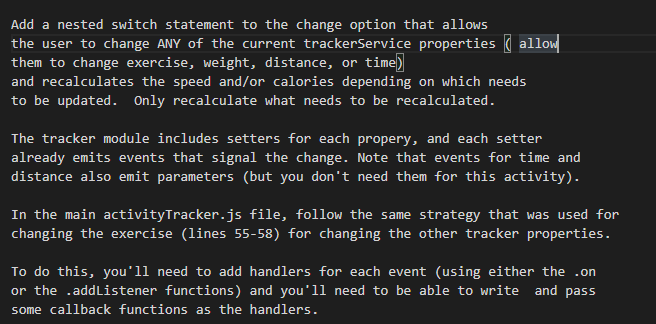
Add a nested switch statement to the change option that allows the user to change ANY of the current trackerservice properties ( allow them to change exercise, weight, distance, or time) and recalculates the speed and/or calories depending on which needs to be updated. Only recalculate what needs to be recalculated. The tracker module includes setters for each propery, and each setter already emits events that signal the change. Note that events for time and distance also emit parameters (but you don't need them for this activity). In the main activityTracker.js file, follow the same strategy that was used for changing the exercise (lines 55-58) for changing the other tracker properties. To do this, you'll need to add handlers for each event (using either the .on or the .addlistener functions) and you'll need to be able to write and pass some callback functions as the handlers. Add a nested switch statement to the change option that allows the user to change ANY of the current trackerservice properties ( allow them to change exercise, weight, distance, or time) and recalculates the speed and/or calories depending on which needs to be updated. Only recalculate what needs to be recalculated. The tracker module includes setters for each propery, and each setter already emits events that signal the change. Note that events for time and distance also emit parameters (but you don't need them for this activity). In the main activityTracker.js file, follow the same strategy that was used for changing the exercise (lines 55-58) for changing the other tracker properties. To do this, you'll need to add handlers for each event (using either the .on or the .addlistener functions) and you'll need to be able to write and pass some callback functions as the handlers
Step by Step Solution
There are 3 Steps involved in it

Get step-by-step solutions from verified subject matter experts
 Study Help