







Question: JavaScript and HTML Shopping Cart I am reposting because the previous question included a link/url to demo. This assignment will utilize Web Storage to store
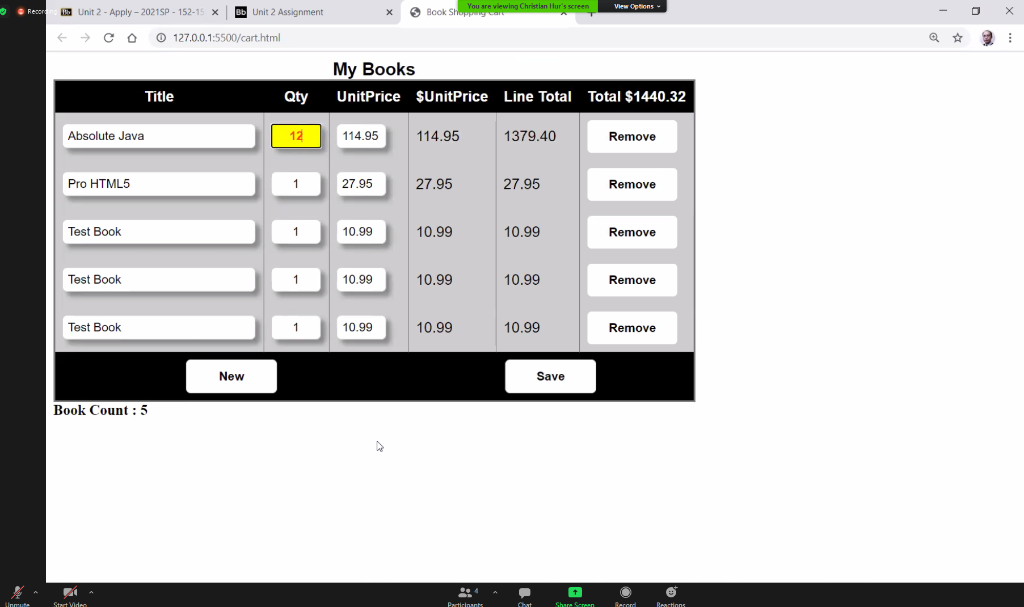 JavaScript and HTML Shopping Cart
I am reposting because the previous question included a link/url to demo.
This assignment will utilize Web Storage to store data on the users local machine. You are going to build a simple shopping cart application using JavaScript and store data to a local storage. Before you begin, please download the shopping_cart.zip from Blackboard. Extract the zip file to your local system and following the instructions in this document to complete this assignment. The required files are included in the zip file: cart.html, cart.css, cart.js Youre going to provide the JavaScript code for the following application.
Instructions Since HTTP is a stateless protocol, the purpose of the assignment is to store data using the Web local storage such that when the user closes the browser or reloads the browser, the data should be retained. Only the part where the items in the cart is required. Starter files are provided to get you started. You dont have to make any changes to the HTML and CSS files unless you want or need to. Open each file and study the code, especially the cart.html file. The cart.js is filled with a book object. Your task is to provide the code and implement the following functionalities.
2. Each time the user visits or revisits the site, check for the following: a. Check the local storage and see if it exists. b. If YES then load the data from the local storage to the cart. c. Otherwise load the default data to the cart. 3. The user should be able to Add new items to the cart, Remove an existing item from the cart, and Save the items in the cart to the Web local storage. 4. Take screen shots of your JavaScript code and results and save to a Word document. Please provide narratives/documentations to explain your code/tasks as necessary.
2. Each time the user visits or revisits the site, check for the following: a. Check the local storage and see if it exists. b. If YES then load the data from the local storage to the cart. c. Otherwise load the default data to the cart. 3. The user should be able to Add new items to the cart, Remove an existing item from the cart, and Save the items in the cart to the Web local storage. 4. Take screen shots of your JavaScript code and results and save to a Word document. Please provide narratives/documentations to explain your code/tasks as necessary.
Completing the cart.js The shopping cart should have the following components and methods: Product id (optional) Product name Unit price Quantity for each product Line total for each item Total for all products in the cart Quantity of the all the items in the cart. Create a function to add a new item Create a function to remove an item Create a function to save an item to the local storage
/*
cart.html
| Title | Qty | UnitPrice | $UnitPrice | Line Total | Total $ |
|---|---|---|---|---|---|
cart.js // Shopping Cart Assignment
// You can use this data for seeding your cart // Or you can create your own
books = [ { title: 'Absolute Java', qty: 1, price: 114.95 }, { title: 'Pro HTML5', qty: 1, price: 27.95 }, { title: 'Head First HTML5', qty: 1, price: 27.89 } ];
cart.css table { border-collapse: collapse; font-family: Futura, Arial, sans-serif; }
caption { font-size: larger; }
th, td { padding: .5em; }
th, thead { background: #000; color: #fff; border: 1px solid #000; }
tr { background: #ccc; }
tbody tr:hover { background: #def; }
td { border-right: 1px solid #777; }
table { border: 2px solid #777; }
tfoot tr { background: #000; color: #fff; border: 1px solid #000; text-align: center; }
tfoot td { border: none; }
input { padding: 5px; border: 1px solid #ccc; -webkit-border-radius: 5px; -moz-border-radius: 5px; border-radius: 5px; -webkit-box-shadow: 5px 5px 5px #888888; -moz-box-shadow: 5px 5px 5px #888888; box-shadow: 5px 5px 5px #888888; }
.title { width: 200px; }
.qty { text-align: center; }
input:focus { background-color: yellow; font-weight: bold; color: #FF4500 }
button { padding: 10px; -webkit-border-radius: 5px; -moz-border-radius: 5px; border-radius: 5px; border: 1px solid #ccc; font-weight: bold; width: 100px; background: #fff; }
button:hover { background: yellow; }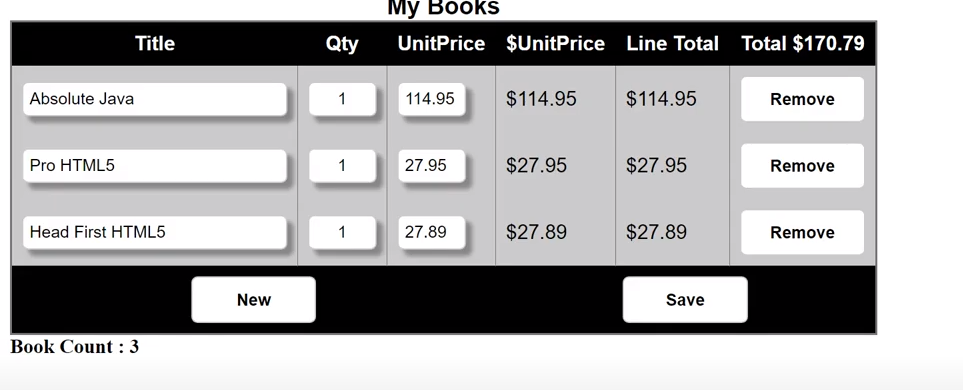
*/
View Options Resort Bd Unit 2 - Apply - 2021SP - 152-15 X Bb Unit 2 Assignment X Book Sh. You are viewing Christian Iur's screen Co 127.0.0.1:5500/cart.html Title Qty My Books UnitPrice $UnitPrice Line Total Total $1440.32 Absolute Java 12 114.95 114.95 1379.40 Remove Pro HTML5 1 27.95 27.95 27.95 Remove Test Book 1 10.99 10.99 10.99 Remove Test Book 1 10.99 10.99 10.99 Remove Test Book 1 10.99 10.99 10.99 Remove New Save Book Count : 5 unuta Start Video Partinents Chat Share Screen Bastions My Books UnitPrice $UnitPrice Line Total Total $170.79 Title Qty Absolute Java 1 114.95 $114.95 $114.95 Remove Pro HTML5 1 27.95 $27.95 $27.95 Remove Head First HTML5 1 27.89 $27.89 $27.89 Remove New Save Book Count : 3 View Options Resort Bd Unit 2 - Apply - 2021SP - 152-15 X Bb Unit 2 Assignment X Book Sh. You are viewing Christian Iur's screen Co 127.0.0.1:5500/cart.html Title Qty My Books UnitPrice $UnitPrice Line Total Total $1440.32 Absolute Java 12 114.95 114.95 1379.40 Remove Pro HTML5 1 27.95 27.95 27.95 Remove Test Book 1 10.99 10.99 10.99 Remove Test Book 1 10.99 10.99 10.99 Remove Test Book 1 10.99 10.99 10.99 Remove New Save Book Count : 5 unuta Start Video Partinents Chat Share Screen Bastions My Books UnitPrice $UnitPrice Line Total Total $170.79 Title Qty Absolute Java 1 114.95 $114.95 $114.95 Remove Pro HTML5 1 27.95 $27.95 $27.95 Remove Head First HTML5 1 27.89 $27.89 $27.89 Remove New Save Book Count : 3
Step by Step Solution
There are 3 Steps involved in it

Get step-by-step solutions from verified subject matter experts
 Study Help