







Question: javascript html css - . O O Create an interactive webpage to collect customer information, income values, and spending values, then calculate ending balance. An
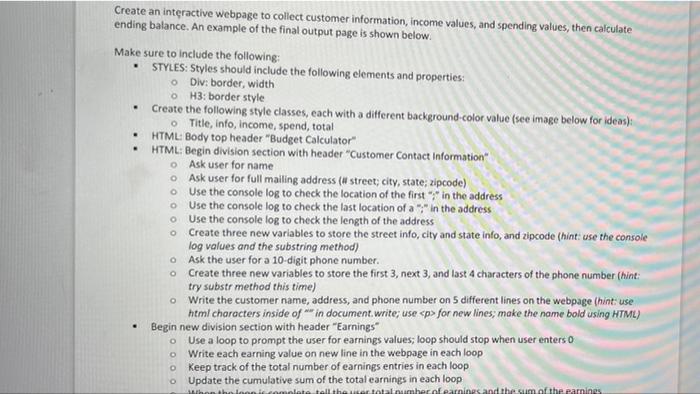
- . O O Create an interactive webpage to collect customer information, income values, and spending values, then calculate ending balance. An example of the final output page is shown below. Make sure to include the following: STYLES: Styles should include the following elements and properties: o Div: border, width OH3: border style Create the following style classes, each with a different background-color value (see image below for ideas): 0 Title, info, income, spend, total HTML: Body top header"Budget Calculator HTML: Begin division section with header Customer Contact Information" Ask user for name o Ask user for full mailing address (# street, city, state; zipcode) Use the console log to check the location of the first ;* in the address Use the console log to check the last location of a ";" in the address o Use the console log to check the length of the address o create three new variables to store the street info, city and state info, and zipcode (hint: use the console log values and the substring method) Ask the user for a 10-digit phone number. Create three new variables to store the first 3, next 3, and last 4 characters of the phone number (hint: try substr method this time) Write the customer name, address, and phone number on 5 different lines on the webpage (hint use html characters inside of ** in document.write; use
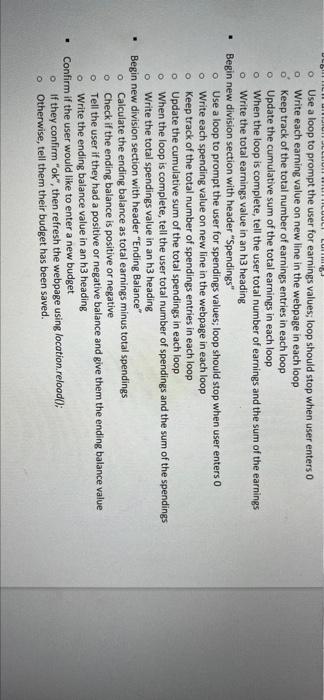
for new lines, make the name bold using HTML) Begin new division section with header "Earnings Use a loop to prompt the user for earnings values; loop should stop when user enterso Write each earning value on new line in the webpage in each loop Keep track of the total number of earnings entries in each loop Update the cumulative sum of the total earnings in each loop won the loon it completo tell the total number of parines and the sum of the carines o O o 0 0 0 0 UTILUULI LUI 0 o O . o O Use a loop to prompt the user for earnings values; loop should stop when user enters 0 Write each earning value on new line in the webpage in each loop o keep track of the total number of earnings entries in each loop o Update the cumulative sum of the total earnings in each loop When the loop is complete, tell the user total number of earnings and the sum of the earnings Write the total earnings value in an h3 heading Begin new division section with header "Spendings" Use a loop to prompt the user for spendings values; loop should stop when user enters 0 Write each spending value on new line in the webpage in each loop o keep track of the total number of spendings entries in each loop Update the cumulative sum of the total spendings in each loop o When the loop is complete, tell the user total number of spendings and the sum of the spendings o Write the total spendings value in an h3 heading Begin new division section with header "Ending Balance" Calculate the ending balance as total earnings minus total spendings Check if the ending balance is positive or negative o Tell the user if they had a positive or negative balance and give them the ending balance value Write the ending balance value in an h3 heading Confirm if the user would like to enter a new budget if they confirm "ok", then refresh the webpage using location.reload(); o Otherwise, tell them their budget has been saved. O
Step by Step Solution
There are 3 Steps involved in it

Get step-by-step solutions from verified subject matter experts
 Study Help