







Question: JavaScript / jQuery: Add exception handling to the Future Value application. 1. Open and review the HTML and JavaScript . 2. Test the application with
JavaScript / jQuery: Add exception handling to the Future Value application.
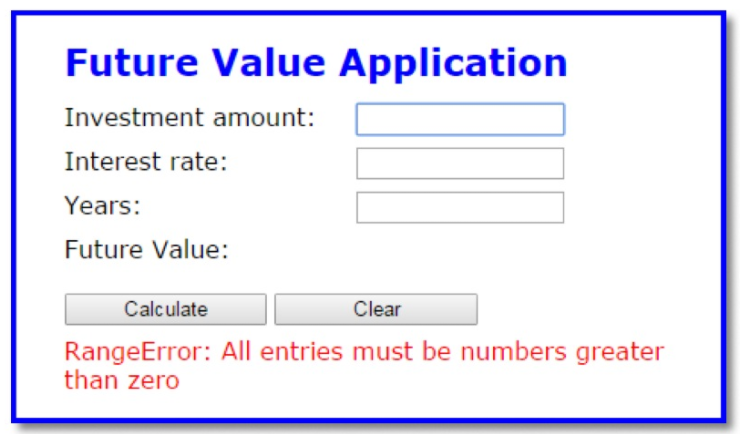
1. Open and review the HTML and JavaScript .
2. Test the application with valid entries. Then, try to make the application throw an exception by clicking the Calculate button with no entries in the text boxes or with string entries like one or two. Either way, the application displays a future value of zero without throwing an exception. This shows how difficult it is to make a JavaScript application throw an exception.
3. In the JavaScript file, add exception handling to the click event handler for the Calculate button. Put all of the statements in this handler except the last two in the try block, and display an error message like the one shown above in the catch block. The message should include both the name and message properties of the Error object.
4. To have the application throw a runtime error, change the name of one of the parameters in the calculateFutureValue() function. Then, test this to see the message thats displayed. This is a programming error, though, not the type of runtime error that requires exception handling. Now, fix the error.
5. Add a throw statement after the if statement in the calculateFutureValue() function. It should throw a RangeError object with the message shown above. A throw statement like this can be used to test the exception handling of an application. Now, test this change.
6. To see how this might work in a real application, move the throw statement into the if statement above it. Then, test the application to see that the message above is displayed when any of the arguments are invalid. This type of coding is often included in a function thats used by other programs. It forces the user to pass valid arguments to the function.
/******Codes**********/
future_value.js
"use strict";
var calculateFutureValue = function( investment, annualRate, years ) {
if ( isNaN(investment) || investment
// add a throw statement here to make sure the passed arguments are valid
}
// add a throw statement here to test the exception handling
var monthlyRate = annualRate / 12 / 100;
var months = years * 12;
var futureValue = 0;
for ( var i = 1; i
futureValue = (futureValue + investment) * (1 + monthlyRate);
}
return futureValue.toFixed(2);
};
$(document).ready(function(){
$("#calculate").click( function() {
$("#message").text( "" );
var investment = parseFloat( $("#investment").val() );
var annualRate = parseFloat( $("#rate").val() );
var years = parseInt( $("#years").val() );
var fv = calculateFutureValue(investment, annualRate, years);
$("#future_value").text( fv );
$("#investment").focus();
$("#investment").select();
});
$("#clear").click( function() {
$("#investment").val( "" );
$("#rate").val( "" );
$("#years").val( "" );
$("#future_value").text( "" );
$("#message").text( "" );
$("#investment").focus();
});
// set focus on initial load
$("#investment").focus();
});
index.html
Future Value Application
future_value.css
body { font-family: Verdana, Arial, Helvetica, sans-serif; font-size: 100%; background-color: white; width: 400px; margin: 0 auto; border: 3px solid blue; padding: 0 2em 1em; } h1 { font-size: 150%; color: blue; margin-bottom: .5em; } label { float: left; width: 12em; } input { width: 10em; margin-bottom: .5em; } #message { color: red; }
Future Value Application Investment amount: Interest rate: Years Future Value: Calculate Clear RangeError: All entries must be numbers greater than zero
Step by Step Solution
There are 3 Steps involved in it

Get step-by-step solutions from verified subject matter experts
 Study Help