







Question: JAVASCRIPT/HTML/CSS: Could someone show me the code of how I can move the pink box and the orange button up to be in the same
JAVASCRIPT/HTML/CSS:
Could someone show me the code of how I can move the pink box and the orange button up to be in the same row as the picture on the left of the website. I would like the pink box and the orange button to remain as the box above and the button below as seen in the screenshot of my website. My code so far is pasted below. 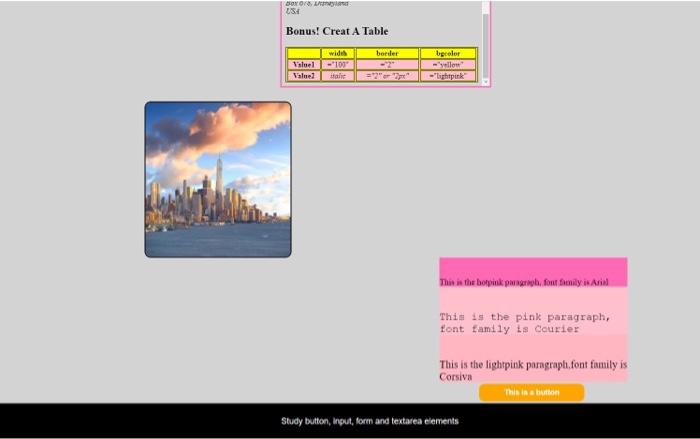
body {margin: 0;
background-color: lightgrey;
display:flex;
min-height:100vh;
flex-direction:column;
justify-content:space-between;
}
#nextSiteEmbed,
#nextSiteIFrame,
#menu {
border: 3px solid #FF69B4;
}
ul {
list-style-type: none;
display: flex;
margin: 0;
flex-direction: row;
justify-content: center;
overflow: hidden;
background-color: black;
font-family: Arial, Helvetica, sans-serif;
}
li {
font-size: large;
color: white;
padding: 0 40px;
width: 75px;
text-align: center
}
li a {
float:left;
padding: 15px;
padding:14px 16px;
color: white;
text-decoration: none;
}
li a:hover {
background-color: orange;
color: white
}
#nextSiteEmbed {
width: 23.4%;
height: 300px;
margin: 0px 760px;
margin-top:20px;
}
#hw1 {
width: 100%;
height: 100%;
}
.content{ display:flex;
flex-direction:column;
margin:0;
}
.hotpink,
.pink,
.lightpink{
display:inline-block;
width:402px;
}
.hotpink{background-color:hotpink;
font-family: "Times New Roman", Times, serif;
font-size: 18.2px;
height:61.9px;
margin-left:1100px;
}
.pink{background-color:pink;
font-family: 'Courier New', monospace;
font-size: 22.7px;
height:101.85px;
margin-left:1100px;
}
.lightpink{background-color:lightpink;
font-family: 'Corsiva', monotype;
font-size: 22.4px;
height:101.85px;
margin-left:1100px;
}
img {
height: 330px;
width: 310px;
border: 2px solid black;
border-radius: 4%;
margin-left:470px;
margin-top:30px;
}
button {
background-color: orange;
border: none;
color: white;
padding: 10px;
text-align: center;
text-decoration: none;
display: inline-block;
font-family: Arial, Helvetica, sans-serif;
font-size: 16px;
margin: 4px 2px;
margin-left:1170px;
cursor: pointer;
width:260px;
outline:0px;
margin-top:60px;
}
.btn {border-radius: 12px;}
footer {
color: white;
background-color: black;
font-size: large;
text-align: center;
padding: 10px;
font-family: Arial, Helvetica, sans-serif;
}

This is the hotpink paragraph, font family is Arial
This is the pink paragraph,
font family is Courier
This is the lightpink paragraph,font family is
Corsiva
Study button, input, form and textarea elements
Step by Step Solution
There are 3 Steps involved in it
1 Expert Approved Answer
Step: 1 Unlock

Question Has Been Solved by an Expert!
Get step-by-step solutions from verified subject matter experts
Step: 2 Unlock
Step: 3 Unlock
 Study Help