







Question: Use JAVA to create A Ball Bouncing Application using the attached diagram. It is JAVA code using Swing. PLEASE ONLY USE the class names and
Use JAVA to create A Ball Bouncing Application using the attached diagram. It is JAVA code using Swing. PLEASE ONLY USE the class names and method names in the diagram to make the application. Class BouncingBallApp Class BouncingBallPanel Class Ball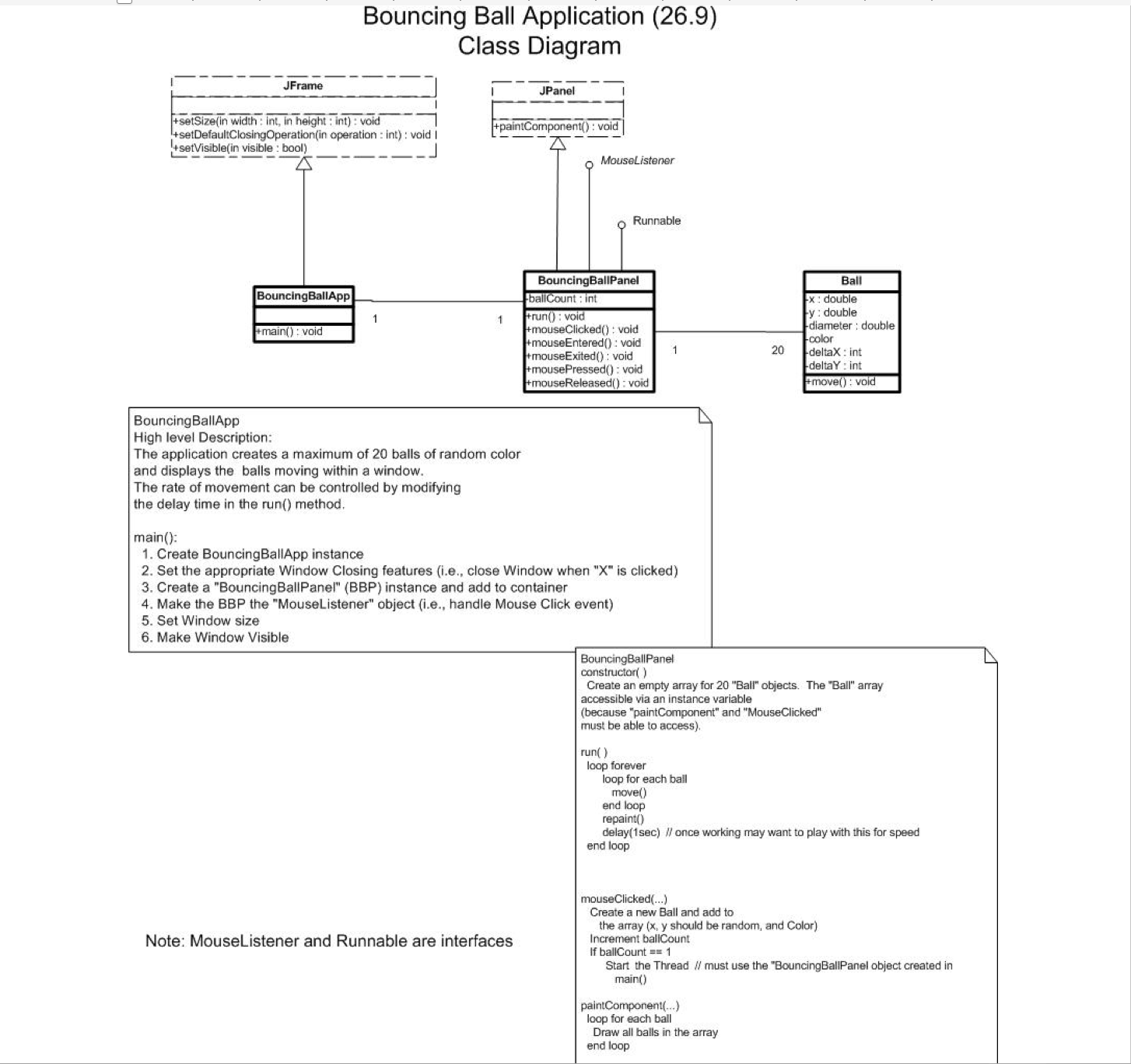
JFrame Bouncing Ball Application (26.9) Class Diagram JPanel +setSize(in width: int, in height: int): void +setVisible(in visible: bool) +setDefaultClosingOperation(in operation: int): void I +paintComponent(): void MouseListener Runnable BouncingBallPanel BouncingBallApp ballCount: int 1 1 +run(): void +main(): void +mouseClicked(): void +mouseEntered(): void Ball x: double y: double diameter: double color 1 20 +mouseExited(): void +mousePressed(): void +mouseReleased(): void deltaX: int deltaY: int +move(): void BouncingBallApp High level Description: The application creates a maximum of 20 balls of random color and displays the balls moving within a window. The rate of movement can be controlled by modifying the delay time in the run() method. main(): 1. Create BouncingBallApp instance 2. Set the appropriate Window Closing features (i.e., close Window when "X" is clicked) 3. Create a "Bouncing BallPanel" (BBP) instance and add to container 4. Make the BBP the "MouseListener" object (i.e., handle Mouse Click event) 5. Set Window size 6. Make Window Visible Note: MouseListener and Runnable are interfaces BouncingBallPanel constructor() Create an empty array for 20 "Ball" objects. The "Ball" array accessible via an instance variable (because "paintComponent" and "MouseClicked" must be able to access). run() loop forever loop for each ball move() end loop repaint() delay(1sec) // once working may want to play with this for speed end loop mouseClicked(...) Create a new Ball and add to the array (x, y should be random, and Color) Increment ballCount If ballCount = 1 Start the Thread // must use the "BouncingBallPanel object created in main() paintComponent(...) loop for each ball Draw all balls in the array end loop
Step by Step Solution
3.37 Rating (153 Votes )
There are 3 Steps involved in it
Based on the provided class diagram and instructions heres a Java program implementing the described Ball Bouncing Application using Swing java import ... View full answer

Get step-by-step solutions from verified subject matter experts
 Study Help