







Question: js_asmt01.html is a relatively blank HTML document that you will add script tags and JavaScript code. Change the file name to js_Lastname_01.html , where Lastname
- js_asmt01.html is a relatively blank HTML document that you will add script tags and JavaScript code.
- Change the file name to js_Lastname_01.html, where Lastname is your last name.
- Open the HTML document in a browser and in Atom. You will be making modifications in Atom and viewing the changes in the browser.
- Inside the paragraph tags on the page, make a single pair of script tags. Ensure the type attribute is set for JavaScript.
- Inside the script tags, do all of the following:
- Declare and initialize a variable that stores your first name.
- Declare and initialize a variable that stores your last name.
- Use document.write to write out the variables. Be sure to include a label and have each variable on its own line.
- Declare and initialize an array that stores all the classes you are taking this semester. Populate each element in the array with the course number and the course name. For example, "ICS 215 - Intro to Scripting" will be one value in the array.
- If you are only taking one class this semester, still create an array but with only 1 value.
- Loop through the array and write out each class on separate lines.
- Looping through the array means to create a loop that counts from 0 to less than the length of the array. The loop should work for any amount of classes you are taking. If you were to add or remove classes from the array, you should not have to change the loop.
- Implement the SpamMusubi algorithm. Write out the numbers 1 to 100, each number on its own line, but replace certain numbers with a word instead:
- For numbers divisible only by 3, write out "Spam" instead of the number.
- For numbers divisible only by 7, write out "Musubi" instead of the number.
- For numbers divisible by 3 and 7, write out "SpamMusubi" instead of the number.
- All other numbers, just write them out.
- Add a label above each section of the write out, see the Completed Output.
- Be sure to also have at least 1 blank line between sections. Write out line break tags
to do so. - Using an HTML comment, add your name as an author at the top of the page.
- Comment all JavaScript code you wrote.
Be sure you are using JavaScript comments, *not* HTML comments for this. 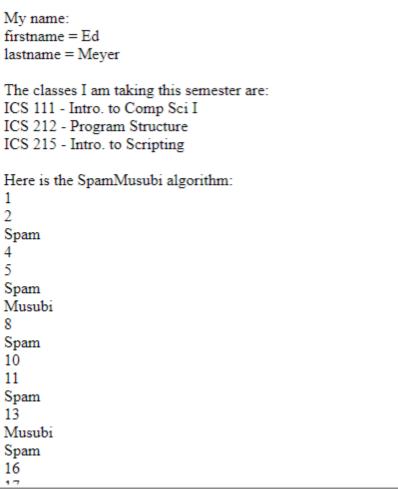
My name: firstname = Ed lastname = Meyer The classes I am taking this semester are: ICS 111 - Intro. to Comp Sci I ICS 212 - Program Structure ICS 215 - Intro. to Scripting Here is the SpamMusubi algorithm: 1 2 Spam 4 5 Spam Musubi 8 Spam 10 11 Spam 13 Musubi Spam 16
Step by Step Solution
★★★★★
3.37 Rating (147 Votes )
There are 3 Steps involved in it
1 Expert Approved Answer
Step: 1 Unlock

Heres the modified jsLastname01 html file with the requested Jav... View full answer
Question Has Been Solved by an Expert!
Get step-by-step solutions from verified subject matter experts
Step: 2 Unlock
Step: 3 Unlock
 Study Help