







Question: Just need help with this lab to make sure i am doing it correctly specifically graphing for 1.4 1.7 1.8 and questions for 1.9 thank
Just need help with this lab to make sure i am doing it correctly specifically graphing for 1.4 1.7 1.8 and questions for 1.9 thank you in advance
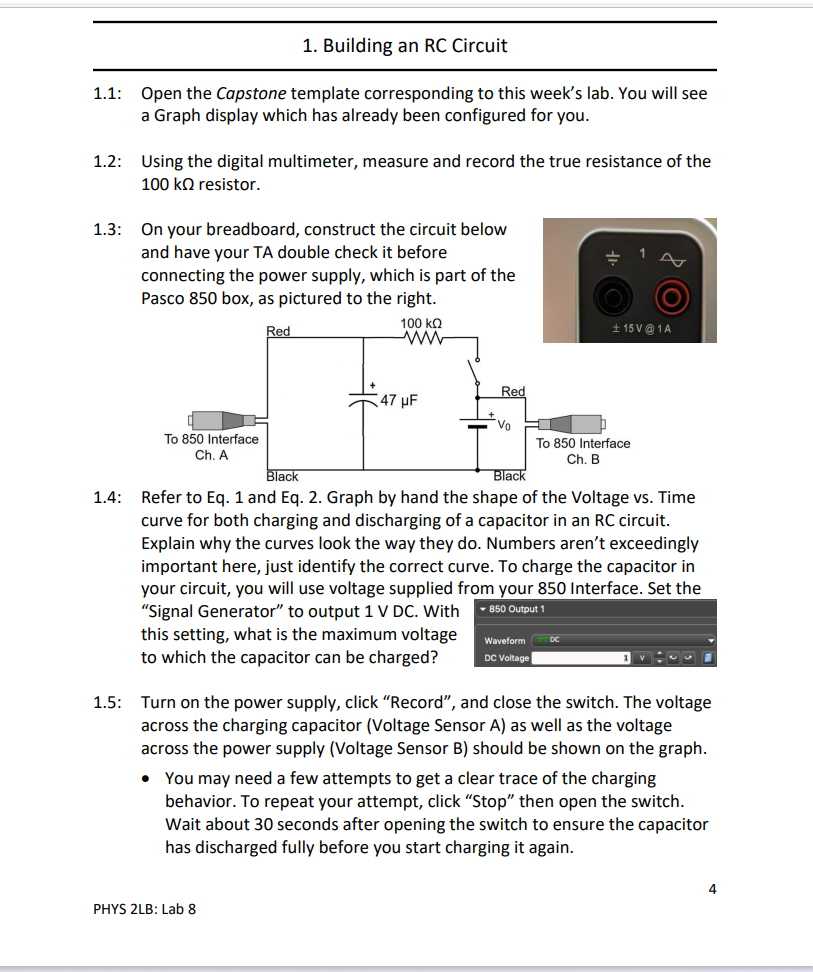
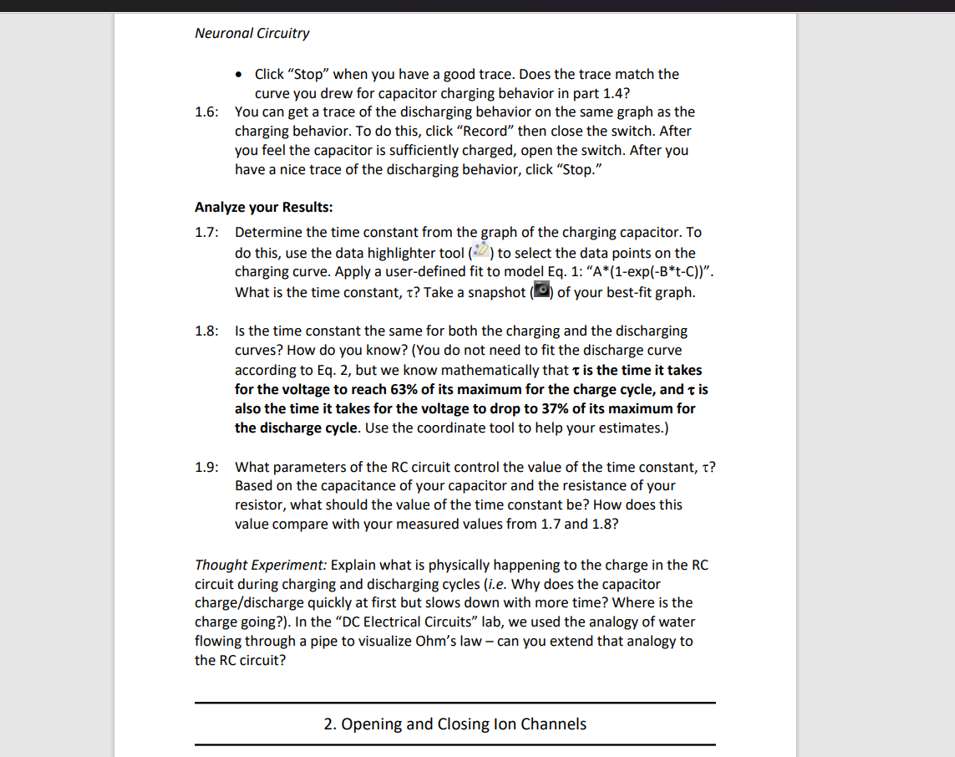
1. Building an RC Circuit 1.1: Open the Capstone template corresponding to this week's lab. You will see a Graph display which has already been configured for you. 1.2: Using the digital multimeter, measure and record the true resistance of the 100 kQ resistor. 1.3: On your breadboard, construct the circuit below and have your TA double check it before connecting the power supply, which is part of the Pasco 850 box, as pictured to the right. Red 100 kQ 1 15 V @ 1A 47 UF Red Vo To 850 Interface To 850 Interface Ch. A Ch. B Black Black 1.4: Refer to Eq. 1 and Eq. 2. Graph by hand the shape of the Voltage vs. Time curve for both charging and discharging of a capacitor in an RC circuit. Explain why the curves look the way they do. Numbers aren't exceedingly important here, just identify the correct curve. To charge the capacitor in your circuit, you will use voltage supplied from your 850 Interface. Set the "Signal Generator" to output 1 V DC. With 850 Output 1 this setting, what is the maximum voltage Waveform - DC to which the capacitor can be charged? DC Voltage 1.5: Turn on the power supply, click "Record", and close the switch. The voltage across the charging capacitor (Voltage Sensor A) as well as the voltage across the power supply (Voltage Sensor B) should be shown on the graph. . You may need a few attempts to get a clear trace of the charging behavior. To repeat your attempt, click "Stop" then open the switch. Wait about 30 seconds after opening the switch to ensure the capacitor has discharged fully before you start charging it again. PHYS 2LB: Lab 8 Neuronal Circuitry e Click "Stop" when you have a good trace. Does the trace match the curve you drew for capacitor charging behavior in part 1.4? 1.6: You can get a trace of the discharging behavior on the same graph as the charging behavior. To do this, click "Record" then close the switch. After you feel the capacitor is sufficiently charged, open the switch. After you have a nice trace of the discharging behavior, click \"Stop." Analyze your Itesults: 1.7: Determine the time constant from the graph of the charging capacitor. To do this, use the data highlighter tool [-1. } to select the data points on the charging curve. Apply a user-dened t to model Eq. 1: \"A*[1-exp[-B't-Cli'. What is the time constant, c? Take a snapshot [I] of your best-t graph. 1.3: Is the time constant the same for both the charging and the discharging curves? How do you know? {You do not need to t the discharge curve according to Eq. 2, but we know mathematically that 1: is the time it takes for the voltage to reach 63% of its maximum for the charge cycle, and 1: is also the time it takes for the voltage to drop to 37% of its maximum for the discharge cycle. Use the coordinate tool to help your estimates.) 1.9: What parameters of the RC circuit control the value of the time constant. 1:? Based on the capacitance of your capacitor and the resistance of your resistor, what should the value of the time constant be? How does this value compare with your measured values from 1.7 and 1.3? Thought Experiment: Explain what is physically happening to the charge in the RE circuit during charging and discharging cycles (Le. Wi'iy does the capacitor chargei'discharge quickly at rst but slows down with more time? Where is the charge going?). In the \"DC Electrical Circuits" lat}, we used the analogy of water owing through a pipe to visualize Ohm's law can you extend that analogy to the RC circuit? 2. Opening and Closing Ion Channels
Step by Step Solution
There are 3 Steps involved in it

Get step-by-step solutions from verified subject matter experts
 Study Help