







Question: Just show me the work EA9-A1 Perform a Financial Statement Analysis for Legal Services Co. PG In this exercise, you will perform a financial statement
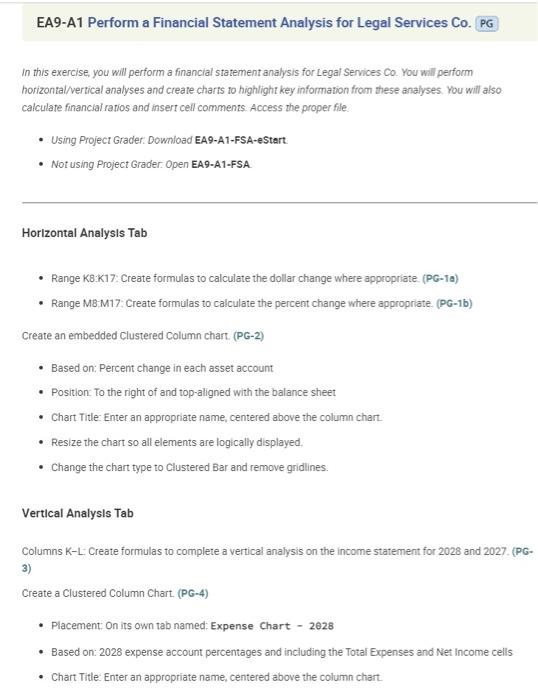
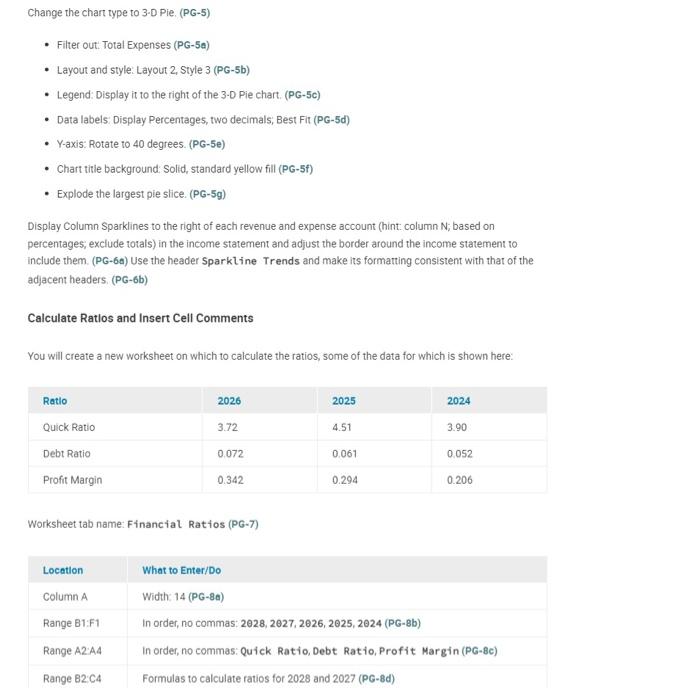
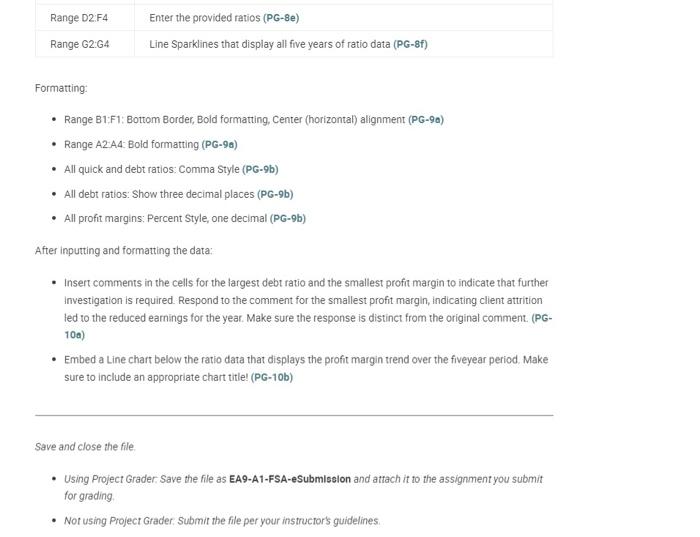
EA9-A1 Perform a Financial Statement Analysis for Legal Services Co. PG In this exercise, you will perform a financial statement analysis for Legal Services co. You will perform horizontal/vertical analyses and creare charts to highlight key information from these analyses, You will also calculate financial ratios and insert cell comments. Access the proper file. - Using Project Grader: Download EA9-A1-FSA-eStert. - Not using Project Grader: Open EA9-A1-FSA. Horizontal Analysis Tab - Range K8:K17: Create formulas to calculate the dollar change where appropriate. (PG-10) - Range M8:M17: Create formulas to calculate the percent change where appropriate. (PG-1b) Create an embedded Clustered Column chart. (PG-2) - Based on: Percent change in each asset account - Position: To the right of and top-aligned with the balance sheet - Chart Title: Enter an appropriate name, centered above the column chart. - Resize the chart so all elements are logically displayed. - Change the chart type to Clustered Bar and remove gridlines. Vertical Analysis Tab Columns K-L: Create formulas to complete a vertical analysis on the income statement for 2028 and 2027. (PG3) Create a Clustered Column Chart. (PG-4) - Placement: On its own tab named: Expense Chart - 2028 - Based on: 2028 expense account percentages and including the Total Expenses and Net Income cells - Chart Title: Enter an appropriate name, centered above the column chart. Formatting: - Range B1:F1: Bottom Border, Bold formatting, Center (horizontal) alignment (PG-9a) - Range A2-A4: Bold formatting (PG-9a) - All quick and debt ratios: Comma Style (PG-9b) - All debt ratios: Show three decimal places (PG-9b) - All profit margins: Percent Style, one decimal (PG-9b) After inputting and formarting the data: - Insert comments in the cells for the largest debt ratio and the smallest profit margin to indicate that further Investigation is required. Respond to the comment for the smallest profit margin, indicating client attrition led to the reduced earnings for the year. Make sure the response is distinct from the original comment. (PG10a) - Embed a Line chart below the ratio data that displays the profit margin trend over the fiveyear period. Make sure to include an appropriate chart title! (PG-10b) Save and close the file. - Using Project Grader: Save the file as EA9-A1-FSA-eSubmiselon and attach it to the assignment you submit for grading - Not using Project Grader. Submit the file per your instructor's guidelines. Worksheet tab name: Financial Ratios (PG-7) EA9-A1 Perform a Financial Statement Analysis for Legal Services Co. PG In this exercise, you will perform a financial statement analysis for Legal Services co. You will perform horizontal/vertical analyses and creare charts to highlight key information from these analyses, You will also calculate financial ratios and insert cell comments. Access the proper file. - Using Project Grader: Download EA9-A1-FSA-eStert. - Not using Project Grader: Open EA9-A1-FSA. Horizontal Analysis Tab - Range K8:K17: Create formulas to calculate the dollar change where appropriate. (PG-10) - Range M8:M17: Create formulas to calculate the percent change where appropriate. (PG-1b) Create an embedded Clustered Column chart. (PG-2) - Based on: Percent change in each asset account - Position: To the right of and top-aligned with the balance sheet - Chart Title: Enter an appropriate name, centered above the column chart. - Resize the chart so all elements are logically displayed. - Change the chart type to Clustered Bar and remove gridlines. Vertical Analysis Tab Columns K-L: Create formulas to complete a vertical analysis on the income statement for 2028 and 2027. (PG3) Create a Clustered Column Chart. (PG-4) - Placement: On its own tab named: Expense Chart - 2028 - Based on: 2028 expense account percentages and including the Total Expenses and Net Income cells - Chart Title: Enter an appropriate name, centered above the column chart. Formatting: - Range B1:F1: Bottom Border, Bold formatting, Center (horizontal) alignment (PG-9a) - Range A2-A4: Bold formatting (PG-9a) - All quick and debt ratios: Comma Style (PG-9b) - All debt ratios: Show three decimal places (PG-9b) - All profit margins: Percent Style, one decimal (PG-9b) After inputting and formarting the data: - Insert comments in the cells for the largest debt ratio and the smallest profit margin to indicate that further Investigation is required. Respond to the comment for the smallest profit margin, indicating client attrition led to the reduced earnings for the year. Make sure the response is distinct from the original comment. (PG10a) - Embed a Line chart below the ratio data that displays the profit margin trend over the fiveyear period. Make sure to include an appropriate chart title! (PG-10b) Save and close the file. - Using Project Grader: Save the file as EA9-A1-FSA-eSubmiselon and attach it to the assignment you submit for grading - Not using Project Grader. Submit the file per your instructor's guidelines. Worksheet tab name: Financial Ratios (PG-7)
Step by Step Solution
There are 3 Steps involved in it

Get step-by-step solutions from verified subject matter experts
 Study Help