



Question: K A H B D E 1 MY PERSONAL EXPENSES 2 January to June 3 4 January February March April May Junel Total 5 Credit
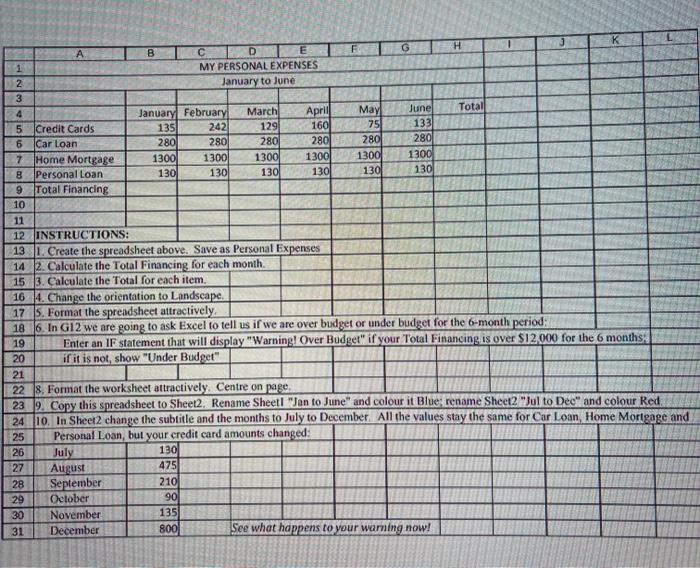
K A H B D E 1 MY PERSONAL EXPENSES 2 January to June 3 4 January February March April May Junel Total 5 Credit Cards 135 242 129 160 75 133 6 Car Loan 280 280 2801 280 280 280 7 Home Mortgage 1300 1300 1300 1300 1300 1300 B Personal Loan 1301 130 130 130 130 130 9 Total Financing 10 11 12 INSTRUCTIONS: 13. Create the spreadsheet above. Save as Personal Expenses 14 2. Calculate the Total Financing for each month. 15 3. Calculate the Total for each item. 16 4. Change the orientation to Landscape 17 5. Format the spreadsheet attractively 18 6. In G12 we are going to ask Excel to tell us if we are over budget or under budget for the 6-month period: 19 Enter an 1F statement that will display "Warning! Over Budget" if your Total Financing is over $12,000 for the 6 months 20 if it is not show "Under Budget" 21 22 8. Format the worksheet attractively. Centre on page, 23 9. Copy this spreadsheet to Sheet2, Rename Sheetl "Jan to June" and colour it Blue: rename Sheet2 Jul to Dec" and colour Red, 24 10. In Sheet2 change the subtitle and the months to July to December. All the values stay the same for Car Loan, Home Mortgage and 25 Personal Loan, but your credit card amounts changed: 26 July 130 27 August 475 28 September 210 29 October 90 30 November 135 31 December 800 See what happens to your warning now! . SI
Step by Step Solution
There are 3 Steps involved in it

Get step-by-step solutions from verified subject matter experts