







Question: knock-knock-1.html, knock-knock-1.js, and knock- knock-1.css . A) In Atom, use Emmet to create a standards-compliant HTML5 web page, with an empty body. Save it as
knock-knock-1.html, knock-knock-1.js, and knock- knock-1.css.
A) In Atom, use Emmet to create a standards-compliant HTML5 web page, with an empty body. Save it as knock- knock-1.html in your 111/p5/ folder. B) Add a script element at the end of the body element to
connect the .html file to the knock-knock-1.js.
C) Add a link element to the head section that connects to the .css file. D) Download knock-knock.js to your p5 folder.
E) Complete clickHandler1, and test the web app. F). Complete clickHandler2, and test the web app. G) Complete clickHandler3. When the user clicks the Youtube It! button, an iFrame is created and appended to the web page. A youtube video related to the knock, knock joke starts on autoplay. H) In the .css file, include rules that style the iFrame so that it not jammed against other page elements, is centered, and has a border.
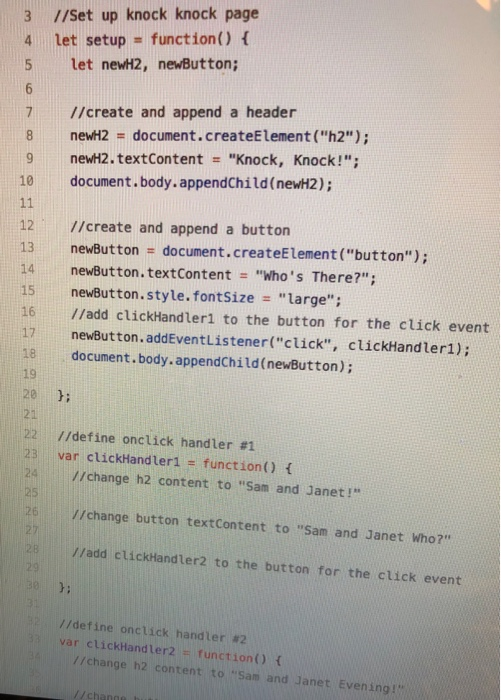
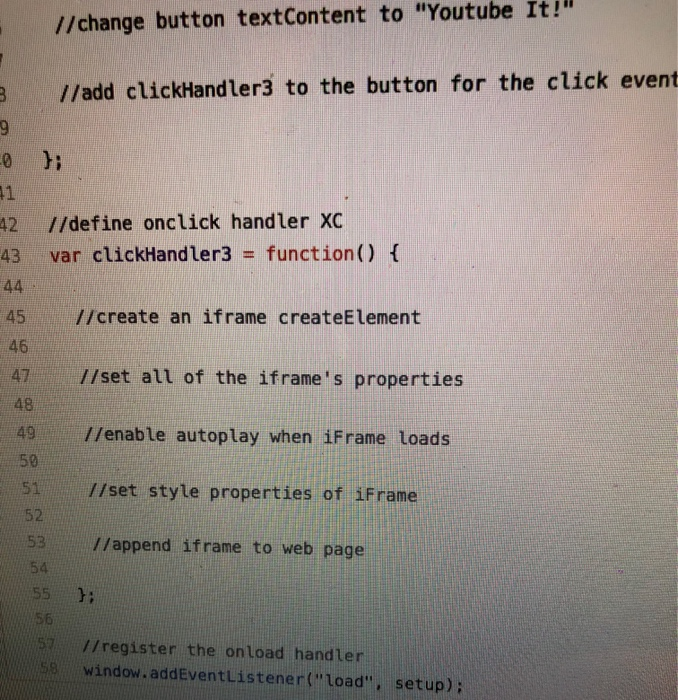
3 I/set up knock knock page 4 let setup function) f 5 let newH2, newButton; 7 //create and append a header newH2 = document.createElement( "h2"); 9 newH2.textContent "Knock, Knock!"; 10 document.body.appendChild(newH2); 12//create and append a button 13 newButton # document.createElement ("button"); 14 newButton. textContent "who's There?"; 15 newButton.style. fontSize "large" 16 //add clickHandlerl to the button for the click event 17 newButton. addEventListener("click", clickHandler1); 18 document.body.appendChild(newButton); 19 20 21 22 //define onclick handler #1 23 var clickHandler1 - function) t //change h2 content to "Sam and Janet! //change button textContent to "Sam and Janet who?" //add clickHandler2 to the button for the click event 26 h: //define onctick handler #2 var clickHandler2 function) ( //change h2 content to Sam and Janet Evening! //change button textContent to "Youtube It! //add clickHandler3 to the button for the click event 0 hi 42 //define onclick handler XC 43 var clickHandler3 function() t 45 //create an iframe createElement 46 47 //set all of the iframe's properties 48 49 //enable autoplay when iFrame Loads 50 51 I/set style properties of iFrame 52 53 //append iframe to web page 54 55 Y: 56 //register the onload handler window.addEventListener("Load", setup)
Step by Step Solution
There are 3 Steps involved in it

Get step-by-step solutions from verified subject matter experts
 Study Help