



Question: La Copy Paste BIU - Prav Ar Merge & Center - $ - % 9 o O Number Conditional Forr Formatting Tal Format Painter Clipboard
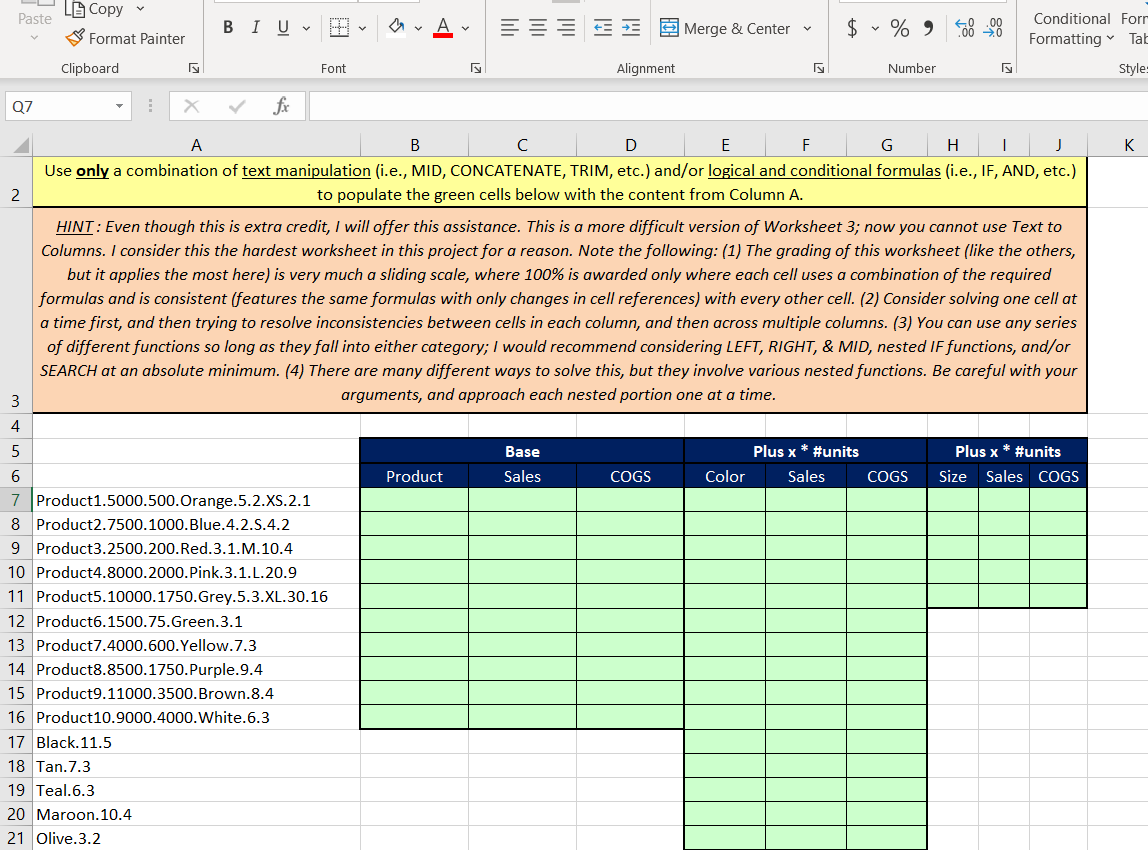
La Copy Paste BIU - Prav Ar Merge & Center - $ - % 9 o O Number Conditional Forr Formatting Tal Format Painter Clipboard Font Alignment C Style: Q7 X fx B C D E F G H I J Use only a combination of text manipulation (i.e., MID, CONCATENATE, TRIM, etc.) and/or logical and conditional formulas (i.e., IF, AND, etc.) to populate the green cells below with the content from Column A. K HINT: Even though this is extra credit, I will offer this assistance. This is a more difficult version of Worksheet 3; now you cannot use Text to Columns. I consider this the hardest worksheet in this project for a reason. Note the following: (1) The grading of this worksheet (like the others, but it applies the most here) is very much a sliding scale, where 100% is awarded only where each cell uses a combination of the required formulas and is consistent (features the same formulas with only changes in cell references) with every other cell. (2) Consider solving one cell at a time first, and then trying to resolve inconsistencies between cells in each column, and then across multiple columns. (3) You can use any series of different functions so long as they fall into either category; I would recommend considering LEFT, RIGHT, & MID, nested IF functions, and/or SEARCH at an absolute minimum. (4) There are many different ways to solve this, but they involve various nested functions. Be careful with your arguments, and approach each nested portion one at a time. m Base Sales Plus x * #units Color Sales Plus x * #units Size Sales COGS Product COGS COGS 7 Product1.5000.500. Orange.5.2.XS.2.1 8 Product2.7500.1000.Blue.4.2.5.4.2 9 Product3.2500.200.Red.3.1.M.10.4 10 Product4.8000.2000.Pink.3.1.L.20.9 11 Product5.10000.1750. Grey.5.3.XL.30.16 12 Product6.1500.75. Green.3.1 13 Product7.4000.600.Yellow.7.3 14 Product8.8500.1750.Purple.9.4 15 Product9.11000.3500. Brown.8.4 16 Product10.9000.4000. White.6.3 17 Black.11.5 18 Tan.7.3 19 Teal.6.3 20 Maroon. 10.4 21 Olive.3.2 La Copy Paste BIU - Prav Ar Merge & Center - $ - % 9 o O Number Conditional Forr Formatting Tal Format Painter Clipboard Font Alignment C Style: Q7 X fx B C D E F G H I J Use only a combination of text manipulation (i.e., MID, CONCATENATE, TRIM, etc.) and/or logical and conditional formulas (i.e., IF, AND, etc.) to populate the green cells below with the content from Column A. K HINT: Even though this is extra credit, I will offer this assistance. This is a more difficult version of Worksheet 3; now you cannot use Text to Columns. I consider this the hardest worksheet in this project for a reason. Note the following: (1) The grading of this worksheet (like the others, but it applies the most here) is very much a sliding scale, where 100% is awarded only where each cell uses a combination of the required formulas and is consistent (features the same formulas with only changes in cell references) with every other cell. (2) Consider solving one cell at a time first, and then trying to resolve inconsistencies between cells in each column, and then across multiple columns. (3) You can use any series of different functions so long as they fall into either category; I would recommend considering LEFT, RIGHT, & MID, nested IF functions, and/or SEARCH at an absolute minimum. (4) There are many different ways to solve this, but they involve various nested functions. Be careful with your arguments, and approach each nested portion one at a time. m Base Sales Plus x * #units Color Sales Plus x * #units Size Sales COGS Product COGS COGS 7 Product1.5000.500. Orange.5.2.XS.2.1 8 Product2.7500.1000.Blue.4.2.5.4.2 9 Product3.2500.200.Red.3.1.M.10.4 10 Product4.8000.2000.Pink.3.1.L.20.9 11 Product5.10000.1750. Grey.5.3.XL.30.16 12 Product6.1500.75. Green.3.1 13 Product7.4000.600.Yellow.7.3 14 Product8.8500.1750.Purple.9.4 15 Product9.11000.3500. Brown.8.4 16 Product10.9000.4000. White.6.3 17 Black.11.5 18 Tan.7.3 19 Teal.6.3 20 Maroon. 10.4 21 Olive.3.2
Step by Step Solution
There are 3 Steps involved in it

Get step-by-step solutions from verified subject matter experts