







Question: Lab 0 7 : Data Transferring Using UDP socket in Python Introduction The Internet protocol suite supports a connectionless transport protocol called UDP ( User
Lab: Data Transferring Using UDP socket in Python
Introduction
The Internet protocol suite supports a connectionless transport protocol called UDP User Datagram Protocol UDP provides a way for applications to send encapsulated IP datagrams without having to establish a connection. The objective of this lab is to write a client server application that using UDP socket in Python.
Instruction:
Study the UDP client and server programs in Python discussed in the class.
Write the client and server programs in Python to transfer data in a file as described in the program description section below.
Demonstrate the program in the lab and submit in the blackboard.
Write all the steps clearly in a separate file doc or pdf how to run your application.
Program Description
In this lab, you are required to write a simple file transfer application based on the clientserver model using UDP socket. The server is a connectionless iterative server. Thus, UDP is used as the underlying communication protocol.
The protocol data unit PDU exchanged between the client and server has the following format:
Type
Data optional
Figure : PDU length and format
The "type" field specifies the PDU type. There can be as many as PDU types:
byte
type D DATA PDU;
type L LAST PDU;
type E ERROR PDU;
type F FILENAME PDU.
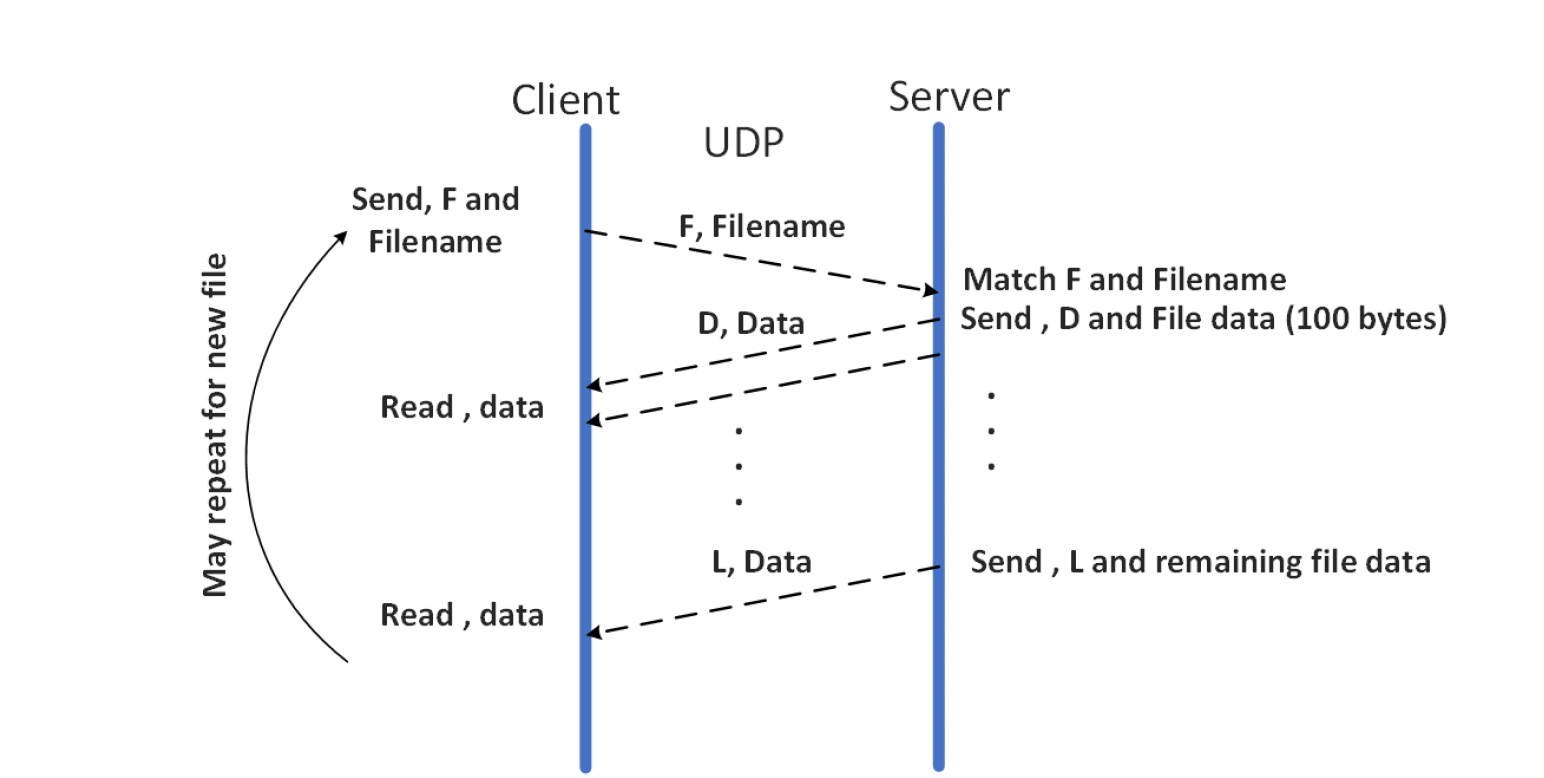
the FILENAME PDU is sent by the client to specify a file name that the client wants to download from the server. The DATA PDU is used by the server to send the file data to the client; the LAST PDU is used to signal the end of a file transfer; the ERROR PDU is used to report an error; the FILENAME PDU is sent by the client to specify a file name that the client wants to download from the server. The following diagram outlines the general exchange between the client and the server. Note that the LAST PDU carries the last portion of the file data.
Figure : Communication between Client and server
Note: Add sufficient comments to your program.
Step by Step Solution
There are 3 Steps involved in it
1 Expert Approved Answer
Step: 1 Unlock

Question Has Been Solved by an Expert!
Get step-by-step solutions from verified subject matter experts
Step: 2 Unlock
Step: 3 Unlock
 Study Help