







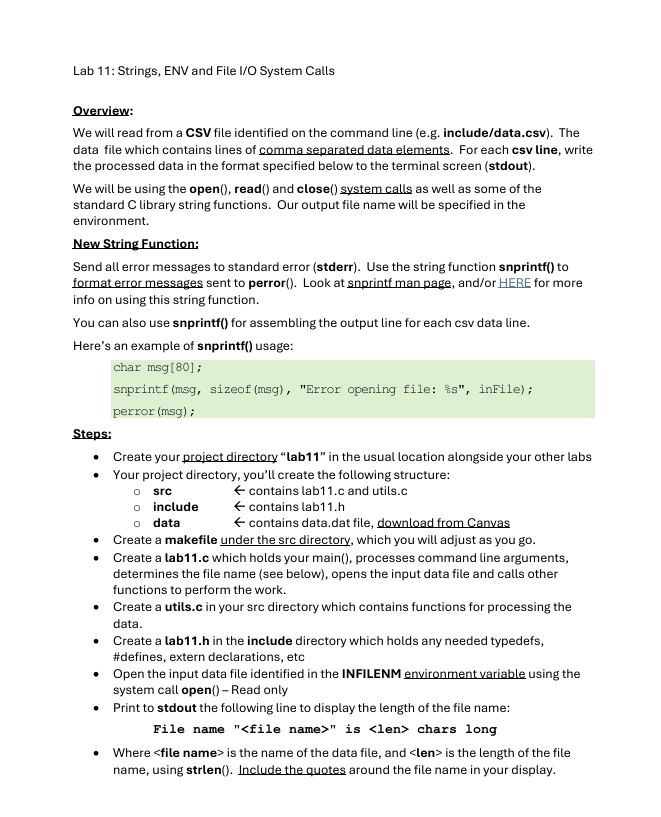
Question: Lab 1 1 : Strings, ENV and File I / O System Calls Overview: We will read from a CSV file identified on the command
Lab : Strings, ENV and File IO System Calls
Overview:
We will read from a CSV file identified on the command line eg includedatacsv The data file which contains lines of comma separated data elements. For each csv line, write the processed data in the format specified below to the terminal screen stdout
We will be using the open read and close system calls as well as some of the standard C library string functions. Our output file name will be specified in the environment.
New String Function:
Send all error messages to standard error stderr Use the string function snprintf to formaterror messages sent to perror Look at snprintf man page, andor HERE for more info on using this string function.
You can also use snprintf for assembling the output line for each csv data line.
Here's an example of snprintf usage:
char msg;
snprintfmsg sizeofmsg "Error opening file: inFile;
perrormsg ;
Steps:
Create your project directory "lab in the usual location alongside your other labs
Your project directory, you'll create the following structure:
sre quad leftarrow contains labc and utils.c
include leftarrow contains labh
data leftarrow contains data.dat file, download from Canvas
Create a makefile under the src directory, which you will adjust as you go
Create a labc which holds your main processes command line arguments, determines the file name see below opens the input data file and calls other functions to perform the work.
Create a utils.c in your src directory which contains functions for processing the data.
Create a labh in the include directory which holds any needed typedefs, #defines, extern declarations, etc
Open the input data file identified in the INFILENM environment variable using the system call open Read only
Print to stdout the following line to display the length of the file name:
File name is chars long
Where is the name of the data file, and is the length of the file name, using strlen Include the quotes around the file name in your display. Loop through reading lines of the input data file a csv line
Use strtok to parse the separate elements from the csv line.
You will reformat the comma separated data elements on each line of the data file into a single output line see below Hint: another use for snprintf
Note: strtok doesn't have to be called in a loop, you can just call it times.
For each parsed line, use the following functions from string.h:
strcpy& strcat to combine the first and last name from the data file together to be in a single variable in the form
strcmp to determine the sort order of and based on the ASCII values of the characters in the two strings. display or based on the comparison. eg "Adam" is less than "Bill" so display
strstr to check if their favorite quote contains the substring "cat"
Print the following line for each of the csv lines read:
Data line: ID Name:
Where is the or display and is the string "Does have a cat" or "Does NOT have a cat" depending on the results of strstr
For example: Read the csv line Bill,Johnson,I am a doctor not a cat"
Data Line: ID Full Name Johnson, Bill Does have cat
Data:
The data file is a Comma Separated Value CSV file with fixed width lines of characters. This file is provided in the Canvas Assignment. You'll read into a buffer of size to account for the new line character at the end of each csv data line.
The individual data elements in the line are all strings, in order from left to right in the file they are:
Here is what the content of that file looks like:
The actual data, but need to have the right length of data lines since we're using read to read in a data line of a particular length.
Bill,Johnson, I am a doctor not a cat
Betty,Smith, I have a dream
Hank,Blusefield, I have a cat
Phillip,Phillip, Where's my cat!?!
Zelda,Nozzel,Ask not what you can do
Output:
The output from the program should look as follows just showing output for one input data line, your output should include all input data lines:
Data Line: ID Full Name Johnson, Bill Does have cat
Note: the read system call will include newlines, and not include a NULL to terminate the csv line we would like to treat as a string. So use something like this for reading lines from the csv data file with the read system call into a string value without the newline:
LINELEN is defined as for reading lines of length to account for the n
Load the data in from the csv file
void loadListint inFileFD
int numRead;
char buf callocLINELEN sizeofchar;
while numRead readinFileFD buf, LINELEN
bufLINELEN; replace the
with a NULL
printfRead line: s
buf;
Step by Step Solution
There are 3 Steps involved in it
1 Expert Approved Answer
Step: 1 Unlock

Question Has Been Solved by an Expert!
Get step-by-step solutions from verified subject matter experts
Step: 2 Unlock
Step: 3 Unlock
 Study Help