







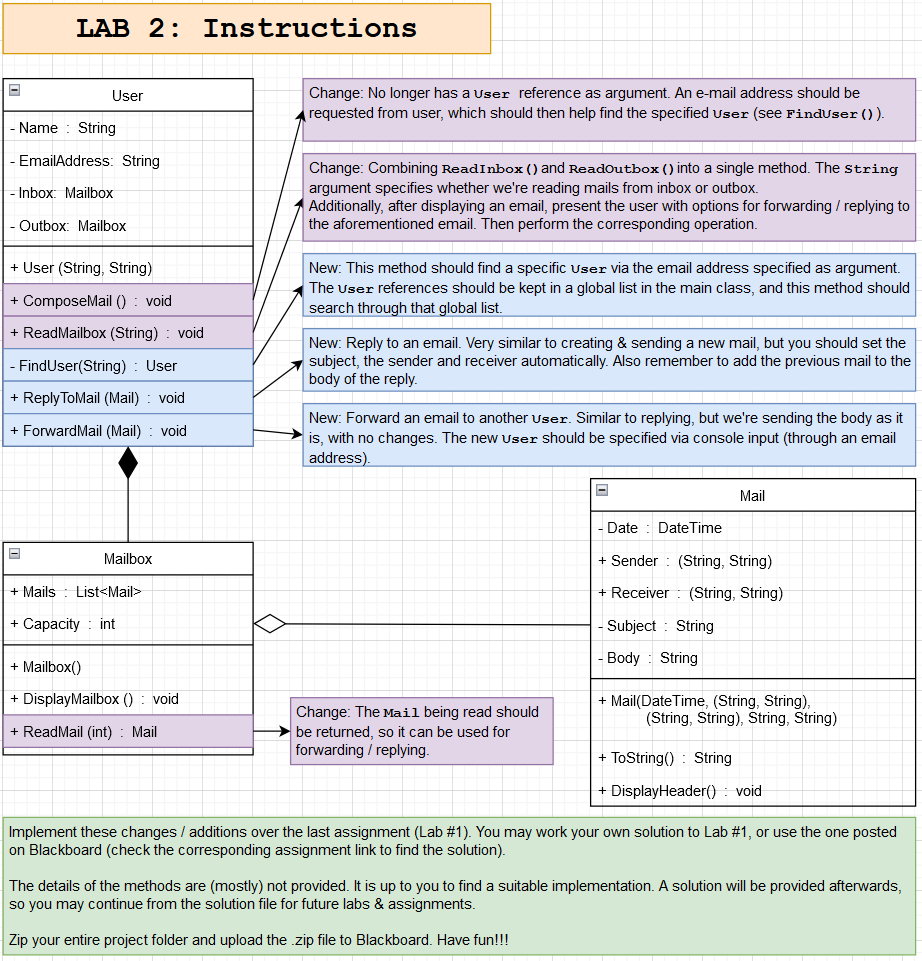
Question: LAB 2 : Instructions Implement these changes / additions over the last assignment ( Lab # 1 ) . You may work your own
LAB : Instructions
Implement these changes additions over the last assignment Lab # You may work your own solution to Lab # or use the one posted on Blackboard check the corresponding assignment link to find the solution
The details of the methods are mostly not provided. It is up to you to find a suitable implementation. A solution will be provided afterwards, so you may continue from the solution file for future labs & assignments.
Zip your entire project folder and upload the zip file to Blackboard. Have fun!!! user class; using System;
using System.Collections.Generic;
using System.Text;
namespace LAB
class User
private String Name get; set;
private String EmailAddress get; set;
private Mailbox Inbox get; set;
private Mailbox Outbox get; set;
public UserString name, String emailAddress
Name name; EmailAddress emailAddress;
Inbox new Mailbox; Outbox new Mailbox;
public void ComposeMailUser otherUser
Console.WriteLineName EmailAddress composing a mail to: otherUser.Name otherUser.EmailAddress ;
Console.WriteLineEnter subject:";
String subject Console.ReadLine;
Console.WriteLineEnter body:";
String body Console.ReadLine;
String String sender Name EmailAddress;
String String receiver otherUserName, otherUser.EmailAddress;
Mail composedMail new MailDateTimeNow, sender receiver, subject, body;
ifOutboxMails.Count Outbox.Capacity otherUser.Inbox.Mails.Count otherUser.Inbox.Capacity
Console.WriteLineCapacity exceeded!";
Console.WriteLine;
return;
Outbox.Mails.AddcomposedMail;
otherUser.Inbox.Mails.AddcomposedMail;
Console.WriteLineMail successfully sent.";
Console.WriteLine;
public void ReadInbox
Console.WriteLineInbox for Name EmailAddress :;
Inbox.DisplayMailbox;
ifInboxMails.Count
Console.Write
Enter the number for the mail you want to read: ;
int selection Convert.ToIntConsoleReadLine;
Console.WriteLine;
Inbox.ReadMailselection ;
Console.WriteLine;
public void ReadOutbox
Console.WriteLineOutbox for Name EmailAddress :;
Outbox.DisplayMailbox;
if OutboxMails.Count
Console.Write
Enter the number for the mail you want to read: ;
int selection Convert.ToIntConsoleReadLine;
Outbox.ReadMailselection ;
Console.WriteLine;
mail class ;using System;
using System.Collections.Generic;
using System.Text;
namespace LAB
class Mail
private DateTime Date;
private String Subject;
private String Body;
public String String Sender get; private set;
public String String Receiver get; private set;
public DateTime GetDate return Date;
public String GetSubject return Subject;
public String GetBody return Body;
public MailDateTime date, String String senderString String receiver, String subject, String body
Date date; Sender sender; Receiver receiver; Subject subject; Body body;
public override String ToString
String finalString Date.ToShortDateString Date.ToShortTimeString
;
finalString "From: Sender.Item Sender.Item
;
finalString To: Receiver.Item Receiver.Item
;
finalString "Subject: Subject
Body;
return finalString;
public void DisplayHeader Console.WriteLineSubject: Subject;
mailbox class;using System;
using System.Collections.Generic;
using System.Text;
namespace LAB
class Mailbox
public List Mails get; set;
public int Capacity get; set;
public Mailbox
Mails new List;
Capacity ; To test capacity
public void DisplayMailbox
if MailsCount
Console.WriteLineNo mails here!";
else
forint i ; i Mails.Count; i
Console.Writei;
MailsiDisplayHeader;
public void ReadMailint selection
Console.WriteLineMailsselectionToString;
program cs ;using System;
namespace LAB
class Program
static void Mainstring args
User cg new UserCinar Gedizlioglu", cgedizlioglu";
User ke new UserKutluhan Erol", kerol";
keComposeMailcg;
cgComposeMailke;
keReadInbox;
keReadOutbox;
Capacity exceeded here
cgComposeMailke;
keReadInbox;
Step by Step Solution
There are 3 Steps involved in it
1 Expert Approved Answer
Step: 1 Unlock

Question Has Been Solved by an Expert!
Get step-by-step solutions from verified subject matter experts
Step: 2 Unlock
Step: 3 Unlock
 Study Help