







Question: Lab - 3 Authentication Objectives: Having hands-on experience on Securing Router Administrative Access using AAA server using Packet Tracer Authentication provides a method to identify
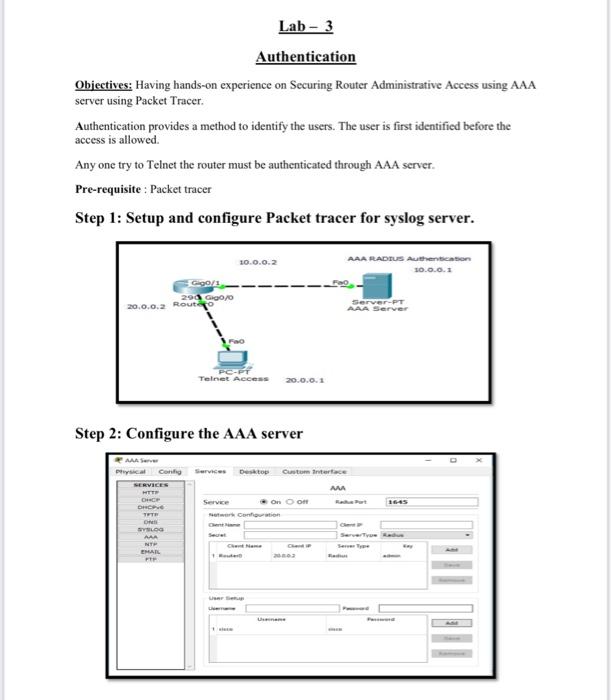
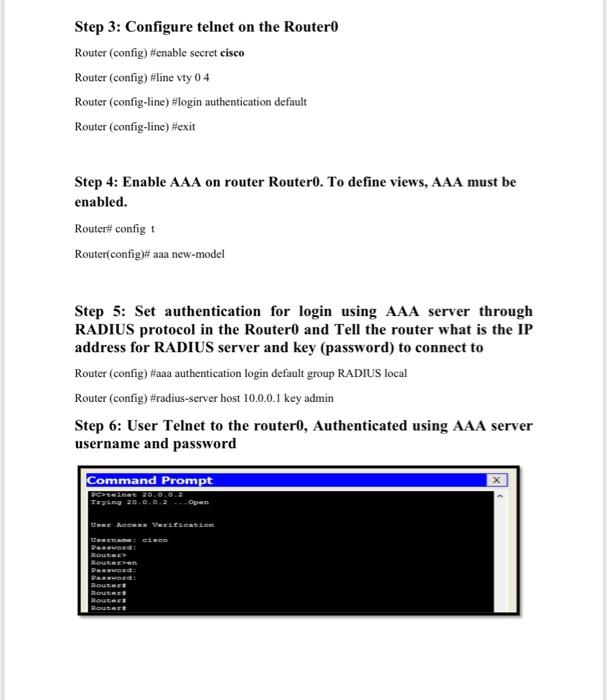
Lab - 3 Authentication Objectives: Having hands-on experience on Securing Router Administrative Access using AAA server using Packet Tracer Authentication provides a method to identify the users. The user is first identified before the access is allowed. Any one try to Telnet the router must be authenticated through AAA server. Pre-requisite : Packet tracer Step 1: Setup and configure Packet tracer for syslog server. 20.0.0.2 AAA RADIUS Authention 0.0.0.1 G90/1 2aae0/0 20.0.0.2 Routayo Server-PT AAA Server FO Telnet Access 20.0.0.1 Step 2: Configure the AAA server MAS Coni Service SERVICES Desktop Custom Interface MA on om CH DHCP TER Service LOS MAR EMAIL Step 3: Configure telnet on the Routero Router (config)#enable secret cisco Router (config)#line vty 0 4 Router (config-line) #login authentication default Router (config-line) #exit Step 4: Enable AAA on router Routero. To define views, AAA must be enabled. Router config + Router(config#aaa new-model Step 5: Set authentication for login using AAA server through RADIUS protocol in the Router0 and Tell the router what is the IP address for RADIUS server and key (password) to connect to Router (config)#aaa authentication login default group RADIUS local Router (config)#radius-server host 10.0.0.1 key admin Step 6: User Telnet to the router0, Authenticated using AAA server username and password Command Prompt Benet 20.0.0.2 Trying 20.0.0.2 ... Open USCE Access Versation Laco Routerren SEEGEE toutes Router
Step by Step Solution
There are 3 Steps involved in it

Get step-by-step solutions from verified subject matter experts
 Study Help