







Question: Lab - 4 Authorization Objectives: Having hands-on experience on Securing Router Administrative ACL using Packet Tracer Authorization describes what a user is allowed to perform.
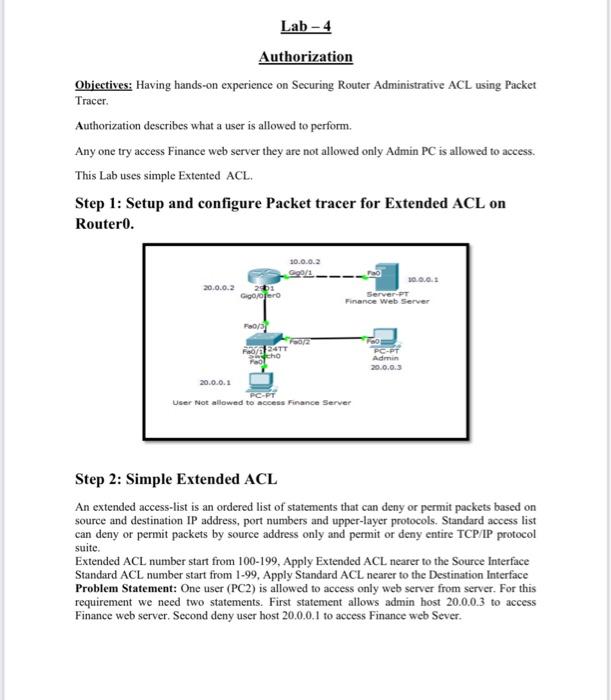
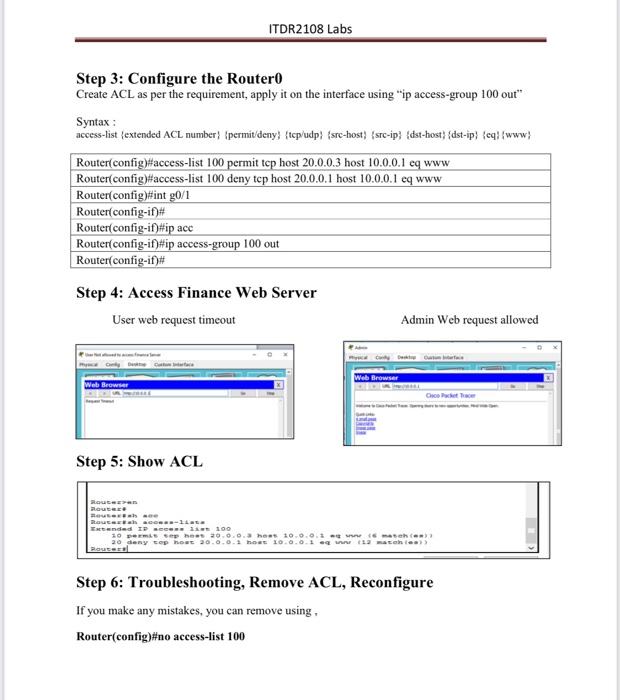
Lab - 4 Authorization Objectives: Having hands-on experience on Securing Router Administrative ACL using Packet Tracer Authorization describes what a user is allowed to perform. Any one try access Finance web server they are not allowed only Admin PC is allowed to access. This Lab uses simple Extented ACL. Step 1: Setup and configure Packet tracer for Extended ACL on Routero. 10.0.0.2 Cool2 20.0.0.2 Gigooro 10.0.0. Server PT Finance Web Server ETT ho Food PC- Admin 20.0.0.3 20.0.0.1 User Not allowed to access Finance Server Step 2: Simple Extended ACL An extended access-list is an ordered list of statements that can deny or permit packets based on source and destination IP address, port numbers and upper-layer protocols. Standard access list can deny or permit packets by source address only and permit or deny entire TCP/IP protocol suite. Extended ACL number start from 100-199, Apply Extended ACL nearer to the Source Interface Standard ACL number start from 1-99, Apply Standard ACL nearer to the Destination Interface Problem Statement: One user (PC2) is allowed to access only web server from server. For this requirement we need two statements. First statement allows admin host 20.0.0.3 to access Finance web server. Second deny user host 20.0.0.1 to access Finance web Sever. ITDR2108 Labs Step 3: Configure the Router Create ACL as per the requirement, apply it on the interface using "ip access-group 100 out" Syntax : access-list (extended ACL number} (permit/deny) (tcp/udp) (src-host) (src-ip} {dst-host) {dst-ip) cqfwww} Router(config)#access-list 100 permit top host 20.0.0.3 host 10.0.0.1 cq www Router(config)#access-list 100 deny tep host 20.0.0.1 host 10.0.0.1 cq www Router(config)#int g0/1 Router(config-if)# Router(config-if)#ip acc Router(config-if)#ip access-group 100 out Router(config-if)# Step 4: Access Finance Web Server User web request timeout Admin Web request allowed Web Browser Web Browser Cicle Step 5: Show ACL Route COR-ILL Extended IP - 100 20 miehe 20.00. hs 10.0.0.1 mm 20 deny top hoes 20.0.0.1 Hot 10.0.0.1 1.2 m Step 6: Troubleshooting, Remove ACL, Reconfigure If you make any mistakes, you can remove using. Router(config)#no access-list 100
Step by Step Solution
There are 3 Steps involved in it

Get step-by-step solutions from verified subject matter experts
 Study Help