







Question: Lab 5.1 - Bars 21 GUI This project is about designing a Bars 21 Games using the JavaFx. This will illustrate the principles of object
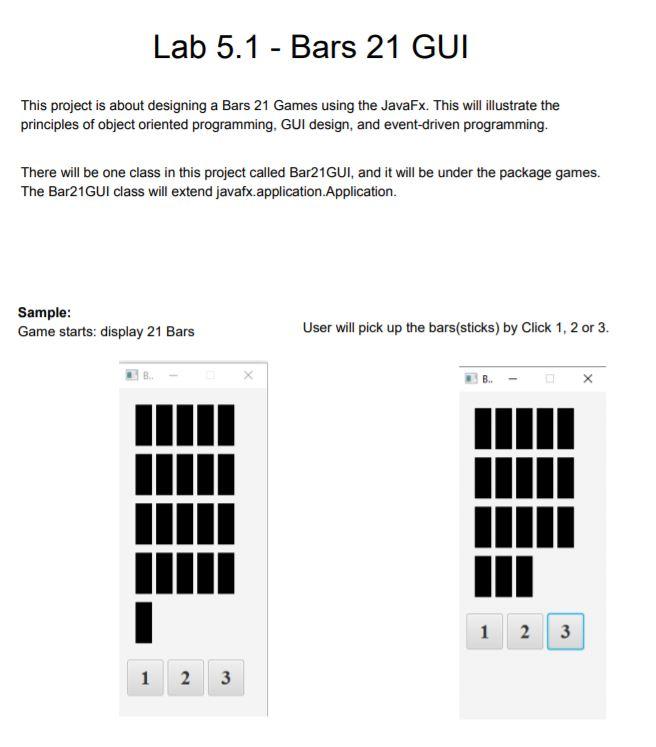
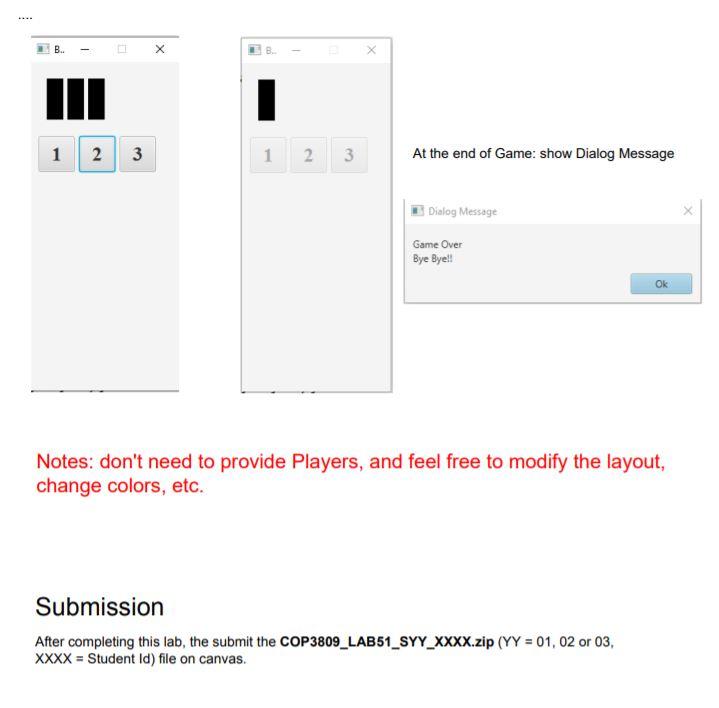
Lab 5.1 - Bars 21 GUI This project is about designing a Bars 21 Games using the JavaFx. This will illustrate the principles of object oriented programming, GUI design, and event-driven programming. There will be one class in this project called Bar21GUI, and it will be under the package games. The Bar21GUI class will extend javafx application Application. Sample: Game starts: display 21 Bars User will pick up the bars(sticks) by Click 1, 2 or 3. 1 2 3 1 2 2 3 - X B. X 1 2 3 1 2 3 3 At the end of Game: show Dialog Message Dialog Message X Game Over Bye Bye!! Ok Notes: don't need to provide Players, and feel free to modify the layout, change colors, etc. Submission After completing this lab, the submit the COP3809_LAB51_SYY_XXXX.zip (YY = 01, 02 or 03, XXXX = Student Id) file on canvas. Lab 5.1 - Bars 21 GUI This project is about designing a Bars 21 Games using the JavaFx. This will illustrate the principles of object oriented programming, GUI design, and event-driven programming. There will be one class in this project called Bar21GUI, and it will be under the package games. The Bar21GUI class will extend javafx application Application. Sample: Game starts: display 21 Bars User will pick up the bars(sticks) by Click 1, 2 or 3. 1 2 3 1 2 2 3 - X B. X 1 2 3 1 2 3 3 At the end of Game: show Dialog Message Dialog Message X Game Over Bye Bye!! Ok Notes: don't need to provide Players, and feel free to modify the layout, change colors, etc. Submission After completing this lab, the submit the COP3809_LAB51_SYY_XXXX.zip (YY = 01, 02 or 03, XXXX = Student Id) file on canvas
Step by Step Solution
There are 3 Steps involved in it

Get step-by-step solutions from verified subject matter experts
 Study Help