





Question: Lab 8: Shell Scripting 1. Use vi to create the following script. Call the file scriptl. When completed, change the permissions to 745. Run the
 Lab 8: Shell Scripting 1. Use vi to create the following

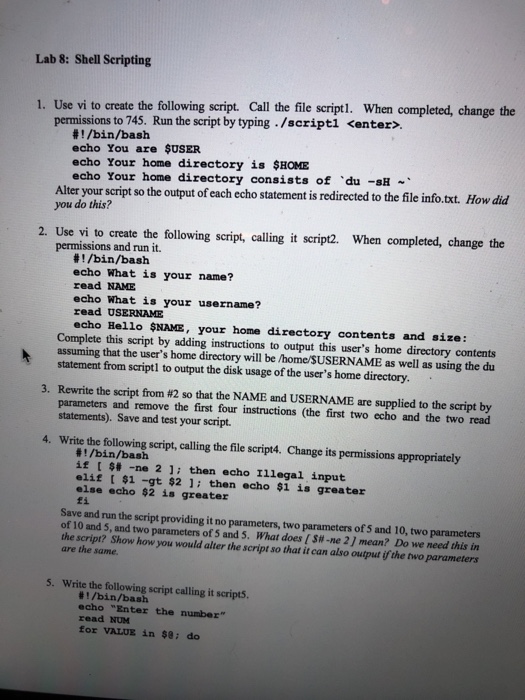
Lab 8: Shell Scripting 1. Use vi to create the following script. Call the file scriptl. When completed, change the permissions to 745. Run the script by typing /scriptl . !/bin/bash echo You are $USER echo Your home directory is $HOME echo Your home directory consists of du -sH Alter your script so the output of each echo statement is redirected to the file info.toxt. How did you do this? 2. Use vi to create the following script, calling it script2. When completed, change the permissions and run it. #1 /bin/bash echo What is your name? read NAME echo What is your username? read USERNAME echo Hello $NAME, your home directory contents and size: Complete this script by adding instructions to output this user's home directory contents assuming that the user's home directory will be /home/SUSERNAME as well as using the du statement from script1 to output the disk usage of the user's home directory. 3. Rewrite the script from #2 so that the NAME and USERNAME are supplied to the script by parameters and remove the first four instructions (the first two echo and the two read statements). Save and test your script Write the following script, calling the file script4. Change its permissions appropriately 4. /bin/bash if [ S# -ne 2 ]; then echo Illegal input elif $1 -gt $2 1 then echo $1 is greater else echo $2 is greater fi Save and run the script providing it no parameters, two parameters of S and 10, two parameters of 10 and 5, and two parameters of 5 and 5. What does [S#-ne 2 ] mean? Do we need this in the script? Show how you would alter the script so that it can also output if the two parameters are the same 5. Write the following script calling it scripts. E/bin/bash echo "Enter the number" read NUM for VALUE in $8: do

Step by Step Solution

There are 3 Steps involved in it

1 Expert Approved Answer
Step: 1 Unlock blur-text-image
Question Has Been Solved by an Expert!

Get step-by-step solutions from verified subject matter experts

Step: 2 Unlock
Step: 3 Unlock

Students Have Also Explored These Related Databases Questions!