







Question: LAB ACTIVITY* 6.6 . 7 : Warm up : Parsing strings ( Python 3) main . py # TYPE Your code here while ( True
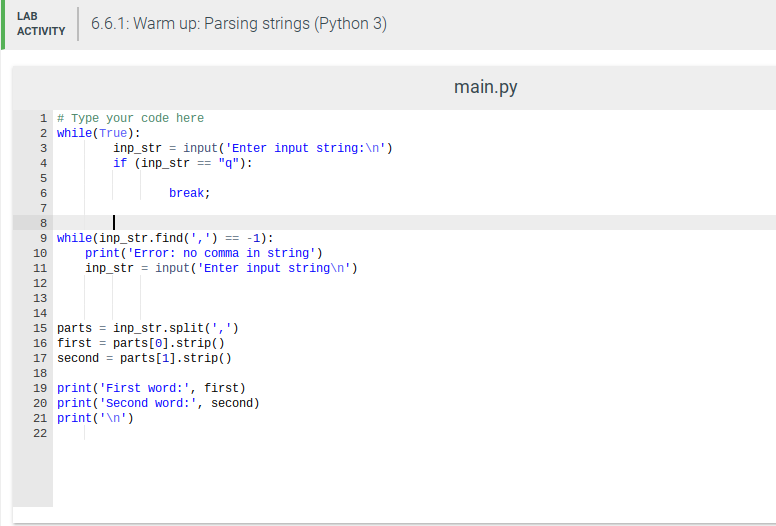
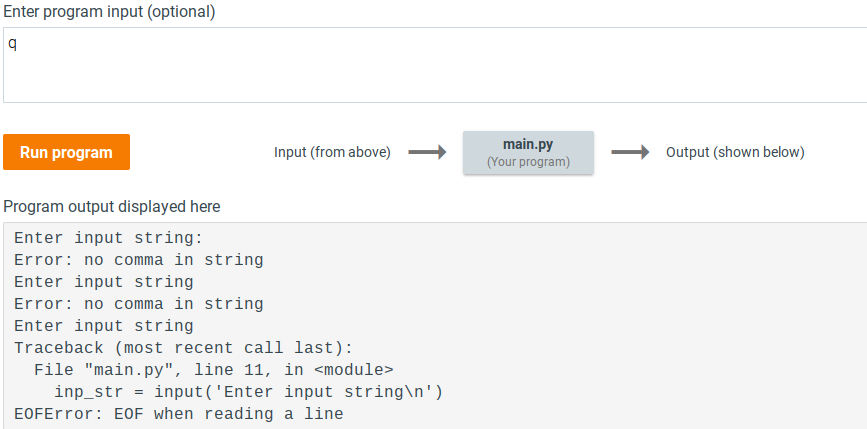
LAB ACTIVITY* 6.6 . 7 : Warm up : Parsing strings ( Python 3) main . py # TYPE Your code here while ( True ) :` inp_ str = input ( ' Enter input string : " n' ] if ( inp_ str = = " 9 " ] :` break ;" [O \\ITI while ( inp_ str . Find! ' , ' ] = = = 11 :` 10 print ! ' Error : no comma in string ' ] 11 inp_ str = input ( ' Enter input string in ' ] 12 13 14 15 parts = inp_ str . splitt' , ' ] 16 first = parts [ D ] . Stripe !" 17 Second = part s [ 1 ] . Stripe ! 10 19 print ! ' First word : ' , First !" 20 print ! ' Second word : " , Second !" 21 print ( " " n'] 27Enter program input (optional) b Run program Input (from above) main.py (Your program) Output (shown below) Program output displayed here Enter input string: Error: no comma in string Enter input string Error: no comma in string Enter input string Traceback (most recent call last) : File "main . py", line 11, in
Step by Step Solution
There are 3 Steps involved in it

Get step-by-step solutions from verified subject matter experts
 Study Help