







Question: Lab Assignment : Part 1. Write and interface ContainerADT.java for the bag container using generics. The characteristics of the bag container are in the provided
Lab Assignment :
Part 1. Write and interface ContainerADT.java for the bag container using generics. The characteristics of the bag container are in the provided ContainerADT.pdf file. You will find there the description of methods that should be included in the interface. Description: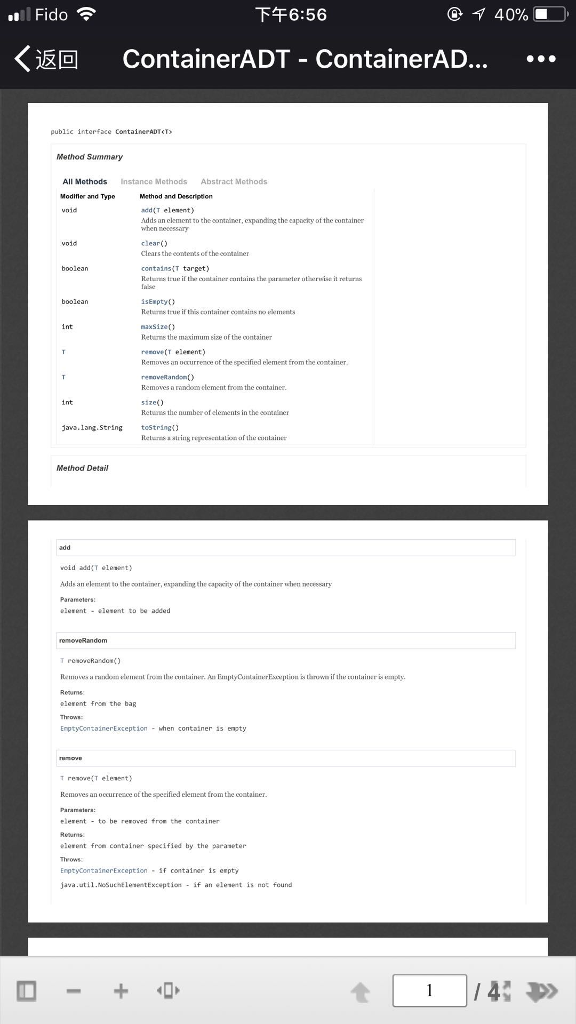
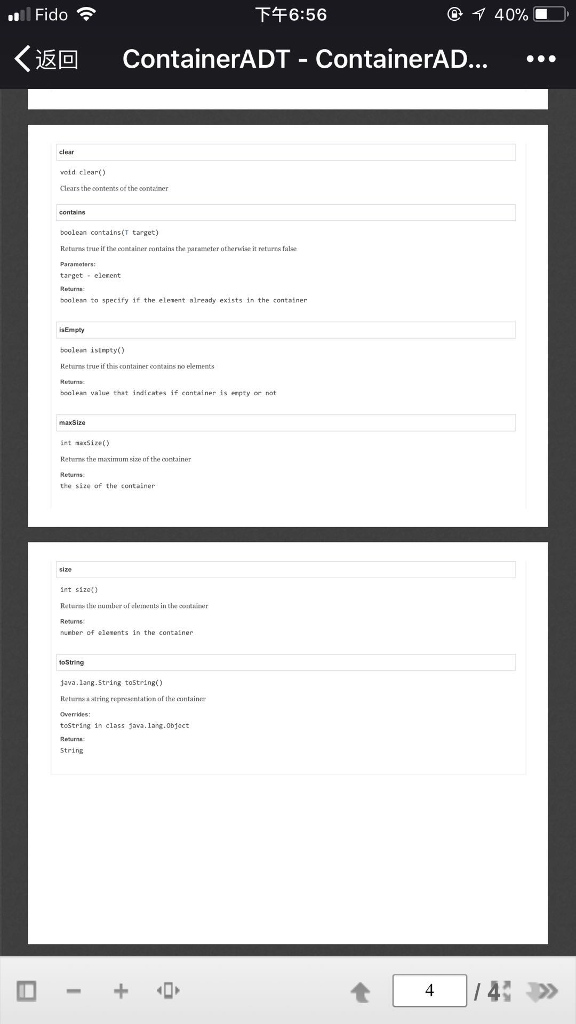
Part 2. Write an ArrayContainer.java class that implements the interface ContainerADT using an array. Use generics. Write two constructors: a default constructor that creates a container for 100 elements and a constructor that receives container's capacity by parameter. When implementing method remove, make sure to deal with the empty spots in the array.
Part 3. Write an EmptyContainerException class.
Part 4. Test the the ArrayContainer. You can write your own application to test the methods or you can use the provided memory game.
Memory game:
/* * MemoryGame.java * This application uses an ArrayContainer object to store string names of * animal species that will be used as labels on buttons. The player will * uncover the buttons to pair the buttons with the same species. */ package GUI;
import container.ArrayContainer; import exceptions.*; import java.awt.*; import java.awt.event.*; import javax.swing.*;
public class MemoryGame extends JFrame implements ActionListener {
private JPanel panel = new JPanel(); private TileButton btnA = null; //Two Button references to form a pair private TileButton btnB = null; //define some constants to use for configuring the game interface private static final int GAMEBOARD_WIDTH = 300; private static final int GAMEBOARD_HEIGHT = 250; private static final int ROWS_IN_GAME = 5; private static final int COLS_IN_GAME = 4; private ArrayContainer
public static void main(String[] args) { Frame f = new MemoryGame(); f.setSize(GAMEBOARD_WIDTH, GAMEBOARD_HEIGHT); f.setVisible(true); }
/** * Initialize the game board: size it, store the symbols, create the buttons, * give each button a symbol to display and place the buttons on the panel. */ public MemoryGame() { super("Lab2: Memory Game"); init(); }
/** * listen for clicks on the buttons. */ public void actionPerformed(ActionEvent e) { // if clicked button was in hidden state do the following tests, // otherwise ignore clicks on visible buttons if (!((TileButton) e.getSource()).isTileVisible()) { //was in hidden state if ((btnA != null) && (btnB != null)) {// both buttons are now visible // if they are not a pair then if (!(btnA.getLabelForVisibleState().equals(btnB.getLabelForVisibleState()))) { btnA.hideLabel(); //hide the buttons btnB.hideLabel(); btnA = null; btnA = (TileButton) e.getSource(); //assign clicked button to btnA btnA.showLabel(); btnB = null; } else { // they are a pair btnA = (TileButton) e.getSource(); btnA.showLabel(); btnB = null; } } // end if part for test for btnA and btnB not null else { // btnA or btnB (or both ) is/are null if (btnA == null) { // we are getting first of a pair btnA = (TileButton) e.getSource(); btnA.showLabel(); } else { // we are getting second of a pair btnB = (TileButton) e.getSource(); btnB.showLabel(); } } // end else part of test for btnA and btnB both not null }//end test for visible tileButton } // end actionPerformed()
/** * initialize the memory game */ private void init() { String output = ""; setDefaultCloseOperation(EXIT_ON_CLOSE); testMethods1(); storeSymbols(); add(panel); // add the panel to the frame //create the buttons, give them a symbol and //add an actionlistener to each. try { for (int i = 0; i
/** * store the Strings in the container. Store two copies of each symbol */ private void storeSymbols() { for (int i = 0; i
/** * This methods has no purpose in the memory game application. This method * tests size, toString, isEmpty, remove and removeRandom methods from the * ArrayContainer class */ private void testMethods1() { String output = ""; storeSymbols(); // store the symbols in the container JOptionPane.showMessageDialog(null, "There are " + container.size() + " animals in the game "); JOptionPane.showMessageDialog(null, "Animals in the container " + container.toString());
while (!container.isEmpty()) { try { String element = container.removeRandom(); //remove a random element output += element + ", ";
container.remove(element); //remove the duplicate element } catch (EmptyContainerException e) { JOptionPane.showMessageDialog(null, e.getMessage(), "Container is empty" + output, JOptionPane.ERROR_MESSAGE); } } }
} // end class MemoryGame
oB Fido 6:56 40% 10 ContainerADT-ContainerAD public interface ContaieeADTCT> Method Summary All Mothods Instance Methods Abstract Mothods Modifier and Type Mathod and Deecripdion add(T elesent) Adds an clemem to thecontniner, espanding the capocky of the containee when necessany clear) Clears t containsiT target) isENpty Retures true if thi container comtains no ements naxsize Returms the masimum size uf the ontainer Remaves an occurrence of the specified elemert from the containmer Removes a random clement fromm the containes size) Retuus the number ofelements in the cone Java. 1angString toString Method Detail void add(T eleiet Adds an element to the container,espaig the capity of the container when receeary T resowcRa do) Ren".ws a nndattwirment from tw ontainer An EmpiyOntainerEustpiiu" taruvm iftli", "'"lain.r gapty. elerent fron the baR EnptyconzoinerException-hen container i5 enpty Removes an occurresce of the specified elemeat from the coatainer elerent to be re ved from the container elerent from container specified by the paraseter EnptycontainerException f container is erpty java.util.NoSuchlesentException if an leset is not found
Step by Step Solution
There are 3 Steps involved in it

Get step-by-step solutions from verified subject matter experts
 Study Help