







Question: Lab Description operations. In this program, you are to create a Roman Numeral class to handle roman numeral How to convert a Roman Numeral to
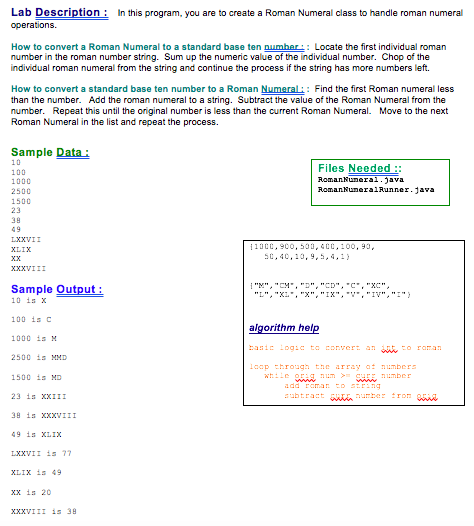
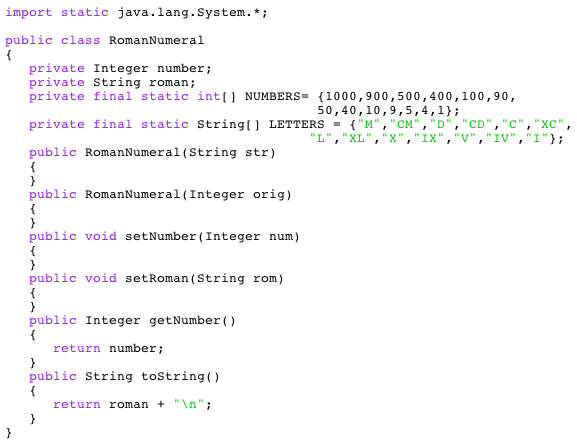
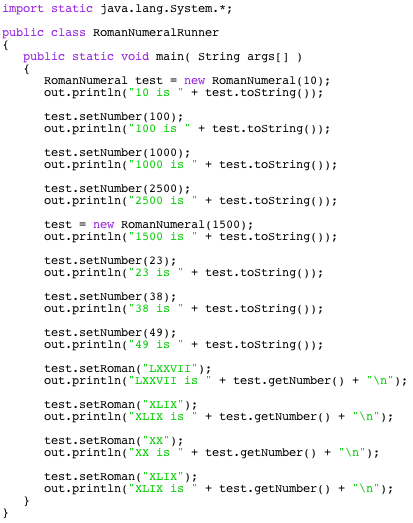
Lab Description operations. In this program, you are to create a Roman Numeral class to handle roman numeral How to convert a Roman Numeral to a standard base ten pumher: Locate the first individual roman number in the roman number string. Sum up the numeric value of the individual number. Chop of the individual roman numeral from the string and continue the process if the string has more numbers left. How to convert a standard base ten number to a Roman Numeral:: Find the first Roman numeral less than the number. Add the roman numeral to a string. Subtract the value of the Roman Numeral from the number. Repeat this until the original number is less than the current Roman Numeral. Move to the next Roman Numeral in the list and repeat the process. Sample Data 100 1000 2500 1500 Files Needed: RomanNuneral.ava RomanNuneralRunner.1ava 39 49 .40,20,9,5,4 Sample Output: 10 1s 100 isc 1000 is M 2500 is HND 1500 is ND 23 is xxIII 39 1s KXXVIII 49 is XLIX XXVII 1s 77 algorithm he anie Logicto conver ano ronan ber XX is 20 XXVIII 15 3 import static java.lang.System.; public class RomanNumeral private Integer numberi private String roman; private final static int] NUMBERS1000,900,500,400,100,90, 50,40,10,9,5,4,1; private final static String LETTERS-, "CM, "D, "CD", C,XC, public RomanNumeral (String str) public RomanNumeral (Integer orig) public void set Number(Integer num) public void setRoman(String rom) public Integer getNumber ) return number; public String toString() return roman + n import static java.lang.System.*; public class RomanNumeralRunner public static void main( String args) RomanNumeral testnew RomanNumeral (10) out.println("10 is "+ test.tostring)) test.setNumber (100); out.println( "100 is "+ test.tostring)) test.setNumber (1000) out.println( "1000 is "test.tostring)) test.setNumber (2500) out.println("2500 is "test.tostring)) test new RomanNumeral (1500) out.println( "1500 is "test.tostring)); test.setNumber (23); out.println( "23 is "+ test.tostring)); test.setNumber (38); out.println("38 is "+ test.tostring)); test.setNumber (49); out.println("49 is "+ test.tostring)); test.setRoman("LXXVII" out.printIn('. LXXVI I S " + test.getNumber() + " "); test.setRoman("XLIX" out.println( "XLIX is"test.getNumber"In" test.setRoman("XX"; out.println("XX is"+ test.getNumber"n") test.setRoman("XLIX" out.printIn("XLIX s " + test.getNumber() + " ")
Step by Step Solution
There are 3 Steps involved in it

Get step-by-step solutions from verified subject matter experts
 Study Help