







Question: LAB EXERCISE: CREATE A DYNAMIC CHESSBOARD WEBPAGE Create a webpage using bootstrap to generate the following side by side layout for medium and large displays:
LAB EXERCISE: CREATE A DYNAMIC CHESSBOARD WEBPAGE
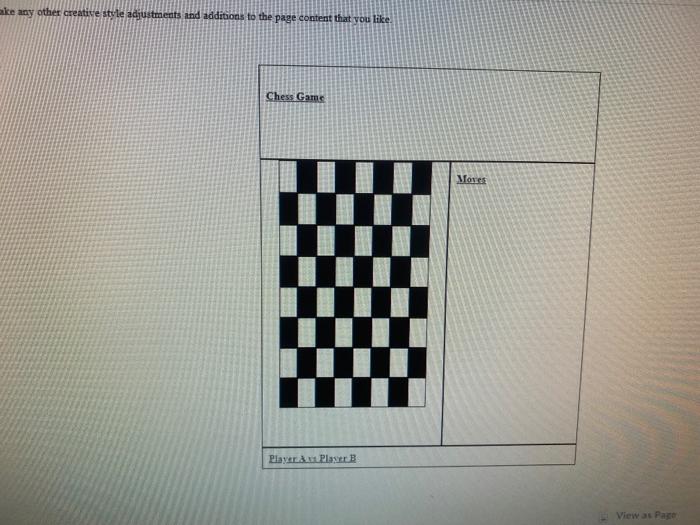
Create a webpage using bootstrap to generate the following side by side layout for medium and large displays:
The Moves box should be 25% of the available width.
Use nested columns to produce the chessboard.
Add your own stylesheet with rules to set the background colors on the chessboard
Make any other creative style adjustments and additions to the page content that you like.
Chess Game
Moves
Player A vs Player B
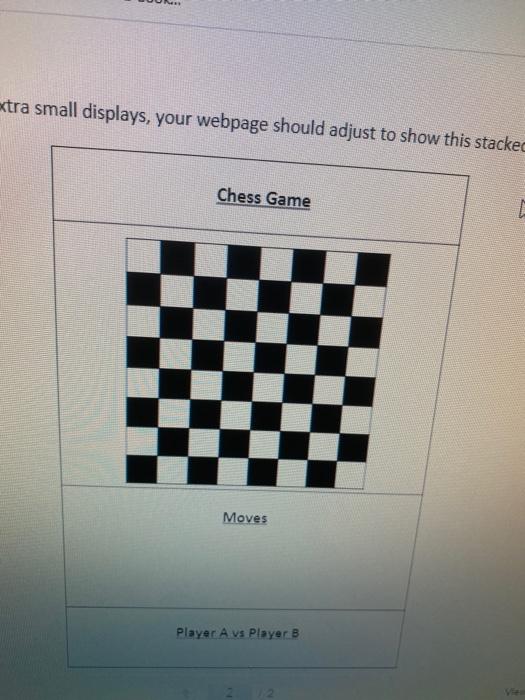
For small and extra small displays, your webpage should adjust to show this stacked layout:
Chess Game
Moves
Player A vs Player B
ke any other creative style adjustments and additions to the page content that you like Chess Garn Mones Play Player B View as Page extra small displays, your webpage should adjust to show this stacked Chess Game 1 Moves Player A vs Player B
Step by Step Solution
There are 3 Steps involved in it
1 Expert Approved Answer
Step: 1 Unlock

Question Has Been Solved by an Expert!
Get step-by-step solutions from verified subject matter experts
Step: 2 Unlock
Step: 3 Unlock
 Study Help