







Question: Lab Exercise: In JAVA Please provide code with comments and output pictures Instructions The example code given in this lab can produce the outcome as
Lab Exercise: In JAVA
Please provide code with comments and output pictures
Instructions The example code given in this lab can produce the outcome as shown in the figure below.
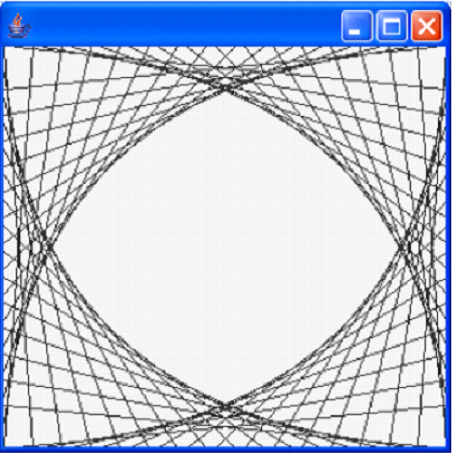
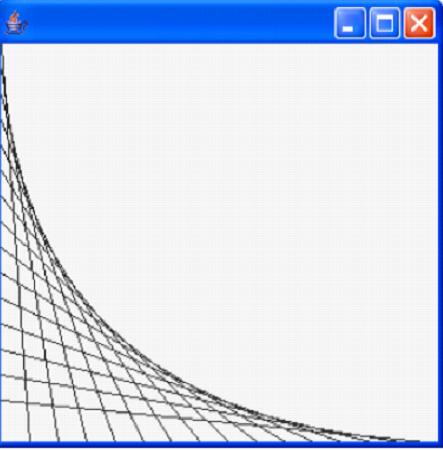 Study the code, make sure you understand how a JPanel object is used, on which lines are drawn. Each edge is divided into an equal number of increments (say, 15). The first line starts in the top-left corner and ends one step right on the bottom edge. For each successive line, move down one increment on the left edge and right one increment on the bottom edge. Continue drawing lines until you reach the bottom-right corner. The figure should scale as you resize the window so that the endpoints always touch the edges. Modify the code to mirror the design in all four corners, as shown in the figure below.
 Add random colors to the lines Use a Runnable thread (you should take time to learn how to use the Runnable interface to create threads) to animate the drawing of lines, and add a button so that it can be pressed at any time to stop and resume the drawing (the text of the button should be able to change to reflect the current situation: say, from draw to stop to resume).
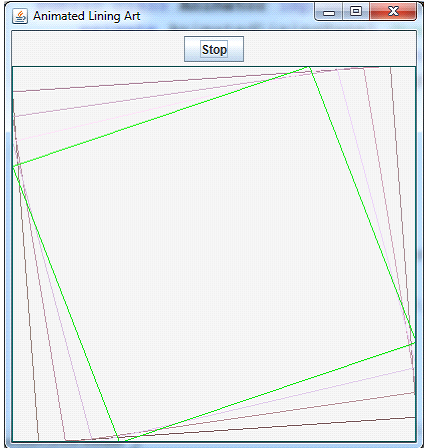
Final output should look like this 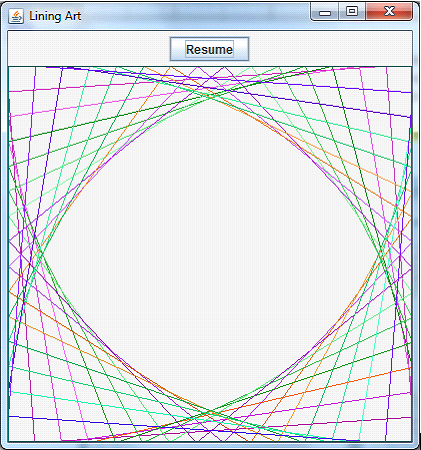
[[ XOC 0 Animated Lining Art Stop Lining Art Resume
Step by Step Solution
There are 3 Steps involved in it

Get step-by-step solutions from verified subject matter experts
 Study Help