







Question: LAB OVERVIEW Scenario and Summary Lab 5 will introduce the concept of multi-table JOINS in order to work with data in two or more related
LAB OVERVIEW
Scenario and Summary
Lab 5 will introduce the concept of multi-table JOINS in order to work with data in two or more related tables simultaneously. This lab may be completed using either DeVrys Omnymbus EDUPE-APP lab environment, or a local copy of the MySQL database running on your own computer using the ACME database tables. The lab will utilize a set of tables that are represented by the ERD (ACME.docx) and are created and populated by the script file (create_ACME_db.sql). Use the ACME ERD to do these problems.
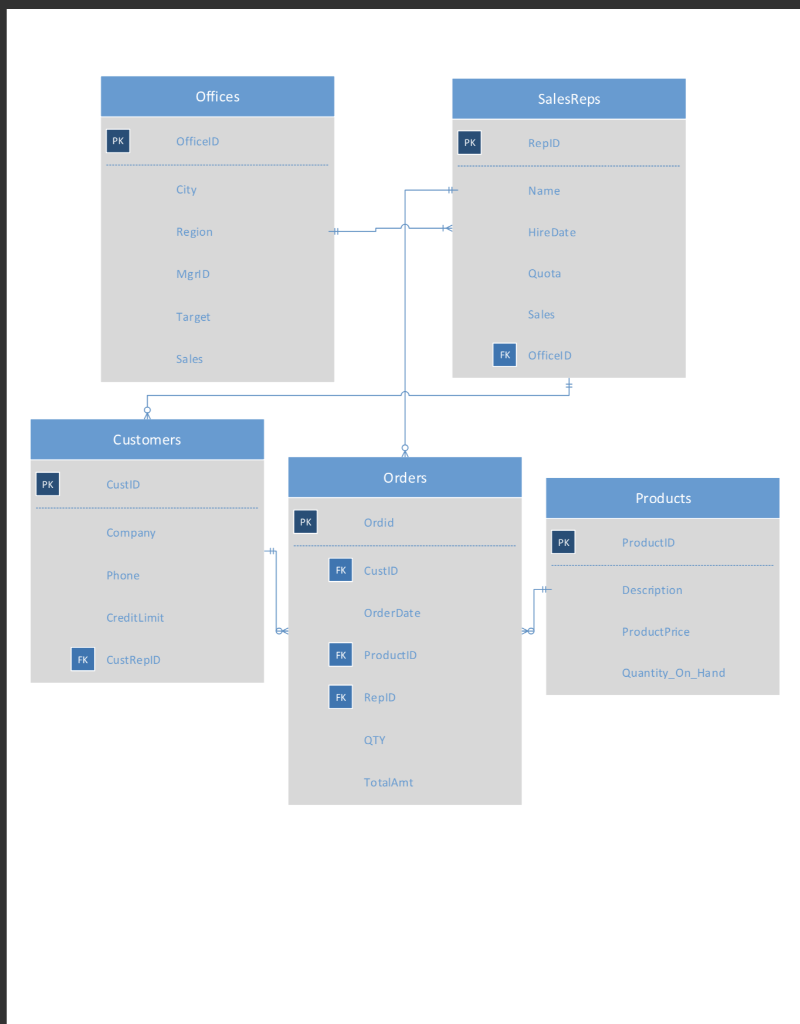
Deliverables
- Lab Report (Answer Sheet) containing both the student-created SQL command(s) for each exercise, and the output showing the results obtained. Be sure your name is on the file.
LAB STEPS: Complete each of the exercises below:
1. Write a query using the implicit Join statement to display the sales rep name, sales, office ID and the office sales target.
2. Write the same query as number 1 except use the explicit Join syntax.
3. Write a query using the implicit join syntax (the WHERE clause) to display the office id, office city, sales rep name, and quota for all sales reps with a quota that has not been met yet.
4. Write the same join statement as number 3 except use the USING syntax and show all reps who have met their quota.
Offices SalesReps PK OfficelD ReplD PK City Name Region Hire Date MgriD Quota Target Sales ales FK Officel D Customers Orders PK CustID Products PK Ordid Company PK ProductID FK CustID Phone Description OrderDate CreditLimit Product Price FK ProductiD FK CustReplD Quantity_On Hand FK RepID QTY TotalAmt
Step by Step Solution
There are 3 Steps involved in it

Get step-by-step solutions from verified subject matter experts
 Study Help