







Question: LAB OVERVIEW Scenario and Summary Lab 6 will introduce the concept of group functions and subqueries to meet more complex report requirements. This lab will
LAB OVERVIEW
Scenario and Summary
Lab 6 will introduce the concept of group functions and subqueries to meet more complex report requirements. This lab will be completed using ACCESS and the Northwind database. If you need to, review how to use ACCESS to execute SQL statements in my video demonstration in the Announcement area.
Do your work in Notepad. When you create column name alias, you can use single quotes around the column name in ACCESS.
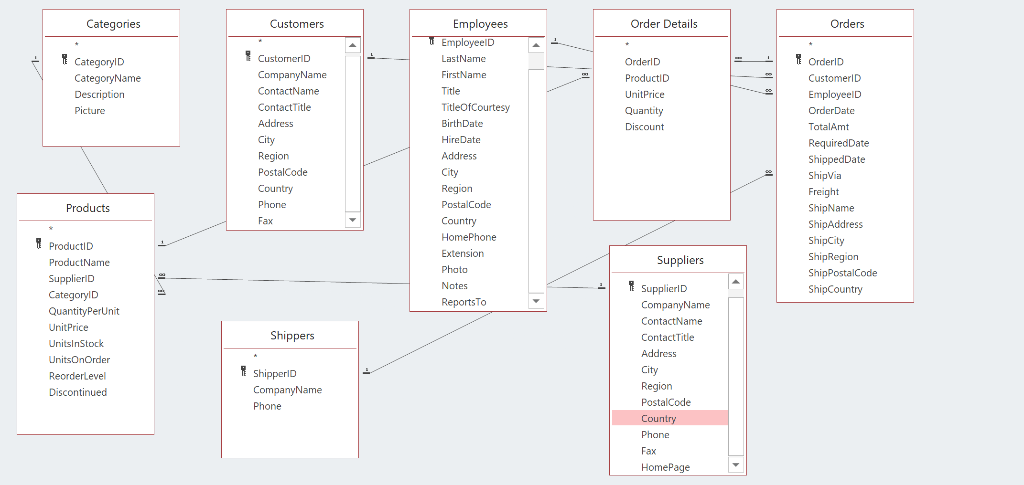
13. Write a query that displays the category name and the number of products that belong to that category for categories 3, 6 and 8 and only if the number of products exceeds 5.
14. Use a SubQuery a query that displays all customer IDs that have orders that are greater than the average order in the database. Sort by customer Ids in descending order.
15. Use a SubQuery that displays all product IDs that have a price that is greater than the average price of a product.
16. Use a SubQuery to list all Employees (Employee ID) that have an average total dollar amount in orders greater the average dollar amount in orders for the Employees. Use the Orders table for this problem. Use the TotalAmt column in the Orders table to get your average for each employee person and then compare each employees average to the average for ALL employees.
You can use a correlated sub query or an uncorrelated subquery. You need a correlated sub query if you wish to compare the average sales dollar amount to the average sales dollar amount to all the other employees NOT including the employees you are comparing to.
Categories Employees Order Details Orders CustomerlD CategorylD CategoryName OrderlD OrderlD ProductiD Picture ContactTitle TitleOfC ourtesy RequiredDate ShippedDate Products ProductName Suppliers ShipPostalCode SupplierlD ReportsTo QuantityPerUnit ame Shippers ContactTitle Shipper!D CompanyName Phone
Step by Step Solution
There are 3 Steps involved in it

Get step-by-step solutions from verified subject matter experts
 Study Help