







Question: Lab - Password Cracking - Objectives Use a password cracking tool to recover a user's password. Background / Scenario There are four user accounts, Alice,
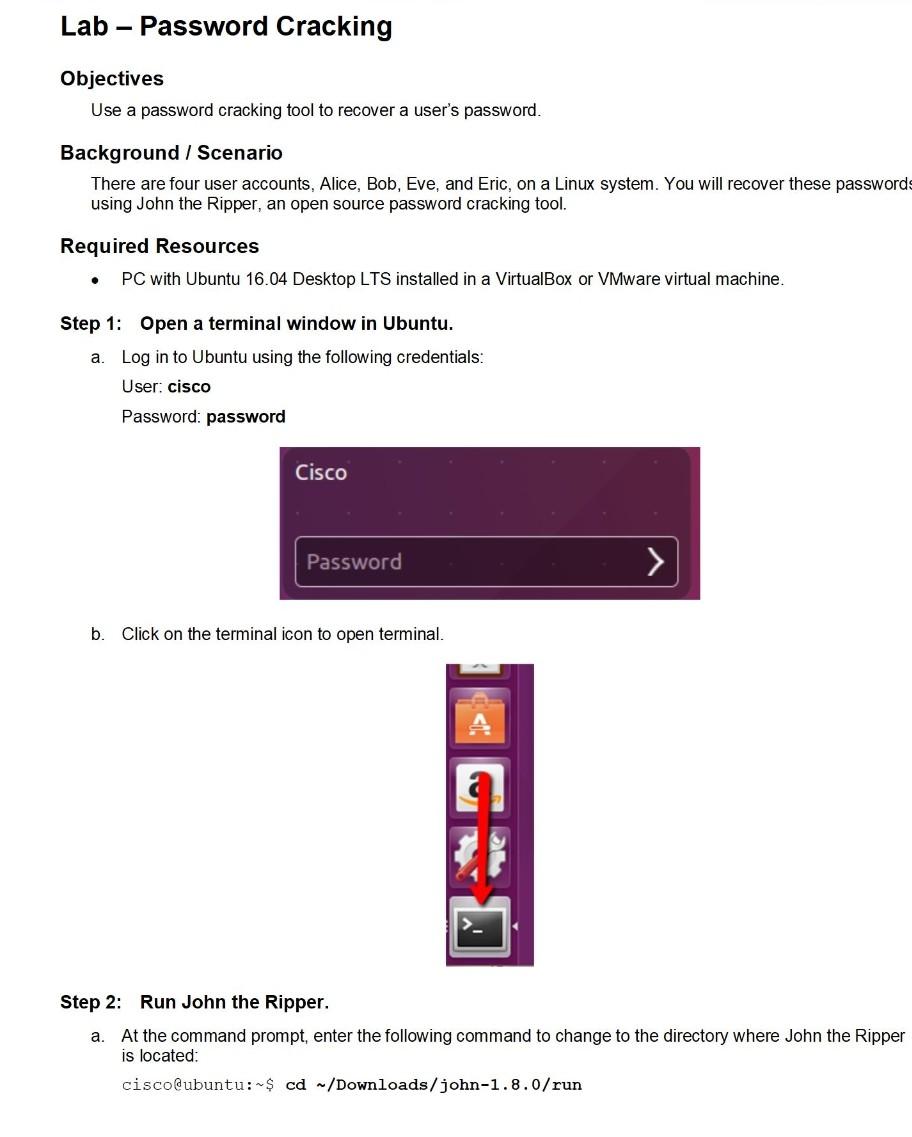
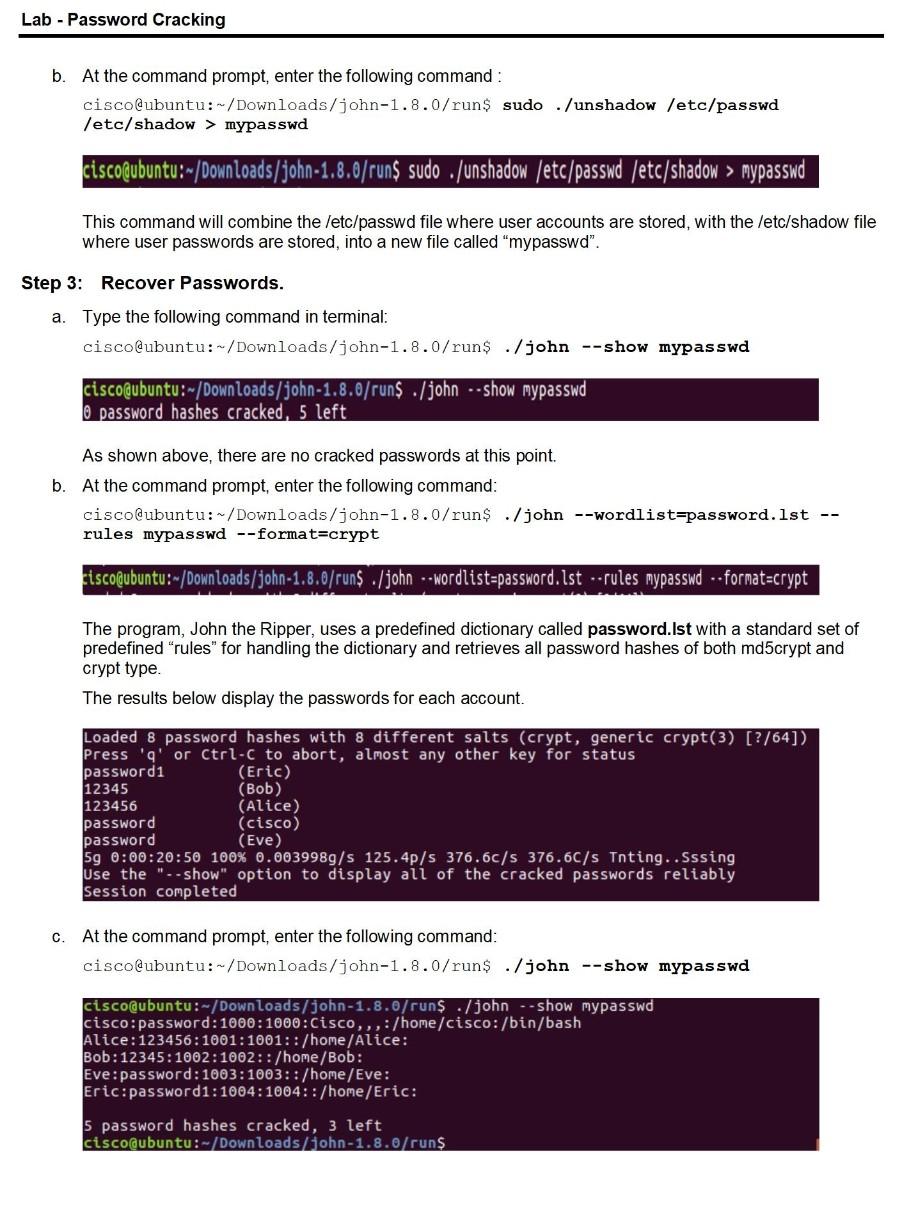

Lab - Password Cracking - Objectives Use a password cracking tool to recover a user's password. Background / Scenario There are four user accounts, Alice, Bob, Eve, and Eric, on a Linux system. You will recover these passwords using John the Ripper, an open source password cracking tool. Required Resources PC with Ubuntu 16.04 Desktop LTS installed in a VirtualBox or VMware virtual machine. . Step 1: Open a terminal window in Ubuntu. a. Log in to Ubuntu using the following credentials: User: cisco Password: password Cisco Password b. Click on the terminal icon to open terminal. Step 2: Run John the Ripper. a. At the command prompt, enter the following command to change to the directory where John the Ripper is located: cisco@ubuntu:$ cd /Downloads/john-1.8.0/run Lab - Password Cracking b. At the command prompt, enter the following command : cisco@ubuntu:-/Downloads/john-1.8.0/run$ sudo ./unshadow /etc/passwd /etc/shadow > mypasswd ciscoubuntu:-/Downloads/john-1.8.0/run$ sudo ./unshadow /etc/passwd /etc/shadow > mypasswd This command will combine the /etc/passwd file where user accounts are stored, with the /etc/shadow file where user passwords are stored into a new file called "mypasswd". Step 3: Recover Passwords. a. Type the following command in terminal: cisco@ubuntu:-/Downloads/john-1.8.0/run$ ./john --show mypasswd cisco@ubuntu: - Downloads/john-1.8.0/runs . /john--show mypasswd O password hashes cracked, 5 left As shown above, there are no cracked passwords at this point. b. At the command prompt, enter the following command: cisco@ubuntu:-/Downloads/john-1.8.0/run$ ./john --wordlist=password. 1st -- rules mypasswd --format=crypt cisco@ubuntu:-/Downloads/john-1.8.0/run$ ./john--wordlist=password. Ist --rules mypasswd --format=crypt The program, John the Ripper, uses a predefined dictionary called password.Ist with a standard set of predefined "rules" for handling the dictionary and retrieves all password hashes of both md5crypt and crypt type. The results below display the passwords for each account. Loaded 8 password hashes with 8 different salts (crypt, generic crypt(3) [?/64]) Press 'q' or Ctrl-c to abort, almost any other key for status password (Eric) 12345 (Bob) 123456 (Alice) password (cisco) password (Eve) 59 0:00:20:50 100% 0.0039989/s 125.4p/s 376.6c/s 376.6C/s Tnting.. Sssing Use th ".-show" option to display all of the cracked pas reliably Session completed C. At the command prompt, enter the following command: cisco@ubuntu:-/Downloads/john-1.8.0/run$ ./john --show mypasswd cisco@ubuntu:-/Downloads/john-1.8./runs ./john --show mypasswd cisco:password: 1000:1000:Cisco,,,:/home/cisco: /bin/bash Alice: 123456:1001:1001::/home/Alice: Bob: 12345:1002:1002::/home/Bob: Eve: password: 1003: 1003: :/home/Eve: Eric: password1:1004: 1004:: /home/Eric: 5 password hashes cracked, 3 left cisco@ubuntu:-/Downloads/john-1.8./runs Lab - Password Cracking How many passwords were cracked? Lab - Password Cracking - Objectives Use a password cracking tool to recover a user's password. Background / Scenario There are four user accounts, Alice, Bob, Eve, and Eric, on a Linux system. You will recover these passwords using John the Ripper, an open source password cracking tool. Required Resources PC with Ubuntu 16.04 Desktop LTS installed in a VirtualBox or VMware virtual machine. . Step 1: Open a terminal window in Ubuntu. a. Log in to Ubuntu using the following credentials: User: cisco Password: password Cisco Password b. Click on the terminal icon to open terminal. Step 2: Run John the Ripper. a. At the command prompt, enter the following command to change to the directory where John the Ripper is located: cisco@ubuntu:$ cd /Downloads/john-1.8.0/run Lab - Password Cracking b. At the command prompt, enter the following command : cisco@ubuntu:-/Downloads/john-1.8.0/run$ sudo ./unshadow /etc/passwd /etc/shadow > mypasswd ciscoubuntu:-/Downloads/john-1.8.0/run$ sudo ./unshadow /etc/passwd /etc/shadow > mypasswd This command will combine the /etc/passwd file where user accounts are stored, with the /etc/shadow file where user passwords are stored into a new file called "mypasswd". Step 3: Recover Passwords. a. Type the following command in terminal: cisco@ubuntu:-/Downloads/john-1.8.0/run$ ./john --show mypasswd cisco@ubuntu: - Downloads/john-1.8.0/runs . /john--show mypasswd O password hashes cracked, 5 left As shown above, there are no cracked passwords at this point. b. At the command prompt, enter the following command: cisco@ubuntu:-/Downloads/john-1.8.0/run$ ./john --wordlist=password. 1st -- rules mypasswd --format=crypt cisco@ubuntu:-/Downloads/john-1.8.0/run$ ./john--wordlist=password. Ist --rules mypasswd --format=crypt The program, John the Ripper, uses a predefined dictionary called password.Ist with a standard set of predefined "rules" for handling the dictionary and retrieves all password hashes of both md5crypt and crypt type. The results below display the passwords for each account. Loaded 8 password hashes with 8 different salts (crypt, generic crypt(3) [?/64]) Press 'q' or Ctrl-c to abort, almost any other key for status password (Eric) 12345 (Bob) 123456 (Alice) password (cisco) password (Eve) 59 0:00:20:50 100% 0.0039989/s 125.4p/s 376.6c/s 376.6C/s Tnting.. Sssing Use th ".-show" option to display all of the cracked pas reliably Session completed C. At the command prompt, enter the following command: cisco@ubuntu:-/Downloads/john-1.8.0/run$ ./john --show mypasswd cisco@ubuntu:-/Downloads/john-1.8./runs ./john --show mypasswd cisco:password: 1000:1000:Cisco,,,:/home/cisco: /bin/bash Alice: 123456:1001:1001::/home/Alice: Bob: 12345:1002:1002::/home/Bob: Eve: password: 1003: 1003: :/home/Eve: Eric: password1:1004: 1004:: /home/Eric: 5 password hashes cracked, 3 left cisco@ubuntu:-/Downloads/john-1.8./runs Lab - Password Cracking How many passwords were cracked
Step by Step Solution
There are 3 Steps involved in it

Get step-by-step solutions from verified subject matter experts
 Study Help