







Question: Lab: Practicing Linux Command - OpenSUSE Take a screenshot from each exercise and paste it below each point Part 2: Use of the common wildcards
Lab: Practicing Linux Command - OpenSUSE
Take a screenshot from each exercise and paste it below each point
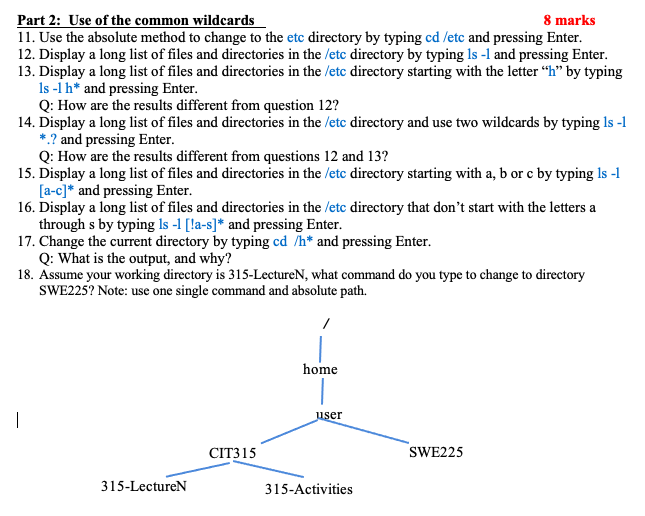
Part 2: Use of the common wildcards 8 marks 11. Use the absolute method to change to the etc directory by typing cd /etc and pressing Enter. 12. Display a long list of files and directories in the /etc directory by typing ls -1 and pressing Enter. 13. Display a long list of files and directories in the /etc directory starting with the letter h by typing ls -lh* and pressing Enter. Q: How are the results different from question 12? 14. Display a long list of files and directories in the /etc directory and use two wildcards by typing ls -1 *? and pressing Enter. Q: How are the results different from questions 12 and 13? 15. Display a long list of files and directories in the /etc directory starting with a, b or c by typing ls -1 [a-c]* and pressing Enter. 16. Display a long list of files and directories in the /etc directory that don't start with the letters a through s by typing ls -1 [!a-s]* and pressing Enter. 17. Change the current directory by typing cd /h* and pressing Enter. Q: What is the output, and why? 18. Assume your working directory is 315-LectureN, what command do you type to change to directory SWE225? Note: use one single command and absolute path. home | user CIT315 SWE225 315-LectureN 315-Activities
Step by Step Solution
There are 3 Steps involved in it

Get step-by-step solutions from verified subject matter experts
 Study Help