







Question: Lab Task 1.0: MATLAB Programming with decision structures. Figure 1 shows liquid in a cylindrical tank with a conical base. If the liquid level is
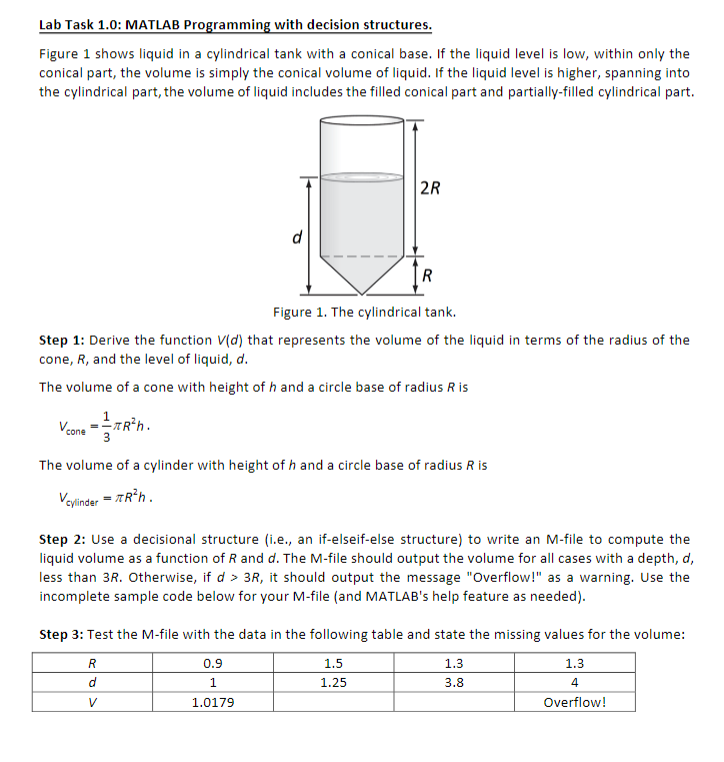
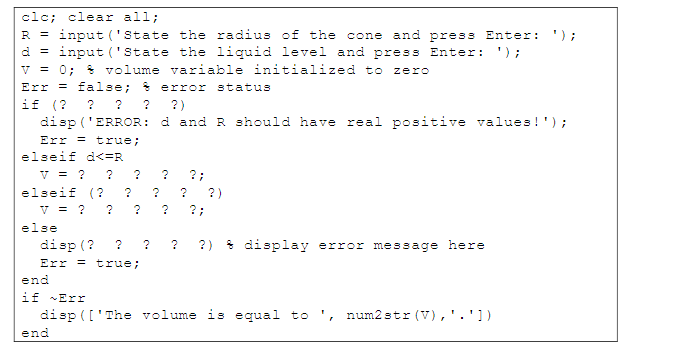
Lab Task 1.0: MATLAB Programming with decision structures. Figure 1 shows liquid in a cylindrical tank with a conical base. If the liquid level is low, within only the conical part, the volume is simply the conical volume of liquid. If the liquid level is higher, spanning into the cylindrical part, the volume of liquid includes the filled conical part and partially-filled cylindrical part. 2R d R Figure 1. The cylindrical tank. Step 1: Derive the function Vid) that represents the volume of the liquid in terms of the radius of the cone, R, and the level of liquid, d. The volume of a cone with height of h and a circle base of radius Ris 1 Vcone Rn. . 3 The volume of a cylinder with height of h and a circle base of radius Ris Vcylinder = Rh. Step 2: Use a decisional structure (i.e., an if-elseif-else structure) to write an M-file to compute the liquid volume as a function of Rand d. The M-file should output the volume for all cases with a depth, d, less than 3R. Otherwise, if d > 3R, it should output the message "Overflow!" as a warning. Use the incomplete sample code below for your M-file (and MATLAB's help feature as needed). 1.3 Step 3: Test the M-file with the data in the following table and state the missing values for the volume: R 0.9 1.5 d 1.25 3.8 V 1.0179 Overflow! 1.3 1 4 clc; clear all; R = input('state the radius of the cone and press Enter: '); d = input('state the liquid level and press Enter: '); V = 0; volume variable initialized to zero Err = false; error status if (? ? ? ? ?) disp('ERROR: d and R should have real positive values!'); Err = true; elseif d
Step by Step Solution
There are 3 Steps involved in it

Get step-by-step solutions from verified subject matter experts
 Study Help