







Question: Lab Task 2.0: MATLAB programming with repetition structures. The cosine function can be evaluated by the following infinite series, where x is in radians: x2
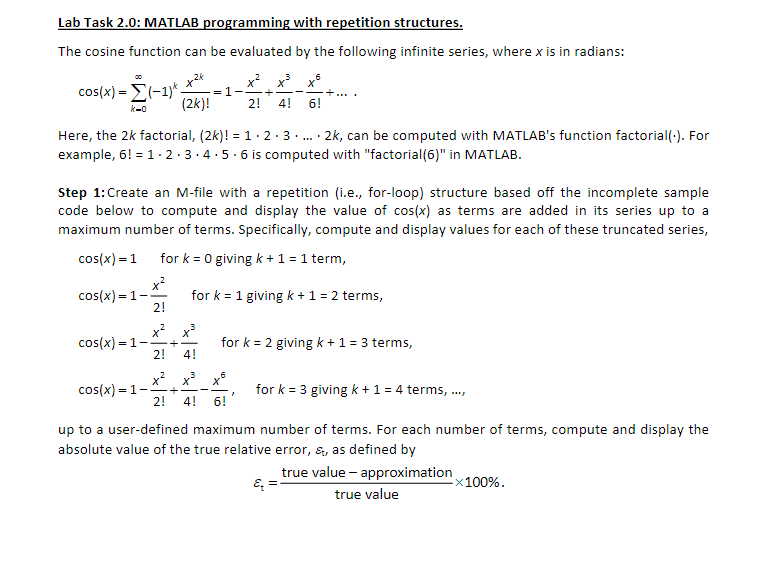
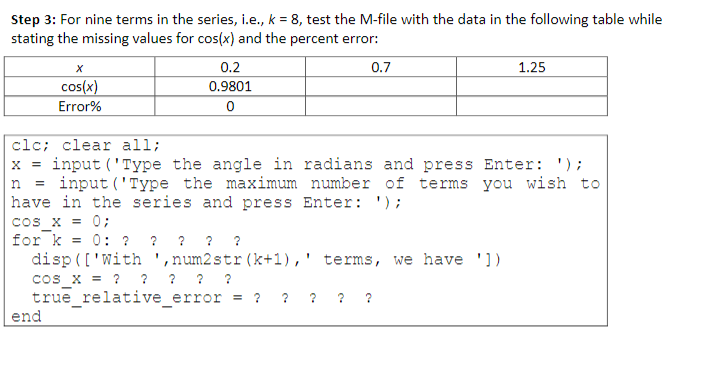
Lab Task 2.0: MATLAB programming with repetition structures. The cosine function can be evaluated by the following infinite series, where x is in radians: x2 cos(x) = (-1) 1 (2k)! 2! + 4! 6! k-0 Here, the 2k factorial, (2k)! = 1.2.3..... . 2k, can be computed with MATLAB's function factorial(.). For example, 6! = 1.2.3.4.5.6 is computed with "factorial(6)" in MATLAB. Step 1: Create an M-file with a repetition (i.e., for-loop) structure based off the incomplete sample code below to compute and display the value of cos(x) as terms are added in its series up to a maximum number of terms. Specifically, compute and display values for each of these truncated series, cos(x) = 1 for k = 0 giving k+ 1 = 1 term, x2 cos(x)-1 for k = 1 giving k+ 1 = 2 terms, = --- 2! cos(x) = 1 - = - 2! for k = 2 giving k + 1 = 3 terms, X - cos(x)=1-- 2! for k = 3 giving k + 1 = 4 terms, 4! 6! up to a user-defined maximum number of terms. For each number of terms, compute and display the absolute value of the true relative error, s, as defined by true value - approximation X100%. true value Step 3: For nine terms in the series, i.e., k = 8, test the M-file with the data in the following table while stating the missing values for cos(x) and the percent error: 0.2 0.7 1.25 cos(x) 0.9801 Error% 0 n COS X = clc; clear all; x = input('Type the angle in radians and press Enter: '); input('Type the maximum number of terms you wish to have in the series and press Enter: '); 0; for k = 0: ? ? ? ? ? disp(['With ', num2str (k+1),' terms, we have ']) cos x = ? ? ? ? ? true_relative_error ? end 1 =
Step by Step Solution
There are 3 Steps involved in it

Get step-by-step solutions from verified subject matter experts
 Study Help