







Question: , Lab1-Ex1 (1) Q- Search Sheet Home Insert Page Layout Formulas Data Review View 9+ Share Arial 10 Conditional Formatting A- A % Format as
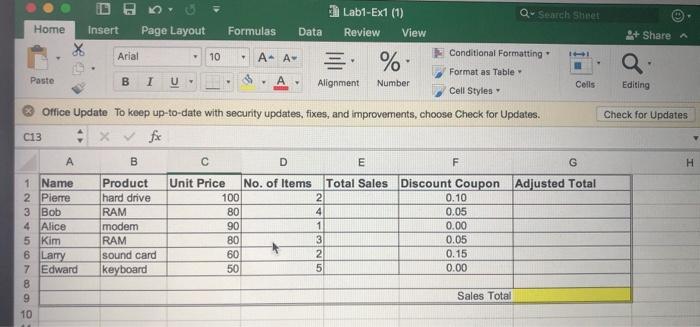
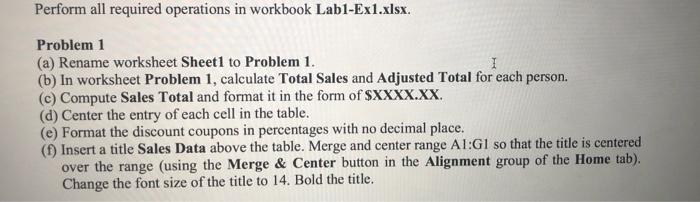
, Lab1-Ex1 (1) Q- Search Sheet Home Insert Page Layout Formulas Data Review View 9+ Share Arial 10 Conditional Formatting A- A % Format as Table Paste BI Alignment Number Colls Editing Cell Styles Office Update To keep up-to-date with security updates, fixes, and improvements, choose Check for Updates. Check for Updates C13 fix B D E F G H 1 Name Product Unit Price No. of Items Total Sales Discount Coupon Adjusted Total 2 Pierre hard drive 100 2 0.10 3 Bob RAM 4 0.05 4 Alice modem 1 0.00 5 Kim RAM 3 0.05 6 Larry sound card 2 0.15 7 Edward 5 0.00 keyboard 8 9 Sales Total 10 88888 Perform all required operations in workbook Labl-Ex1.xlsx. Problem 1 (a) Rename worksheet Sheet1 to Problem 1. 1 (b) In worksheet Problem 1, calculate Total Sales and Adjusted Total for each person. (c) Compute Sales Total and format it in the form of $XXXX.XX. (d) Center the entry of each cell in the table. (e) Format the discount coupons in percentages with no decimal place. (1) Insert a title Sales Data above the table. Merge and center range AI:G1 so that the title is centered over the range (using the Merge & Center button in the Alignment group of the Home tab). Change the font size of the title to 14. Bold the title
Step by Step Solution
There are 3 Steps involved in it

Get step-by-step solutions from verified subject matter experts
 Study Help