







Question: lab4: Loops and Files Lab Objectives Be able to write a while loop Be able to write a do-while loop Be able to write a
lab4:
Loops and Files Lab Objectives Be able to write a while loop Be able to write a do-while loop Be able to write a for loop Be able to use file streams for I/O Be able to write a loop that reads until end of file Be able to implement an accumulator and a counter Introduction This is a simulation of rolling dice. We will roll 10,000 times in our program. The theoretical probability of rolling doubles of a specific number is 1 out of 36 or approximately 278 out of 10,000 times that you roll the pair of dice. Since this is a simulation, the numbers will vary a little each time you run it. We will start with a while loop, then use the same program, changing the while loop to a do-while loop, and then a for loop. We will be introduced to file input and output. We will read a file, line by line, converting each line into a number. We will then use the numbers to calculate the mean and standard deviation. Task #1 Loops 1. Copy the file DiceSimulation.java into NetBeans or other Java IDE tools. 2. The double roll of 1s and 2s are given in the code. You can run the program to get a result like:
Comment Prompt:
C: \MyWork\homework>java Dicesimulation
You rolled snake eyes 279 out of 10000 rolls.
You rolled double twos 275 out of 10000 rolls.
You rolled double threes 0 out of 10000 rolls.
You rolled double fours 0 out of 10000 rolls.
You rolled double sixes 0 out of 10000 rolls.
C: \MyWork\homework>
3. You follow the style to code for double roll value for 3 6 so all the doubles should be around 278. 4. Change the while loop to do-while loop and run the program. Result should be similar. 5. Change the while loop to a for loop and run the program. Result should be similar.
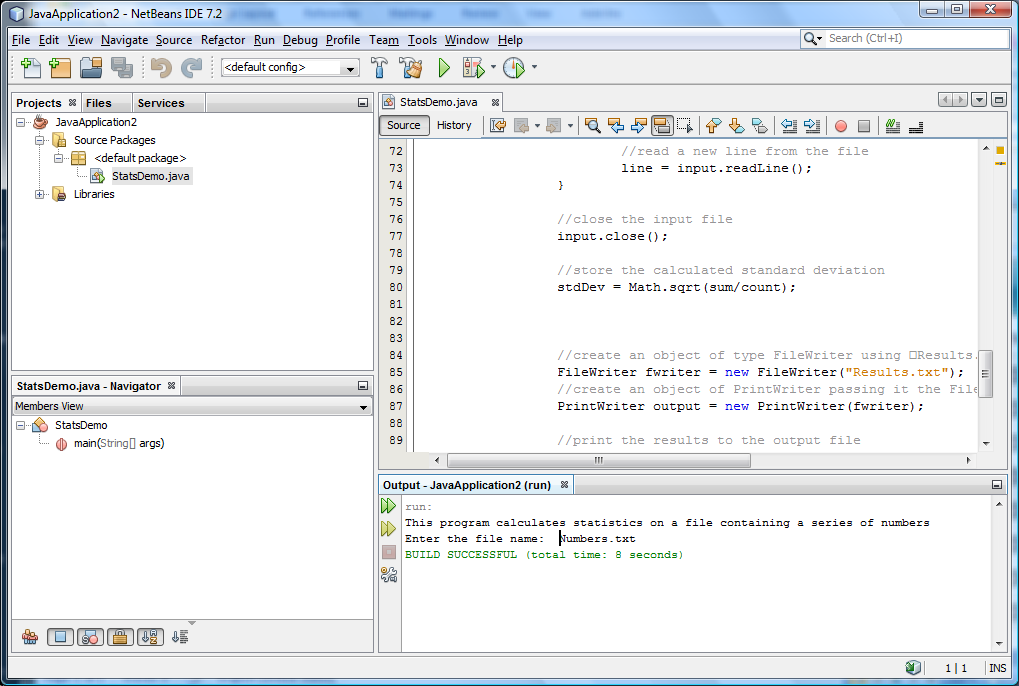
Task #2 File Input and Output 1. Copy the files StatsDemo.java into NetBeans or other Java IDE tools. 2. Read FilePath.doc to know where to put the Numbers.txt. 3. The file input and output part is coded. Try to read through the code and understand the program. 4. Try to run the program. Enter Numbers.txt when prompted. Check the Result.txt. There should be just one line on the file to show mean = 0.000. 5. Modify the program to calculate the mean. Run the program. You should now get a mean of 77.444 in the Result.txt
FilePath:
When dealing with files, file path is a key point.
1. Absolute file path You can give input/output file an absolute file path so that the Java program knows where to find the file. The absolute file path in Windows starts from the dirve name , for example you can copy Numbers.txt to C:\temp\myhomework and input the file name as:
C:\\temp\\myhomework\\Numbers.txt. Note: you need to use double \.
2. Relative file path where to put your input file and where to find your output file if you use NetBeans and just use only the file name Numbers.txt and Results.txt: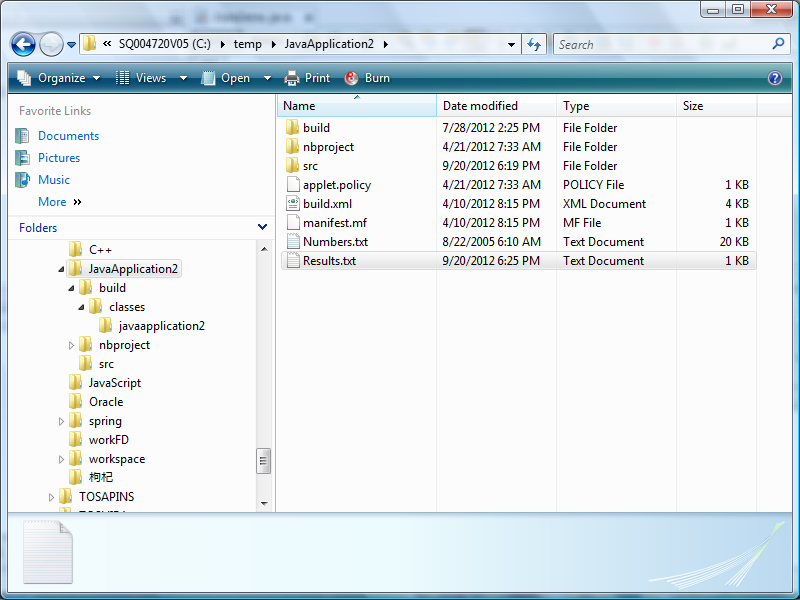
DiceSimulation:
/** This class simulates rolling a pair of dice 10,000 times and counts the number of times doubles of are rolled for each different pair of doubles. */
import java.util.Random; //to use the random number generator public class DiceSimulation { public static void main(String[] args) { final int NUMBER = 10000; //the number of times to roll the dice
//a random number generator used in simulating rolling a dice Random generator = new Random(); int die1Value; // number of spots on the first die int die2Value; // number of spots on the second die int count = 0; // number of times the dice were rolled int snakeEyes = 0; // number of times snake eyes is rolled int twos = 0; // number of times double two is rolled int threes = 0; // number of times double three is rolled int fours = 0; // number of times double four is rolled int fives = 0; // number of times double five is rolled int sixes = 0; // number of times double six is rolled
//ENTER YOUR CODE FOR THE ALGORITHM HERE while(count
if(die1Value == die2Value) { if (die1Value == 1) snakeEyes++; else if (die1Value == 2) twos++; // Task #1 step 3: To do - code for die1Value = 3, 4, 5, and 6 } count++; }
System.out.println ("You rolled snake eyes " + snakeEyes + " out of " + count + " rolls."); System.out.println ("You rolled double twos " + twos + " out of " + count + " rolls."); System.out.println ("You rolled double threes " + threes + " out of " + count + " rolls."); System.out.println ("You rolled double fours " + fours + " out of " + count + " rolls."); System.out.println ("You rolled double fives " + fives + " out of " + count + " rolls."); System.out.println ("You rolled double sixes " + sixes + " out of " + count + " rolls."); } }
StatsDemo:
import java.text.DecimalFormat; //for number formatting import java.util.Scanner; //for keyboard input import java.io.*; // for file input and output
public class StatsDemo { public static void main(String [] args) throws IOException //ADD A THROWS CLAUSE HERE - throws IOException { double sum = 0; //the sum of the numbers int count = 0; //the number of numbers added double mean = 0; //the average of the numbers double stdDev = 0; //the standard deviation of the numbers String line; //a line from the file double difference; //difference between the value and the mean
//create an object of type Decimal Format DecimalFormat threeDecimals = new DecimalFormat("0.000"); //create an object of type Scanner Scanner keyboard = new Scanner (System.in); String filename; // the user input file name
//Prompt the user and read in the file name System.out.println("This program calculates statistics" + "on a file containing a series of numbers"); System.out.print("Enter the file name: "); // user should enter Numbers.txt filename = keyboard.nextLine();
// Create a file reader FileReader freader = new FileReader(filename); //Create a BufferedReader object passing it the FileReader object. BufferedReader input = new BufferedReader(freader); // read the first line of the file line = input.readLine(); //loop that continues until you are at the end of the file while (line != null) { //convert the line into a double value and add the value to the sum sum += Double.parseDouble(line); //increment the counter count++; //read a new line from the file line = input.readLine(); } //close the input file input.close(); // Task #2 step 5: To do - calculate mean // mean = sum/count; //create an object of type FileWriter using Results.txt FileWriter fwriter = new FileWriter("Results.txt"); //create an object of PrintWriter passing it the FileWriter object. PrintWriter output = new PrintWriter(fwriter);
//print the results to the output file output.println("mean = " + threeDecimals.format(mean)); //close the output file output.close(); } }
--------------------------------------------------------------------------
SQ004 720V05 (C:) temp JavaApplication2 organize Open Views Burn Name Favorite Links build Documents nbproject Pictures Src Music applet policy More build.xml manifest.mf Folders Numbers txt Results,txt Application? Java build Classes avaapplication2 nbproject Src JavaScript Oracle spring workFD workspace TOSAPINS Search Date modified Type 7/28/2012 2:25 PM File Folder 4/21/2012 7:33 AM File Folder 9/20/2012 6:19 PM File Folder 4/21/2012 7:33 AM POLICY File 4/10/2012 8:15 PM ML Document 4/10/2012 8:15 PM MIF File 8/22/2005 6:10 AM Text Document 9/20/2012 6:25 PM Text Document Size 1 K 4 KB 1 K 20 KB 1 KB
Step by Step Solution
There are 3 Steps involved in it

Get step-by-step solutions from verified subject matter experts
 Study Help