







Question: Language: C Question 2 Two function prototypes is given in Figure 6 below. float calculate (float x,float y); void display (float total) Figure 6 Based
 Language: C
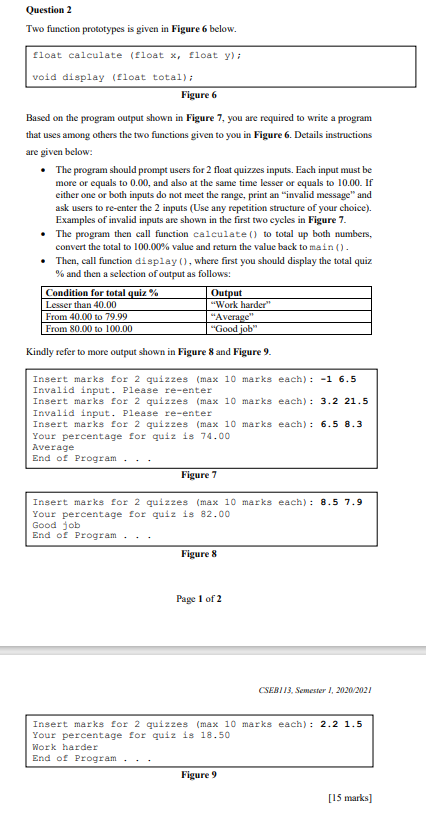
Question 2 Two function prototypes is given in Figure 6 below. float calculate (float x,float y); void display (float total) Figure 6 Based on the program output shown in Figure 7, you are required to write a program that uses among others the two functions given to you in Figure 6. Details instructions are given below: The program should prompt users for 2 float quizzes inputs. Each input must be more or equals to 0.00, and also at the same time lesser or equals to 10.00. If either one or both inputs do not meet the range, print an "invalid message and ask users to re-enter the 2 inputs (Use any repetition structure of your choice). Examples of invalid inputs are shown in the first two cycles in Figure 7. The program then call function calculate () to total up both numbers, convert the total to 100.00% value and return the value back to main(). Then, call function display (), where first you should display the total quiz % and then a selection of output as follows: Condition for total quiz % Output Lesser than 40.00 "Work harder" From 40.00 to 79.99 "Average From 80.00 to 100.00 "Good job" Kindly refer to more output shown in Figure 8 and Figure 9. Insert marks for 2 quizzes (max 10 marks each): -1 6.5 Invalid input. Please re-enter Insert marks for 2 quizzes (max 10 marks each): 3.2 21.5 Invalid input. Please re-enter Insert marks for 2 quizzes (max 10 marks each) : 6.5 8.3 Your percentage for quiz is 74.00 Average End of Program Figure 7 Insert marks for 2 quizzes (max 10 marks each): 8.5 7.9 Your percentage for quiz is 82.00 Good job End of Program. Figure 8 Page 1 of 2 CSEBI 13. Semester 1, 2020/2021 Insert marks for 2 quizzes (max 10 marks each) : 2.2 1.5 Your percentage for quiz is 18.50 Work harder End of Program.. Figure 9 [15 marks]
Step by Step Solution
There are 3 Steps involved in it

Get step-by-step solutions from verified subject matter experts
 Study Help