







Question: language C++, the output as well thank you! 1. Code Assignment/Exercise Exercise 1 A. Update the Praction class given in the Lecture notes at as
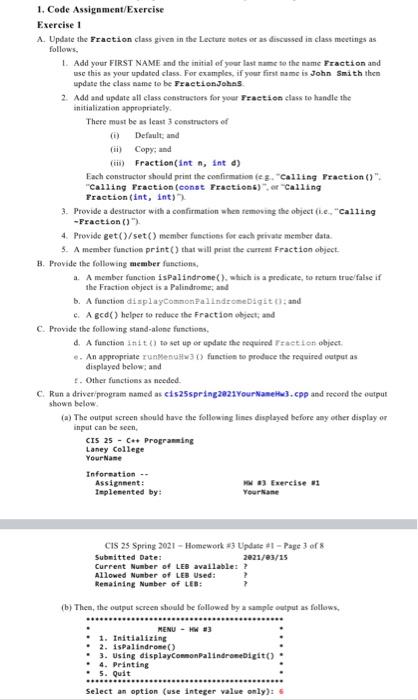
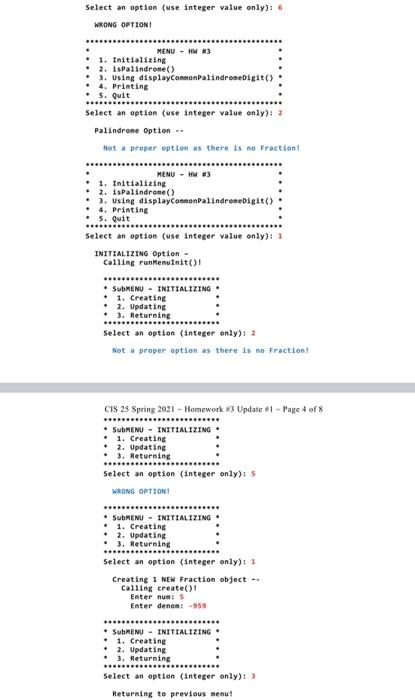
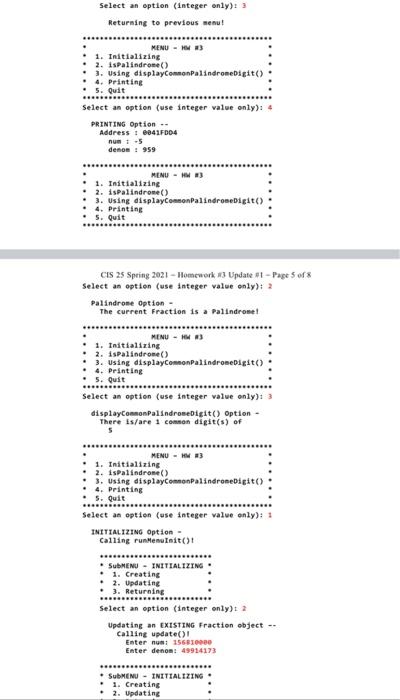
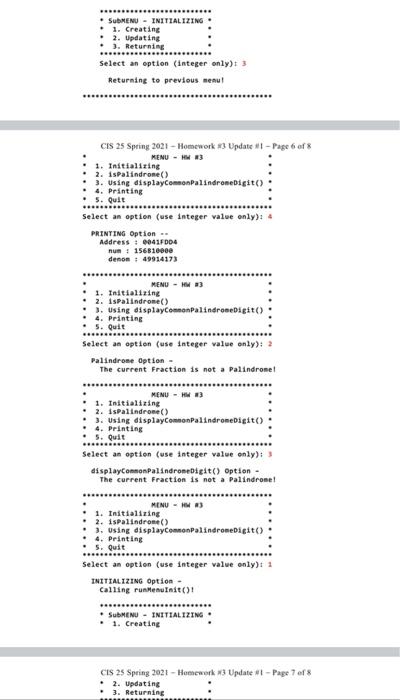
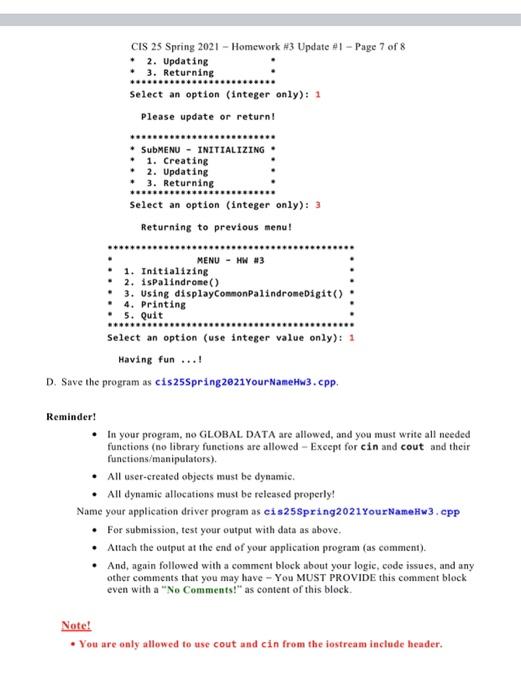
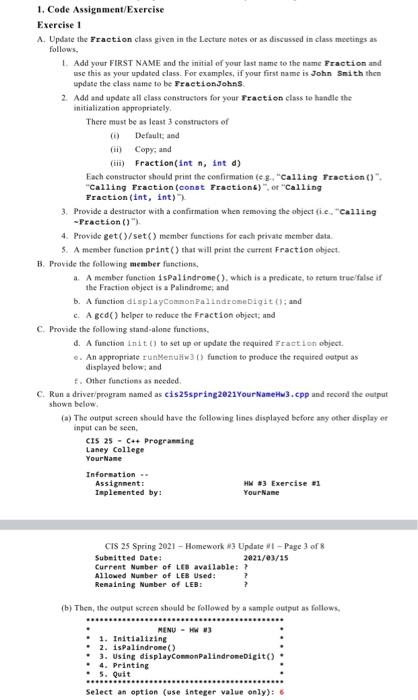
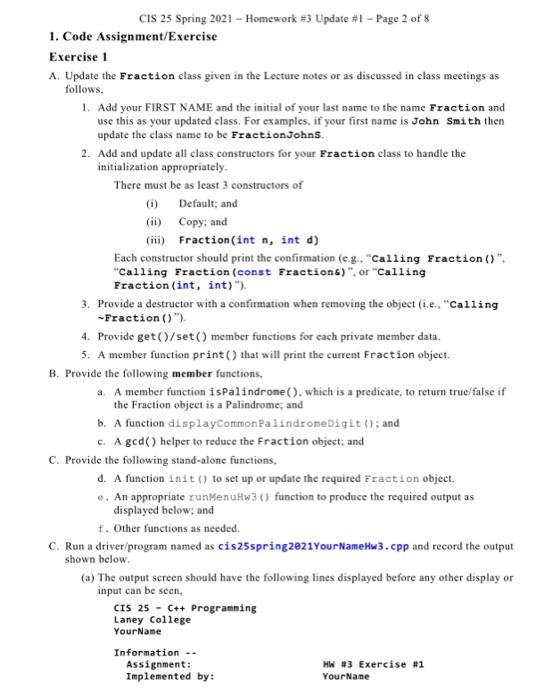
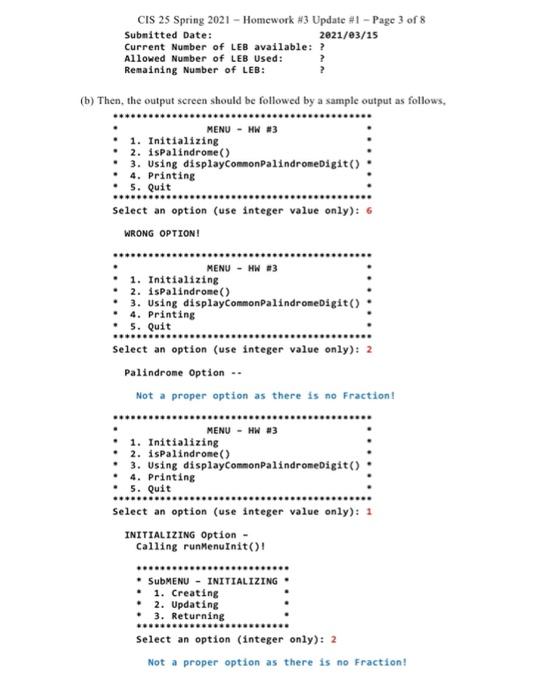
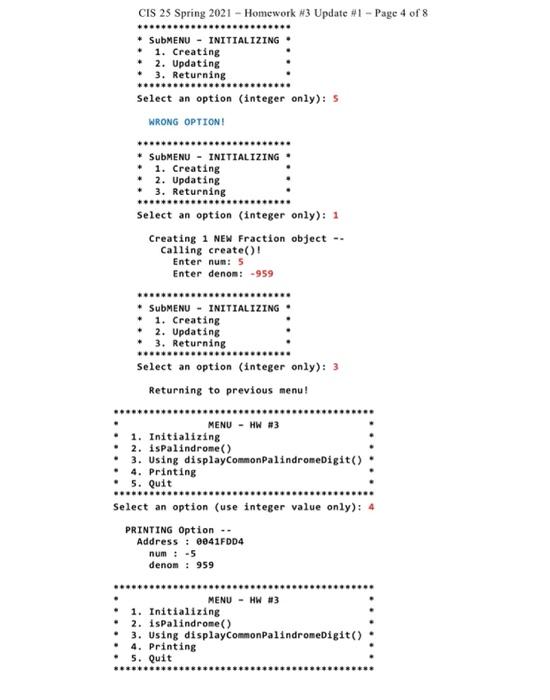
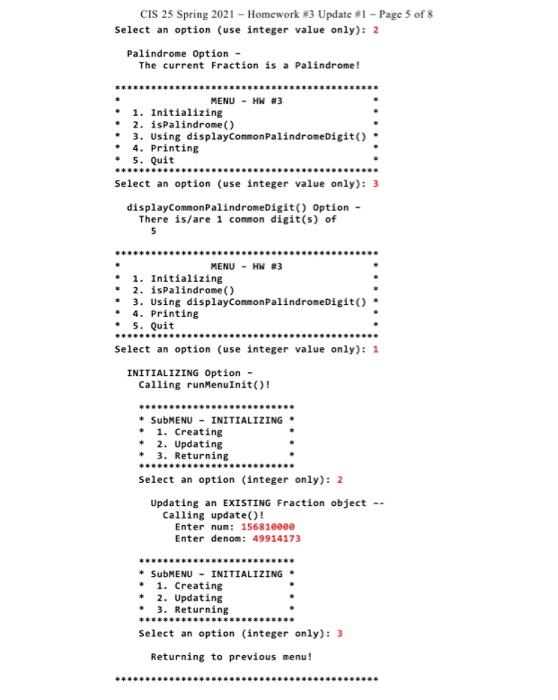
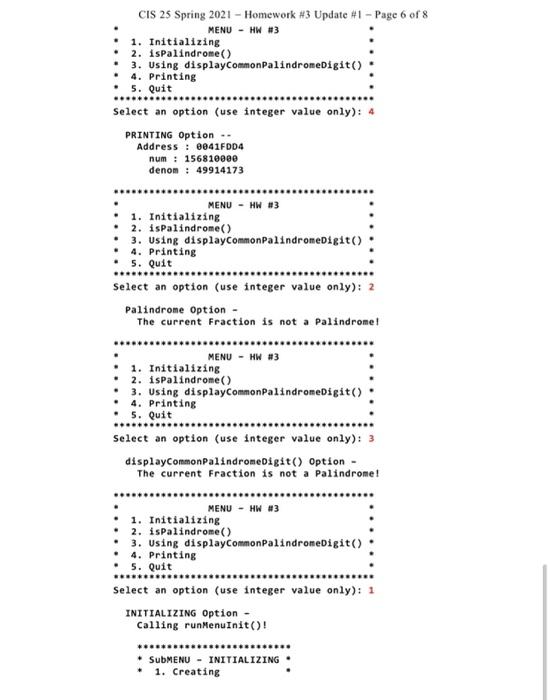
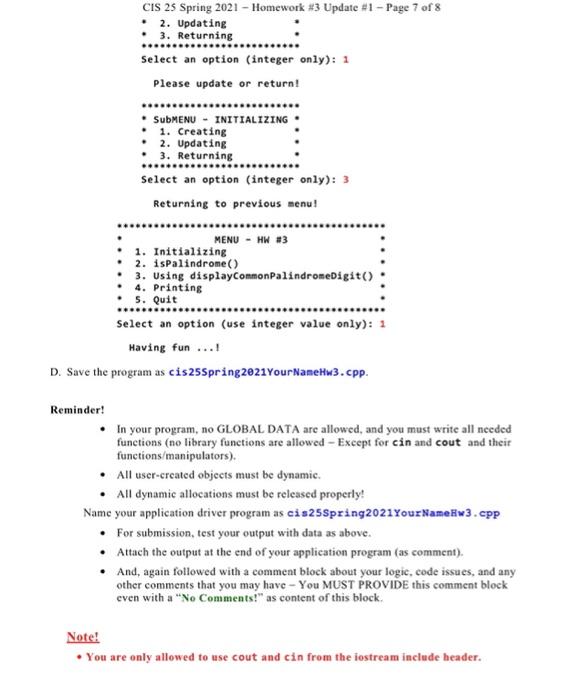
1. Code Assignment/Exercise Exercise 1 A. Update the Praction class given in the Lecture notes at as discussed in class meetings as follows. 1. Add your FIRST NAME and the initial of your last name to the name Fraction and use this as your updated class. For examples, if your first name is John Smith then update the class name to be FractionJohas 2. Add and update all class constructors for your fraction class to handle the initialization appropriately There must be as least 3 constructors of (0) Default and (ii) Copy: and () Fraction(int n, int d) Each constructor should print the confirmation es. "Calling Fraction()" "Calling Traction (const Practions)". "Calling Praction (int, int) 3. Provide a destructor with a confirmation when removing the object (Le "calling -Praction()"), 4. Provide geto/set() member functions for each private member data 5. A member function print that will print the current Fraction object B. Provide the following member functions, 1. A member function ispalindrome(), which is a predicate, to return true false if the Fraction object is a Palindrome, and b. A function displayCommonPalindromeDigitt; and c. Aged() helper to reduce the Fraction object; and C. Provide the following stand-alone functions, d. A function init to set up or update the required Traction object . An appropriate rundent) function to produce the required outputs displayed below and 1. Other functions as needed. c Run a driver program named as cis25spring2821YourNaneu).cpp and second the output shown below (a) The output screen should have the following lines displayed before any other display or input can be seen. CIS 25 - C++ Programming Laney College Your Name Information - Assignment: 23 Exercise Taplemented by: Your Name CIS 25 Spring 2021 - Homework 13 Update #1 - Page 3 of 8 Submitted Date: 2021/03/15 Current Number of LEB available ? Allowed Number of LEB Used: Remaining Number of LEB: (b) Then, the output screen should be followed by a sample output as follows MENU - MW M3 1. Initializing 2. ispalindrose() . 3. Using displayCommon Palindroebigit() 4. Printing 5. Quit Select an option (use integer value only): 5 Select an option (use Integer value only): 6 WRONG OPTIONI MENU - HW33 1. Initializing 2. ispalindrone() 3. Using displayCommonpalindromeDigit() . 4. Printing 5. Quit Select an option (use integer value only): 2 Palindrome Option -- Not proper option as there is no Fraction! MENU - HWS 1. Initializing . 2. ispalindrone) 3. Using displayCommonPalindromeDigit() . 4. Printing . 5. Quit Select an option (use integer value only): 1 INITIALIZING Option - Calling runMenu Init()! SubMENU - INITIALIZING 1. Creating 2. Updating . 3. Returning Select an option (integer only): 2 Not a proper option as there is no Fraction! CIS 25 Spring 2021 - Homework 13 Update 1 - Page 4 of 8 SubMENU - INITIALIZING 1. Creating 2. Updating 3. Returning Select an option (Integer only): WRONG OPTION SubMENU - INITIALIZING 1. Creating 2. Updating 3. Returning Select an option (integer only): 1 Creating 1 NEW Fraction object - Calling create()! Enter num: Enter denen: -959 SubMENU - INITIALIZING 1. Creating 2. Updating 3. Returning Select an option (integer only): 3 Returning to previous menu! Select an option (integer only): 3 Returning to previous meu! MENU - 3 1. Initializing 2. Ispalindrome) 3. Using displayCommonPalindromeDigit() 4. Printing . 5. Quit Select an option (use Integer value only): 4 PRINTING Option Address : 60417004 num 1-5 dene: 959 MENU - HW3 1. Initializing 2. ispalindrome) 3. Using displayContenPalindronebigit() 4. Printing . 5. Quit CIS 25 Spring 2021 - Homework #3 Update #1 - Page 5 of 8 Select an option (use integer value only): 2 Palindrose Option - The current Fraction is a Palindrome! MENU - MWA . 1. Initializing 2. ispalindrome) . 3. Using displayCommonPalindromeDigit() 4. Printing . 5. Quit Select an option (use integer value only): 3 displayConnonPalindron Digit() Option There is/are 1 common digit(s) of 5 MENU - HW3 1. Initializing 2. ispalindrome) 3. Using displayCommonPalindronebigit() 4. Printing . 5. Quit Select an option (use integer value only): 1 INITIALIZING Option Calling runenuinit() SubMENU - INITIALIZING 1. Creating 2. Updating . ). Returning Select an option (integer only): 2 Updating an EXISTING Fraction object -. Calling update() Enter num: 156010000 Enter denon: 49924173 SubMENU - INITIALIZING . 1. Creating 2. Updating SUBMENU - INITIALIZING 1. Creating . 2. Updating 3. Returning Select an option (integer only) 3 Returning to previous nenu! CIS 25 Spring 2021 - Homework 13 Update #- Page 6 of 8 MENU - #3 1. Initializing 2. Ispalindrone) 3. Using displayCommonPalindronebigito 4. Printing . 5. Quit Select an option (use integer value only): 4 PRINTING Option Address : 0041F004 nun 15681000 denon : 49914173 ***** MENU - HW33 1. Initializing . 2. Ispalindrone) . Using displayComanPalindroedigit() 4. Printing 5. Quit Select an option (use Integer value only): 2 Palindrome Option - The current Fraction is not a Palindrome! MENU - HW 13 1. Initializing 2. Ispalindrose() : . using displayCommonPalindromeDigito . 4. Printing 5. Quit Select an option (use integer value only): displayConnonPalindromeDigit() Option - The current Fraction is not a Palindrome! MENU - NR3 . 1. Initializing 2. ispalindrose() .. using displayConnonpalindromeDigito 4. Printing 5. Quit Select an option (use Integer value only): 1 INITIALIZING Option Calling runenuinit() SubMENU - INITIALIZING . 1. Creating CES 25 Spring 2021 - Homework 3 Update! - Page 7 of 8 2. Updating . 3. Returning CIS 25 Spring 2021 - Homework #3 Update #1 - Page 7 of 8 2. Updating 3. Returning Select an option (integer only): 1 Please update or return! *** SubMENU - INITIALIZING 1. Creating 2. Updating 3. Returning Select an option (integer only): 3 Returning to previous menu! .*..... MENU - HW #3 1. Initializing 2. ispalindrome() . 3. Using displayCommonPalindromeDigit() 4. Printing 5. Quit Select an option (use integer value only): 1 Having fun...! D. Save the program as cis25Spring 2e21Your Name Hw3.cpp. Reminder! In your program, no GLOBAL DATA are allowed, and you must write all needed functions (no library functions are allowed - Except for cin and cout and their functions/manipulators). All user-created objects must be dynamic. All dynamic allocations must be released properly! Name your application driver program as eis25Spring2021 Your Name.w3.cpp For submission, test your output with data as above Attach the output at the end of your application program (as comment). . And, again followed with a comment block about your logie, code issues, and any other comments that you may have - You MUST PROVIDE this comment block even with a "No Comments" as content of this block. Note! You are only allowed to use cout and cin from the iostream include header. 1. Code Assignment/Exercise Exercise 1 A Update the Praction class given in the Lecture notes or as discussed in class meetings as follows. L. Add your FIRST NAME and the initial of your last name to the name Fraction and use this as your updated class. For examples, if your first name is John Smith then update the class name to be FractionJohns 2. Add and update all class constructors for your Fraction class to handle the initialization appropriately, There must be as least 3 constructors of (1) Default, and (ii) Copy, and (ii) Fraction(int n, int d) Each constructor should print the confirmation (eg, "Calling Fraction()" "Calling Fraction (const Praction)" or "Calling Fraction (int, int) 3. Provide a destructor with a confirmation when removing the object (ie, "calling -Praction ()") 4. Provide get()/set() member functions for each private member data 5. A member function print that will print the current Fraction object 3. Provide the following member functions, A member function ispalindrome(), which is a predicate, to return true false if the Fraction object is a Palindrome, and b. A function displayCommon Palindromubigit 0); and C. A gcd) helper to reduce the Fraction object; and C. Provide the following stand-alone functions. d. A function init() to set up er update the required Fraction object An appropriate run Menu Hw3() function to produce the required output as displayed below, and 1. Other functions as needed C. Run a driver program named as ciszsspring 2021 Your Name Hw3.cpp and record the output shown below (a) The output screen should have the following lines displayed before any other display or input can be seen. CIS 25 - C++ Programming Laney College Your Name Information - Assignment: HW #3 Exercise #1 Implemented by: Your Name CIS 25 Spring 2021 - Homework 13 Update - Page 3 of 8 Submitted Date: 2021/03/15 Current Number of LEB available: ? Allowed Number of LEB Used: Remaining Number of LEB: (b) Then, the output screen should be followed by a sample output as follows. MENU - MW 1. Initializing 2. ispalindrome) 3. Using displayCommonPalindromeDigit() 4. Printing 5. Quit Select an option (use integer value only): 6 CIS 25 Spring 2021 - Homework #3 Update #1 - Page 2 of 8 1. Code Assignment/Exercise Exercise 1 A. Update the Fraction class given in the Lecture notes or as discussed in class meetings as follows, 1. Add your FIRST NAME and the initial of your last name to the name Fraction and use this as your updated class. For examples, if your first name is John Smith then update the class name to be FractionJohns. 2. Add and update all class constructors for your Fraction class to handle the initialization appropriately. There must be as least 3 constructors of (1) Default; and (ii) Copy, and (iii) Fraction(int n, int d) Each constructor should print the confirmation (e.g., "Calling Fraction()", "Calling Fraction (const Fractions)"or "Calling Fraction (int, int)"). 3. Provide a destructor with a confirmation when removing the object (ie, "Calling -Fraction ()"). 4. Provide geto/set() member functions for each private member data 5. A member function print() that will print the current Fraction object. B. Provide the following member functions, a. A member function is Palindrome().which is a predicate, to return true/false if the Fraction object is a Palindrome, and b. A function displayCommon PalindromeDigit(); and C. A gcd) helper to reduce the Fraction object: and C. Provide the following stand-alone functions, d. A function init() to set up or update the required Fraction object. . An appropriate runMenuHw3() function to produce the required output as displayed below; and 1. Other functions as needed. C. Run a driver/program named as cis25spring2021 Your NameHw3.cpp and record the output shown below. (a) The output screen should have the following lines displayed before any other display or input can be seen, CIS 25 - C++ Programming Laney College Your Name Information -- Assignment: HW #3 Exercise #1 Implemented by: Your Name CIS 25 Spring 2021 - Homework #3 Update #1 - Page 3 of 8 Submitted Date: 2021/03/15 Current Number of LEB available: ? Allowed Number of LEB Used: Remaining Number of LEB: (b) Then, the output screen should be followed by a sample output as follows. MENU - HW #3 1. Initializing . 2. 1sPalindrome) 3. Using displayCommonPalindromeDigit() 4. Printing 5. Quit Select an option (use integer value only): 6 WRONG OPTION! MENU - HW #3 1. Initializing 2. ispalindrome() . 3. Using displayCommonPalindroneDigit() 4. Printing . 5. Quit need Select an option (use integer value only): 2 Palindrome Option .. Not a proper option as there is no Fraction! MENU - HW #3 1. Initializing 2. ispalindrone() . 3. Using displayCommonPalindromeDigit() 4. Printing . 5. Quit Select an option (use integer value only): 1 INITIALIZING Option - Calling runMenuInit()! . SubMENU - INITIALIZING 1. Creating 2. Updating . 3. Returning Select an option (Integer only): 2 Not a proper option as there is no Fraction! CIS 25 Spring 2021 - Homework #3 Update #1 - Page 4 of 8 ...d * SubMENU - INITIALIZING 1. Creating 2. Updating 3. Returning Select an option (integer only): S WRONG OPTION! SubMENU - INITIALIZING 1. Creating 2. Updating 3. Returning ********* Select an option (integer only): 1 Creating 1 NEN Fraction object -- Calling create()! Enter nun: 5 Enter denom: -959 SubMENU - INITIALIZING . 1. Creating 2. Updating 3. Returning ****...... Select an option (integer only): 3 Returning to previous menu! MENU - HW #3 1. Initializing 2. ispalindrome) 3. Using displayCommonPalindromeDigit() 4. Printing . 5. Quit Select an option (use integer value only): 4 PRINTING Option .. Address : 0041FDD4 num: -5 denom : 959 MENU - HW #3 1. Initializing 2. ispalindrome() 3. Using displayCommonPalindromeDigit() 4. Printing 5. Quit CIS 25 Spring 2021 - Homework #3 Update #1 - Page 5 of 8 Select an option (use integer value only): 2 Palindrome Option - The current Fraction is a Palindrome! MENU - HW #3 1. Initializing 2. ispalindrome) 3. Using displayCommonPalindromeDigit() 4. Printing * 5. Quit ******* Select an option (use integer value only): 3 displayCommonPalindromeDigit() Option - There is/are 1 common digit(s) of 5 MENU - HW #3 1. Initializing 2. ispalindrome) 3. Using displayConnonpalindromeDigit() 4. Printing 5. Quit Select an option (use integer value only): 1 INITIALIZING Option - Calling runMenuInit()! ....... * SubMENU - INITIALIZING # 1. Creating 2. Updating + 3. Returning Select an option (integer only): 2 Updating an EXISTING Fraction object -- Calling update! Enter nun: 15681eeee Enter denom: 49914173 * SubMENU - INITIALIZING * 1. Creating * 2. Updating 3. Returning Select an option (integer only): 3 Returning to previous menu! OSB CIS 25 Spring 2021 - Homework #3 Update #1 - Page 6 of 8 MENU - HW #3 1. Initializing 2. ispalindrome() 3. Using displayCommonPalindromeDigit() 4. Printing 5. Quit Select an option (use integer value only): 4 PRINTING Option -- Address: 0041FDD4 num: 156810000 denom : 49914173 MENU - HW #3 1. Initializing 2. ispalindrome() 3. Using displayCommonPalindromeDigit() 4. Printing 5. Quit Select an option (use integer value only): 2 Palindrome Option - The current Fraction is not a Palindrome! .. MENU - HW #3 1. Initializing 2. ispalindrome) 3. Using displayCommonPalindromeDigit() 4. Printing 5. Quit Select an option (use integer value only): 3 displayCommonPalindromeDigit() Option - The current Fraction is not a Palindrome! MENU - HW #3 1. Initializing 2. ispalindrome() 3. Using displayCommonPalindromeDigit() 4. Printing 5. Quit Select an option (use integer value only): 1 INITIALIZING Option - Calling runMenuInit()! ....... SubMENU - INITIALIZING 1. Creating CIS 25 Spring 2021 - Homework #3 Update #1 - Page 7 of 8 2. Updating 3. Returning Select an option (integer only): 1 Please update or return! SubMENU - INITIALIZING 1. Creating 2. Updating 3. Returning Select an option (integer only): 3 Returning to previous menu! ...... MENU - HW #3 1. Initializing 2. ispalindrome() 3. Using displayCommonPalindromeDigit() 4. Printing 5. Quit Select an option (use integer value only): 1 Having fun ...! D. Save the programas cis25Spring2021Your NameHw3.cpp. Reminder! In your program, no GLOBAL DATA are allowed, and you must write all needed functions (no library functions are allowed - Except for cin and cout and their functions/manipulators). All user-created objects must be dynamic. All dynamic allocations must be released properly! Name your application driver program as cis25Spring2021 Your NameHw3.cpp For submission, test your output with data as above. Attach the output at the end of your application program (as comment). And, again followed with a comment block about your logic, code issues, and any other comments that you may have - You MUST PROVIDE this comment block even with a "No Comments!" as content of this block Note! You are only allowed to use cout and cin from the iostream include header. 1. Code Assignment/Exercise Exercise 1 A. Update the Praction class given in the Lecture notes at as discussed in class meetings as follows. 1. Add your FIRST NAME and the initial of your last name to the name Fraction and use this as your updated class. For examples, if your first name is John Smith then update the class name to be FractionJohas 2. Add and update all class constructors for your fraction class to handle the initialization appropriately There must be as least 3 constructors of (0) Default and (ii) Copy: and () Fraction(int n, int d) Each constructor should print the confirmation es. "Calling Fraction()" "Calling Traction (const Practions)". "Calling Praction (int, int) 3. Provide a destructor with a confirmation when removing the object (Le "calling -Praction()"), 4. Provide geto/set() member functions for each private member data 5. A member function print that will print the current Fraction object B. Provide the following member functions, 1. A member function ispalindrome(), which is a predicate, to return true false if the Fraction object is a Palindrome, and b. A function displayCommonPalindromeDigitt; and c. Aged() helper to reduce the Fraction object; and C. Provide the following stand-alone functions, d. A function init to set up or update the required Traction object . An appropriate rundent) function to produce the required outputs displayed below and 1. Other functions as needed. c Run a driver program named as cis25spring2821YourNaneu).cpp and second the output shown below (a) The output screen should have the following lines displayed before any other display or input can be seen. CIS 25 - C++ Programming Laney College Your Name Information - Assignment: 23 Exercise Taplemented by: Your Name CIS 25 Spring 2021 - Homework 13 Update #1 - Page 3 of 8 Submitted Date: 2021/03/15 Current Number of LEB available ? Allowed Number of LEB Used: Remaining Number of LEB: (b) Then, the output screen should be followed by a sample output as follows MENU - MW M3 1. Initializing 2. ispalindrose() . 3. Using displayCommon Palindroebigit() 4. Printing 5. Quit Select an option (use integer value only): 5 Select an option (use Integer value only): 6 WRONG OPTIONI MENU - HW33 1. Initializing 2. ispalindrone() 3. Using displayCommonpalindromeDigit() . 4. Printing 5. Quit Select an option (use integer value only): 2 Palindrome Option -- Not proper option as there is no Fraction! MENU - HWS 1. Initializing . 2. ispalindrone) 3. Using displayCommonPalindromeDigit() . 4. Printing . 5. Quit Select an option (use integer value only): 1 INITIALIZING Option - Calling runMenu Init()! SubMENU - INITIALIZING 1. Creating 2. Updating . 3. Returning Select an option (integer only): 2 Not a proper option as there is no Fraction! CIS 25 Spring 2021 - Homework 13 Update 1 - Page 4 of 8 SubMENU - INITIALIZING 1. Creating 2. Updating 3. Returning Select an option (Integer only): WRONG OPTION SubMENU - INITIALIZING 1. Creating 2. Updating 3. Returning Select an option (integer only): 1 Creating 1 NEW Fraction object - Calling create()! Enter num: Enter denen: -959 SubMENU - INITIALIZING 1. Creating 2. Updating 3. Returning Select an option (integer only): 3 Returning to previous menu! Select an option (integer only): 3 Returning to previous meu! MENU - 3 1. Initializing 2. Ispalindrome) 3. Using displayCommonPalindromeDigit() 4. Printing . 5. Quit Select an option (use Integer value only): 4 PRINTING Option Address : 60417004 num 1-5 dene: 959 MENU - HW3 1. Initializing 2. ispalindrome) 3. Using displayContenPalindronebigit() 4. Printing . 5. Quit CIS 25 Spring 2021 - Homework #3 Update #1 - Page 5 of 8 Select an option (use integer value only): 2 Palindrose Option - The current Fraction is a Palindrome! MENU - MWA . 1. Initializing 2. ispalindrome) . 3. Using displayCommonPalindromeDigit() 4. Printing . 5. Quit Select an option (use integer value only): 3 displayConnonPalindron Digit() Option There is/are 1 common digit(s) of 5 MENU - HW3 1. Initializing 2. ispalindrome) 3. Using displayCommonPalindronebigit() 4. Printing . 5. Quit Select an option (use integer value only): 1 INITIALIZING Option Calling runenuinit() SubMENU - INITIALIZING 1. Creating 2. Updating . ). Returning Select an option (integer only): 2 Updating an EXISTING Fraction object -. Calling update() Enter num: 156010000 Enter denon: 49924173 SubMENU - INITIALIZING . 1. Creating 2. Updating SUBMENU - INITIALIZING 1. Creating . 2. Updating 3. Returning Select an option (integer only) 3 Returning to previous nenu! CIS 25 Spring 2021 - Homework 13 Update #- Page 6 of 8 MENU - #3 1. Initializing 2. Ispalindrone) 3. Using displayCommonPalindronebigito 4. Printing . 5. Quit Select an option (use integer value only): 4 PRINTING Option Address : 0041F004 nun 15681000 denon : 49914173 ***** MENU - HW33 1. Initializing . 2. Ispalindrone) . Using displayComanPalindroedigit() 4. Printing 5. Quit Select an option (use Integer value only): 2 Palindrome Option - The current Fraction is not a Palindrome! MENU - HW 13 1. Initializing 2. Ispalindrose() : . using displayCommonPalindromeDigito . 4. Printing 5. Quit Select an option (use integer value only): displayConnonPalindromeDigit() Option - The current Fraction is not a Palindrome! MENU - NR3 . 1. Initializing 2. ispalindrose() .. using displayConnonpalindromeDigito 4. Printing 5. Quit Select an option (use Integer value only): 1 INITIALIZING Option Calling runenuinit() SubMENU - INITIALIZING . 1. Creating CES 25 Spring 2021 - Homework 3 Update! - Page 7 of 8 2. Updating . 3. Returning CIS 25 Spring 2021 - Homework #3 Update #1 - Page 7 of 8 2. Updating 3. Returning Select an option (integer only): 1 Please update or return! *** SubMENU - INITIALIZING 1. Creating 2. Updating 3. Returning Select an option (integer only): 3 Returning to previous menu! .*..... MENU - HW #3 1. Initializing 2. ispalindrome() . 3. Using displayCommonPalindromeDigit() 4. Printing 5. Quit Select an option (use integer value only): 1 Having fun...! D. Save the program as cis25Spring 2e21Your Name Hw3.cpp. Reminder! In your program, no GLOBAL DATA are allowed, and you must write all needed functions (no library functions are allowed - Except for cin and cout and their functions/manipulators). All user-created objects must be dynamic. All dynamic allocations must be released properly! Name your application driver program as eis25Spring2021 Your Name.w3.cpp For submission, test your output with data as above Attach the output at the end of your application program (as comment). . And, again followed with a comment block about your logie, code issues, and any other comments that you may have - You MUST PROVIDE this comment block even with a "No Comments" as content of this block. Note! You are only allowed to use cout and cin from the iostream include header. 1. Code Assignment/Exercise Exercise 1 A Update the Praction class given in the Lecture notes or as discussed in class meetings as follows. L. Add your FIRST NAME and the initial of your last name to the name Fraction and use this as your updated class. For examples, if your first name is John Smith then update the class name to be FractionJohns 2. Add and update all class constructors for your Fraction class to handle the initialization appropriately, There must be as least 3 constructors of (1) Default, and (ii) Copy, and (ii) Fraction(int n, int d) Each constructor should print the confirmation (eg, "Calling Fraction()" "Calling Fraction (const Praction)" or "Calling Fraction (int, int) 3. Provide a destructor with a confirmation when removing the object (ie, "calling -Praction ()") 4. Provide get()/set() member functions for each private member data 5. A member function print that will print the current Fraction object 3. Provide the following member functions, A member function ispalindrome(), which is a predicate, to return true false if the Fraction object is a Palindrome, and b. A function displayCommon Palindromubigit 0); and C. A gcd) helper to reduce the Fraction object; and C. Provide the following stand-alone functions. d. A function init() to set up er update the required Fraction object An appropriate run Menu Hw3() function to produce the required output as displayed below, and 1. Other functions as needed C. Run a driver program named as ciszsspring 2021 Your Name Hw3.cpp and record the output shown below (a) The output screen should have the following lines displayed before any other display or input can be seen. CIS 25 - C++ Programming Laney College Your Name Information - Assignment: HW #3 Exercise #1 Implemented by: Your Name CIS 25 Spring 2021 - Homework 13 Update - Page 3 of 8 Submitted Date: 2021/03/15 Current Number of LEB available: ? Allowed Number of LEB Used: Remaining Number of LEB: (b) Then, the output screen should be followed by a sample output as follows. MENU - MW 1. Initializing 2. ispalindrome) 3. Using displayCommonPalindromeDigit() 4. Printing 5. Quit Select an option (use integer value only): 6 CIS 25 Spring 2021 - Homework #3 Update #1 - Page 2 of 8 1. Code Assignment/Exercise Exercise 1 A. Update the Fraction class given in the Lecture notes or as discussed in class meetings as follows, 1. Add your FIRST NAME and the initial of your last name to the name Fraction and use this as your updated class. For examples, if your first name is John Smith then update the class name to be FractionJohns. 2. Add and update all class constructors for your Fraction class to handle the initialization appropriately. There must be as least 3 constructors of (1) Default; and (ii) Copy, and (iii) Fraction(int n, int d) Each constructor should print the confirmation (e.g., "Calling Fraction()", "Calling Fraction (const Fractions)"or "Calling Fraction (int, int)"). 3. Provide a destructor with a confirmation when removing the object (ie, "Calling -Fraction ()"). 4. Provide geto/set() member functions for each private member data 5. A member function print() that will print the current Fraction object. B. Provide the following member functions, a. A member function is Palindrome().which is a predicate, to return true/false if the Fraction object is a Palindrome, and b. A function displayCommon PalindromeDigit(); and C. A gcd) helper to reduce the Fraction object: and C. Provide the following stand-alone functions, d. A function init() to set up or update the required Fraction object. . An appropriate runMenuHw3() function to produce the required output as displayed below; and 1. Other functions as needed. C. Run a driver/program named as cis25spring2021 Your NameHw3.cpp and record the output shown below. (a) The output screen should have the following lines displayed before any other display or input can be seen, CIS 25 - C++ Programming Laney College Your Name Information -- Assignment: HW #3 Exercise #1 Implemented by: Your Name CIS 25 Spring 2021 - Homework #3 Update #1 - Page 3 of 8 Submitted Date: 2021/03/15 Current Number of LEB available: ? Allowed Number of LEB Used: Remaining Number of LEB: (b) Then, the output screen should be followed by a sample output as follows. MENU - HW #3 1. Initializing . 2. 1sPalindrome) 3. Using displayCommonPalindromeDigit() 4. Printing 5. Quit Select an option (use integer value only): 6 WRONG OPTION! MENU - HW #3 1. Initializing 2. ispalindrome() . 3. Using displayCommonPalindroneDigit() 4. Printing . 5. Quit need Select an option (use integer value only): 2 Palindrome Option .. Not a proper option as there is no Fraction! MENU - HW #3 1. Initializing 2. ispalindrone() . 3. Using displayCommonPalindromeDigit() 4. Printing . 5. Quit Select an option (use integer value only): 1 INITIALIZING Option - Calling runMenuInit()! . SubMENU - INITIALIZING 1. Creating 2. Updating . 3. Returning Select an option (Integer only): 2 Not a proper option as there is no Fraction! CIS 25 Spring 2021 - Homework #3 Update #1 - Page 4 of 8 ...d * SubMENU - INITIALIZING 1. Creating 2. Updating 3. Returning Select an option (integer only): S WRONG OPTION! SubMENU - INITIALIZING 1. Creating 2. Updating 3. Returning ********* Select an option (integer only): 1 Creating 1 NEN Fraction object -- Calling create()! Enter nun: 5 Enter denom: -959 SubMENU - INITIALIZING . 1. Creating 2. Updating 3. Returning ****...... Select an option (integer only): 3 Returning to previous menu! MENU - HW #3 1. Initializing 2. ispalindrome) 3. Using displayCommonPalindromeDigit() 4. Printing . 5. Quit Select an option (use integer value only): 4 PRINTING Option .. Address : 0041FDD4 num: -5 denom : 959 MENU - HW #3 1. Initializing 2. ispalindrome() 3. Using displayCommonPalindromeDigit() 4. Printing 5. Quit CIS 25 Spring 2021 - Homework #3 Update #1 - Page 5 of 8 Select an option (use integer value only): 2 Palindrome Option - The current Fraction is a Palindrome! MENU - HW #3 1. Initializing 2. ispalindrome) 3. Using displayCommonPalindromeDigit() 4. Printing * 5. Quit ******* Select an option (use integer value only): 3 displayCommonPalindromeDigit() Option - There is/are 1 common digit(s) of 5 MENU - HW #3 1. Initializing 2. ispalindrome) 3. Using displayConnonpalindromeDigit() 4. Printing 5. Quit Select an option (use integer value only): 1 INITIALIZING Option - Calling runMenuInit()! ....... * SubMENU - INITIALIZING # 1. Creating 2. Updating + 3. Returning Select an option (integer only): 2 Updating an EXISTING Fraction object -- Calling update! Enter nun: 15681eeee Enter denom: 49914173 * SubMENU - INITIALIZING * 1. Creating * 2. Updating 3. Returning Select an option (integer only): 3 Returning to previous menu! OSB CIS 25 Spring 2021 - Homework #3 Update #1 - Page 6 of 8 MENU - HW #3 1. Initializing 2. ispalindrome() 3. Using displayCommonPalindromeDigit() 4. Printing 5. Quit Select an option (use integer value only): 4 PRINTING Option -- Address: 0041FDD4 num: 156810000 denom : 49914173 MENU - HW #3 1. Initializing 2. ispalindrome() 3. Using displayCommonPalindromeDigit() 4. Printing 5. Quit Select an option (use integer value only): 2 Palindrome Option - The current Fraction is not a Palindrome! .. MENU - HW #3 1. Initializing 2. ispalindrome) 3. Using displayCommonPalindromeDigit() 4. Printing 5. Quit Select an option (use integer value only): 3 displayCommonPalindromeDigit() Option - The current Fraction is not a Palindrome! MENU - HW #3 1. Initializing 2. ispalindrome() 3. Using displayCommonPalindromeDigit() 4. Printing 5. Quit Select an option (use integer value only): 1 INITIALIZING Option - Calling runMenuInit()! ....... SubMENU - INITIALIZING 1. Creating CIS 25 Spring 2021 - Homework #3 Update #1 - Page 7 of 8 2. Updating 3. Returning Select an option (integer only): 1 Please update or return! SubMENU - INITIALIZING 1. Creating 2. Updating 3. Returning Select an option (integer only): 3 Returning to previous menu! ...... MENU - HW #3 1. Initializing 2. ispalindrome() 3. Using displayCommonPalindromeDigit() 4. Printing 5. Quit Select an option (use integer value only): 1 Having fun ...! D. Save the programas cis25Spring2021Your NameHw3.cpp. Reminder! In your program, no GLOBAL DATA are allowed, and you must write all needed functions (no library functions are allowed - Except for cin and cout and their functions/manipulators). All user-created objects must be dynamic. All dynamic allocations must be released properly! Name your application driver program as cis25Spring2021 Your NameHw3.cpp For submission, test your output with data as above. Attach the output at the end of your application program (as comment). And, again followed with a comment block about your logic, code issues, and any other comments that you may have - You MUST PROVIDE this comment block even with a "No Comments!" as content of this block Note! You are only allowed to use cout and cin from the iostream include header
Step by Step Solution
There are 3 Steps involved in it

Get step-by-step solutions from verified subject matter experts
 Study Help