







Question: language java Based on the ASCII art website http://www.chris.com/ascii/index.php? art=plants/flowers) Submitting Your Work for this lab you will electronically submit the five iles via Blackboard.
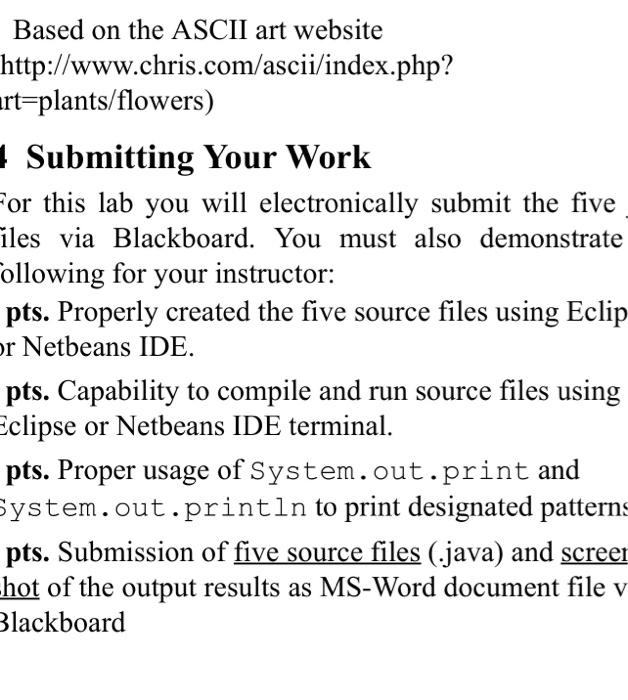
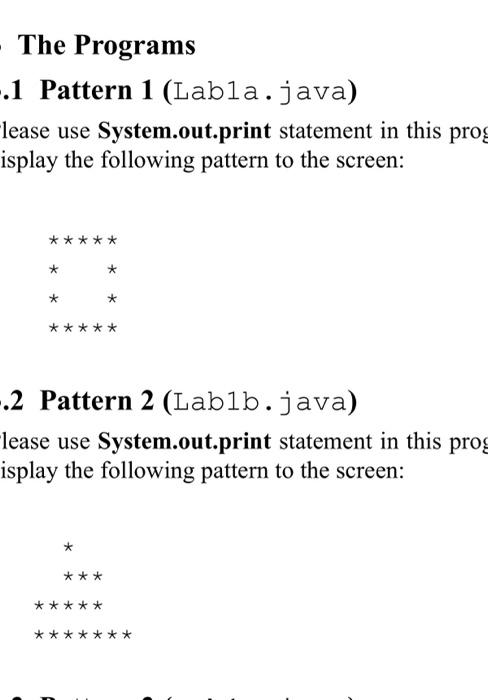
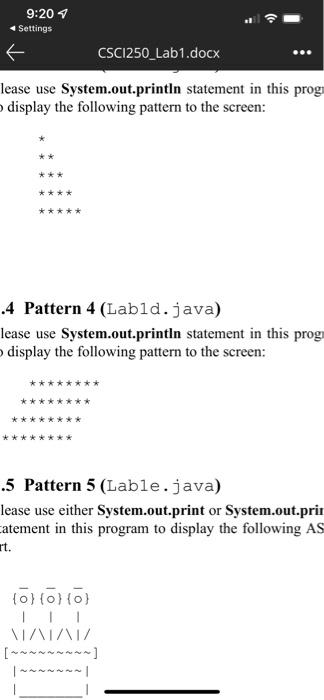
Based on the ASCII art website http://www.chris.com/ascii/index.php? art=plants/flowers) Submitting Your Work for this lab you will electronically submit the five iles via Blackboard. You must also demonstrate Collowing for your instructor: pts. Properly created the five source files using Eclip or Netbeans IDE. pts. Capability to compile and run source files using Eclipse or Netbeans IDE terminal. pts. Proper usage of System.out.print and System.out.println to print designated patterns pts. Submission of five source files (.java) and screer hot of the output results as MS-Word document file v Blackboard - The Programs -.1 Pattern 1 (Labla.java) lease use System.out.print statement in this prog isplay the following pattern to the screen: ***** * k * * -.2 Pattern 2 (Lablb.java) lease use System.out.print statement in this prog isplay the following pattern to the screen: * *** ***** ** *** 9:207 Settings CSC1250_Lab1.docx lease use System.out.println statement in this prog display the following pattern to the screen: *** **** ***** .4 Pattern 4 (Lab1d.java) lease use System.out.println statement in this prog display the following pattern to the screen: .5 Pattern 5 (Lable.java) lease use either System.out.print or System.out.pri atement in this program to display the following AS rt. tollollol 11 VAIN/
Step by Step Solution
There are 3 Steps involved in it

Get step-by-step solutions from verified subject matter experts
 Study Help