







Question: Layout Requirements: ments: reate code-behind vent, for log in button 1.Replace logo with: Yandex vith validation of user logo. redential, password and lept selected, display
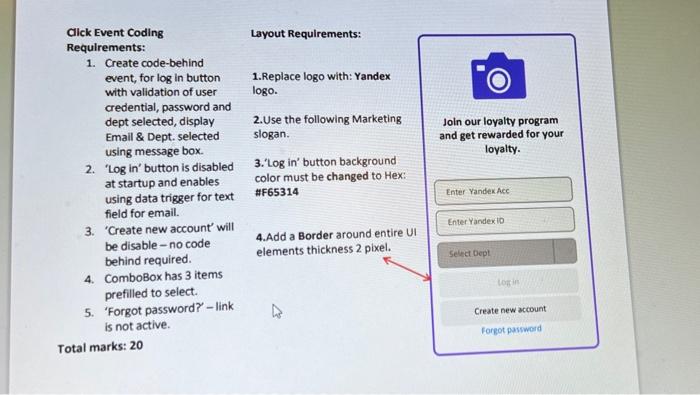
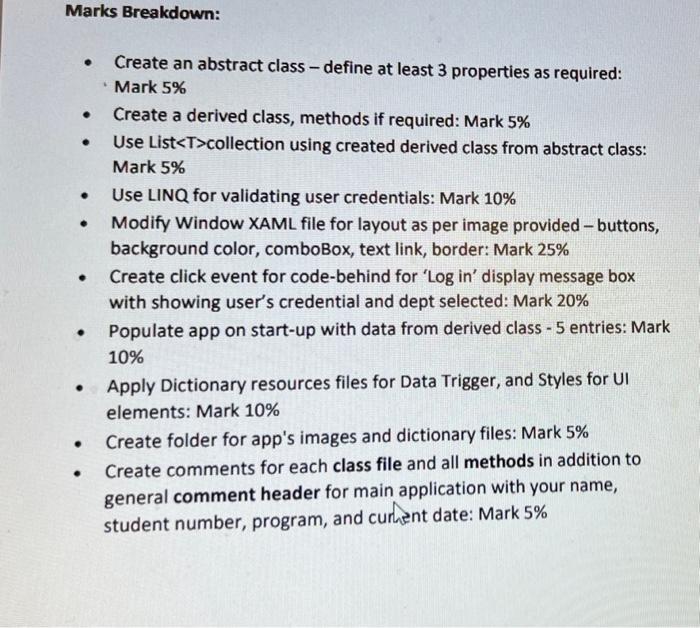
Layout Requirements: ments: reate code-behind vent, for log in button 1.Replace logo with: Yandex vith validation of user logo. redential, password and lept selected, display 2.Use the following Marketing imail \& Dept. selected slogan. ising message box. Log in' button is disabled 3.Log in' button background it startup and enables color must be changed to Hex: ising data trigger for text \#F65314 eld for email. Create new account' will e disable - no code 4. Add a Border around entire UI ehind required. omboBox has 3 items refilled to select. Forgot password? - link not active. ks: 20 - Create an abstract class - define at least 3 properties as required: Mark 5\% - Create a derived class, methods if required: Mark 5% - Use Listcollection using created derived class from abstract class: Mark 5\% - Use LINQ for validating user credentials: Mark 10\% - Modify Window XAML file for layout as per image provided - buttons, background color, comboBox, text link, border: Mark 25\% - Create click event for code-behind for 'Log in' display message box with showing user's credential and dept selected: Mark 20\% - Populate app on start-up with data from derived class - 5 entries: Mark 10\% - Apply Dictionary resources files for Data Trigger, and Styles for UI elements: Mark 10\% - Create folder for app's images and dictionary files: Mark 5\% - Create comments for each class file and all methods in addition to general comment header for main application with your name, student number, program, and curnent date: Mark 5\%
Step by Step Solution
There are 3 Steps involved in it

Get step-by-step solutions from verified subject matter experts
 Study Help