







Question: LC 3 PROGRAMMING ASSEMBLY LANGUAGE Write an LC - 3 assembler program that converts a number stored in memory into its binary representation in the
LC PROGRAMMING ASSEMBLY LANGUAGE Write an LC assembler program that converts a number stored in memory into its binary
representation in the Minecraft world.
a Place your code in the assembly file "writebinary.asm".
b The number to convert is specified in the LC starter file as NUMBERTOCONVERT.
c You can assume that the number to convert will always be nonnegative.
d Use air block ID # to represent zeroes and stone blocks block ID # to represent s
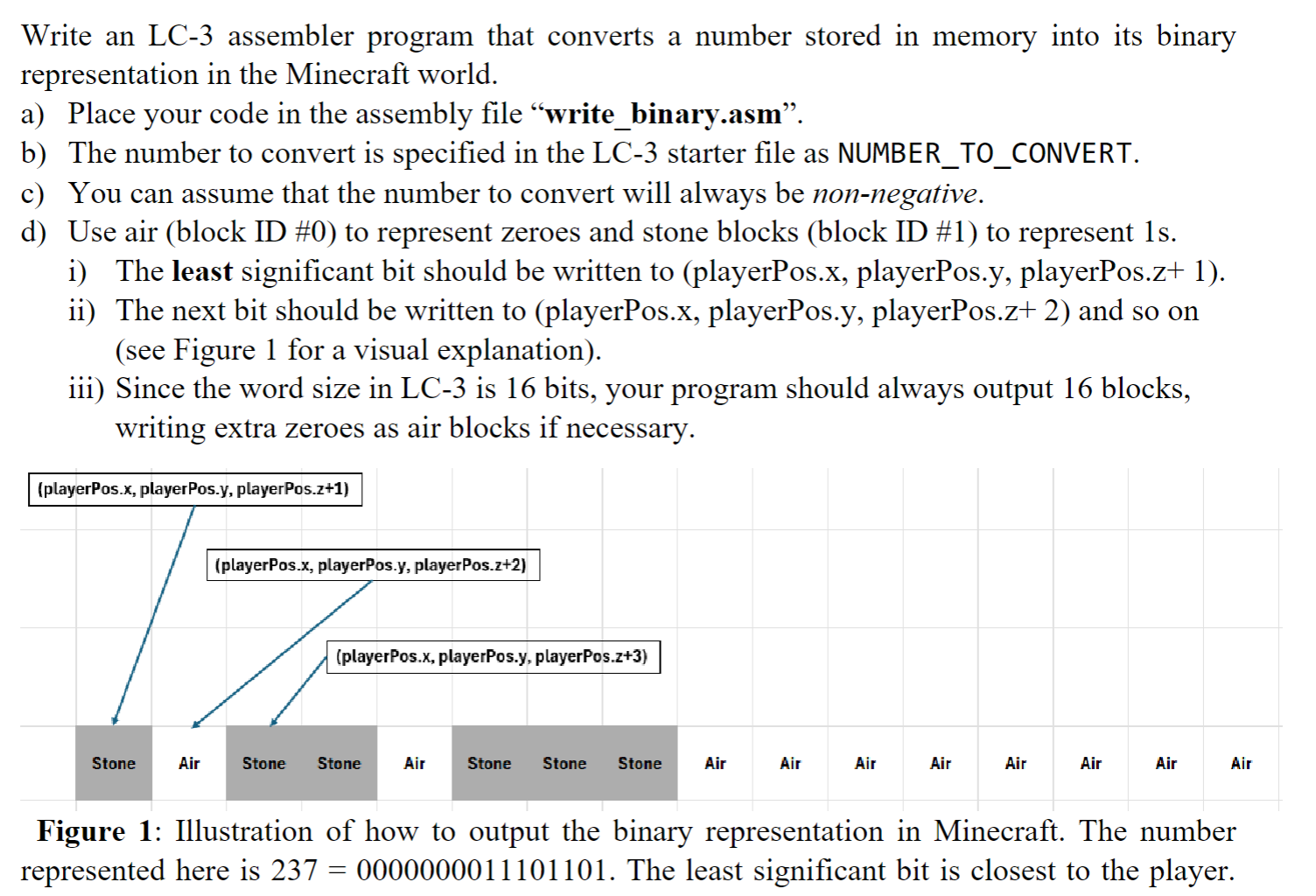
i The least significant bit should be written to playerPosx playerPos.y playerPos.z
ii The next bit should be written to playerPosx playerPos.y playerPos.z and so on
see Figure for a visual explanation
iii Since the word size in LC is bits, your program should always output blocks,
writing extra zeroes as air blocks if necessary.
Figure : Illustration of how to output the binary representation in Minecraft. The number
represented here is The least significant bit is closest to the player.
ORIG x
; Get player's current position
TRAP x ; Get tile position R x R y R z
ADD R R # ; Start at zmove placement one block forward
LD R NUMBERTOCONVERT ; Load the number to convert in binary:
LD R BITCOUNT ; Set loop counter to for bits in binary representation
; Store player's x and y coordinates
ST R PLAYERX
ST R PLAYERY
; Loop to process all bits
CONVERTLOOP
; Check if the least significant bit LSB is or
AND R R # ; Mask the LSB check if it's
BRz CALLAIR ; If the bit is branch to CALLAIR place air block
; If the bit is call the subroutine to place stone
JSR PLACESTONE
BR NEXTBIT
CALLAIR
JSR PLACEAIR ; Call subroutine to place air block
NEXTBIT
ADD R R # ; Increment the zcoordinate for the next block
ADD R R # ; Decrement bit counter
BRz ENDCONVERSION ; If all bits are processed, end
; Shift number to the right by bit to check the next bit
ADD R R R ; Logical shift right move to the next bit
ADD R R # ; This is just a filler to prevent errors, as LSR cannot be used.
ADD R R R ; Shift right by adding R to itself and discarding the result in the upper half
BR CONVERTLOOP
; Subroutine to place a stone block
PLACESTONE
LD R STONEBLOCK ; Load stone block ID into R
LD R PLAYERX ; Load player's x coordinate into R
LD R PLAYERY ; Load player's y coordinate into R
TRAP xC ; Use setBlock xC to place the stone block at R R R
RET ; Return from subroutine
; Subroutine to place an air block
PLACEAIR
LD R AIRBLOCK ; Load air block ID into R
LD R PLAYERX ; Load player's x coordinate into R
LD R PLAYERY ; Load player's y coordinate into R
TRAP xC ; Use setBlock xC to place air block at R R R
RET ; Return from subroutine
ENDCONVERSION
HALT ; End of program
; Data section
NUMBERTOCONVERT FILL # ; The number in binary:
BITCOUNT FILL # ; bits to process
STONEBLOCK FILL # ; Stone block ID
AIRBLOCK FILL # ; Air block ID
PLAYERX BLKW # ; Reserve space to store player's xcoordinate
PLAYERY BLKW # ; Reserve space to store player's ycoordinate
END
currently my code places stone then the rest is air
i want it to place stone air stone stone air stone stone stone then rest air
please fix it
Step by Step Solution
There are 3 Steps involved in it
1 Expert Approved Answer
Step: 1 Unlock

Question Has Been Solved by an Expert!
Get step-by-step solutions from verified subject matter experts
Step: 2 Unlock
Step: 3 Unlock
 Study Help