







Question: Write an LC - 3 assembler program that converts a number stored in memory into its binary representation in the Minecraft world. a ) Place
Write an LC assembler program that converts a number stored in memory into its binary
representation in the Minecraft world.
a Place your code in the assembly file "writebinary.asm".
b The number to convert is specified in the LC starter file as NUMBERTOCONVERT.
c You can assume that the number to convert will always be nonnegative.
d Use air block ID # to represent zeroes and stone blocks block ID # to represent s
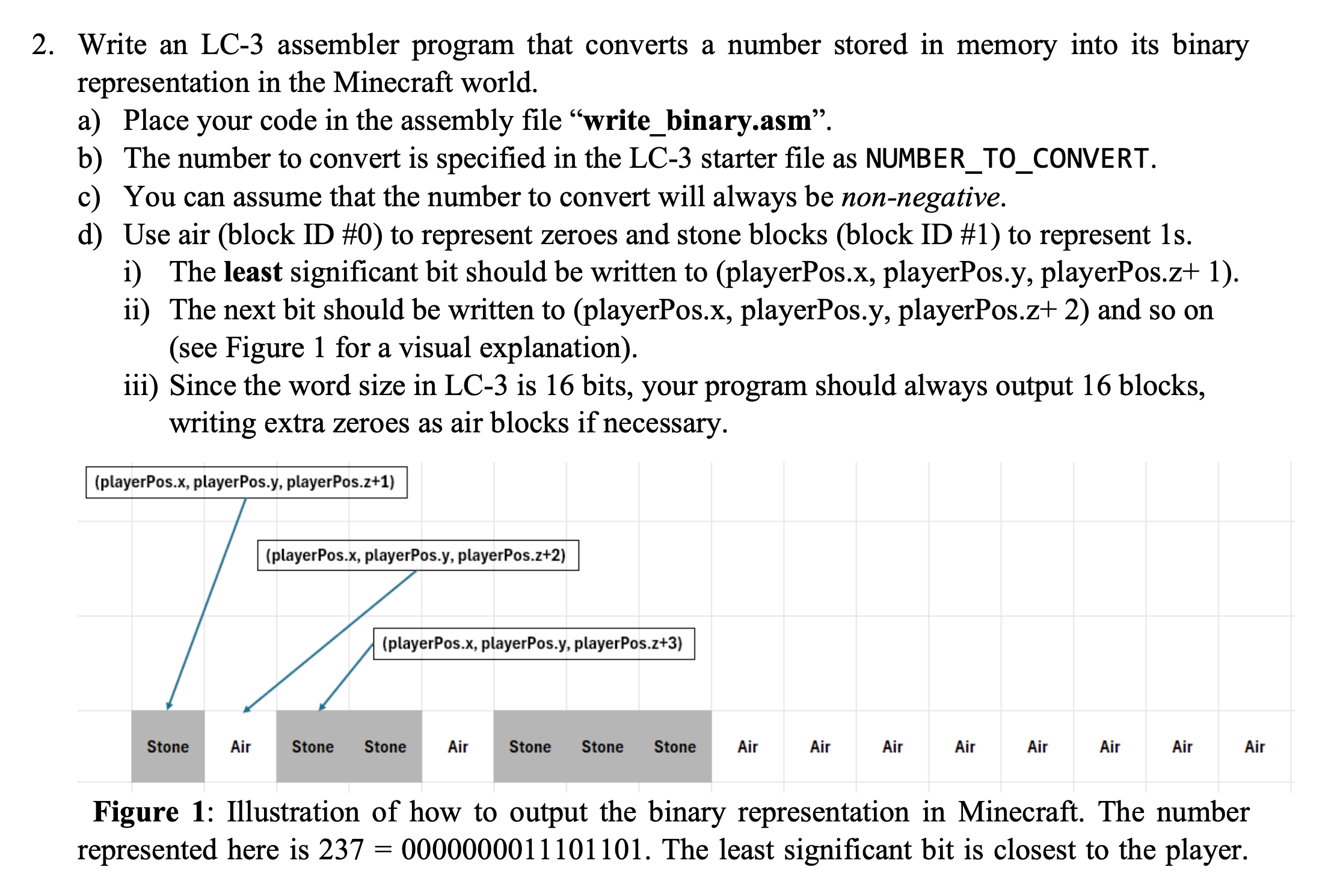
i The least significant bit should be written to playerPosx playerPos.y playerPos.z
ii The next bit should be written to playerPosx playerPos.y playerPos.z and so on
see Figure for a visual explanation
iii Since the word size in LC is bits, your program should always output blocks,
writing extra zeroes as air blocks if necessary.
Figure : Illustration of how to output the binary representation in Minecraft. The number
represented here is The least significant bit is closest to the player. tabletableTrapVectorAlias,Function,Descriptiontimes chatCHATpostToChatRtableOutputs a null terminatingstring starting at theaddress contained in R tothe Minecraft chat.times getpGETPtableplayergetTilePosRRRtableGets the position of thetile that the player iscurrently on The xy andz coordinates are output inregisters R R and Rrespectivelytimes AsetpSETPtableplayersetTilePosRRRtableThis function moves theplayer to the tile x yzR R RxBgetbGETBtabletablegetBlockR R RRtableThis function retrieves theID of the block at tile xyzRRR andreturns it to Rtimes CsetbSETBsetBlock R R R RtableThis function changes theID of the block at tile xyzRRR to thevalue stored in Rtimes DgethGETHgetHeightR R RtableThis function calculatesthe yposition of thehighest nonair block atxzRR andreturns the value to Rtimes regREGprintRegisterstableOutputs the currentregister values to theconsole
Notes:
TRAP xprintRegisters is provided for debugging purposes, since unlike the LC web simulator shown in class, the virtual machine included with the starter code does not provide an easy way of inspecting the register values.
Step by Step Solution
There are 3 Steps involved in it
1 Expert Approved Answer
Step: 1 Unlock

Question Has Been Solved by an Expert!
Get step-by-step solutions from verified subject matter experts
Step: 2 Unlock
Step: 3 Unlock
 Study Help