







Question: Learning Objectives Upon completion of this activity, you will be able to: . Part 1: All Configuration, Interfaces & Test Connectivity of the Topology. Part
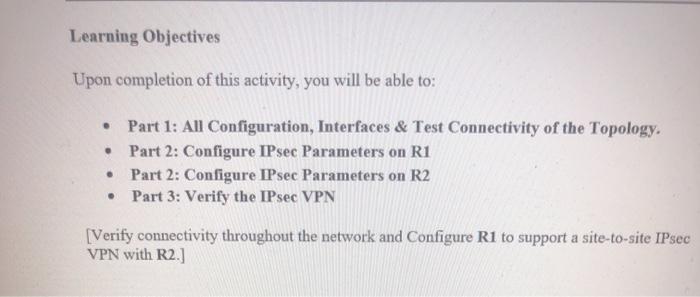
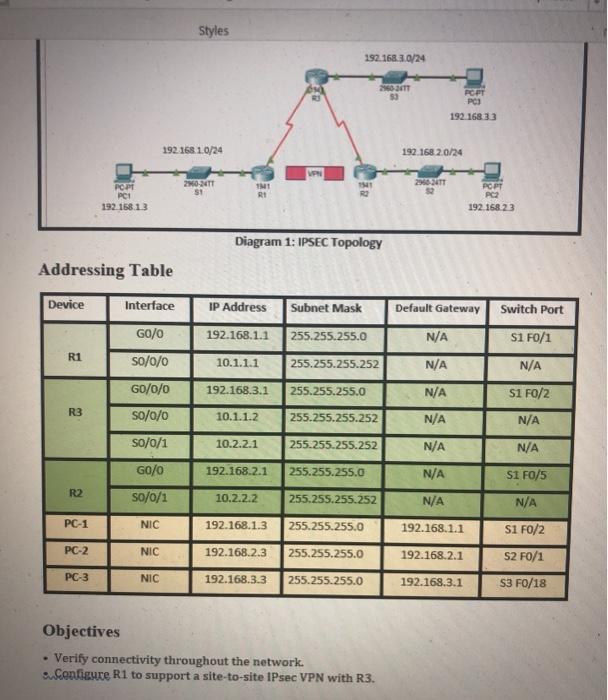
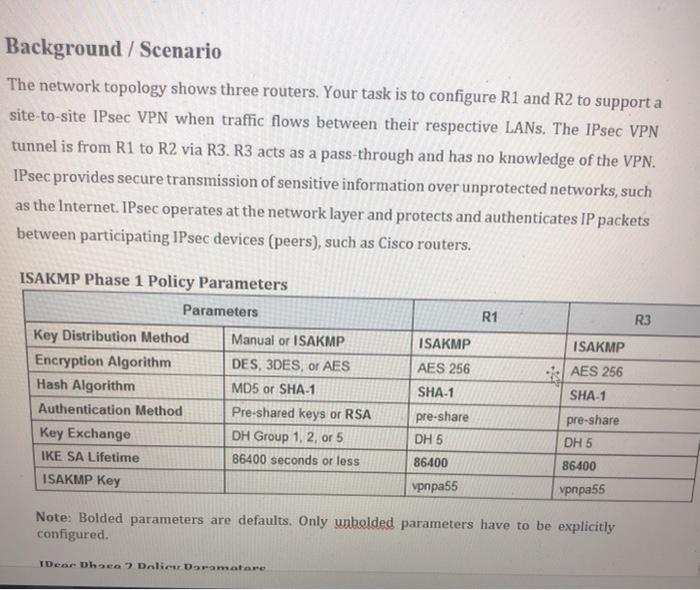
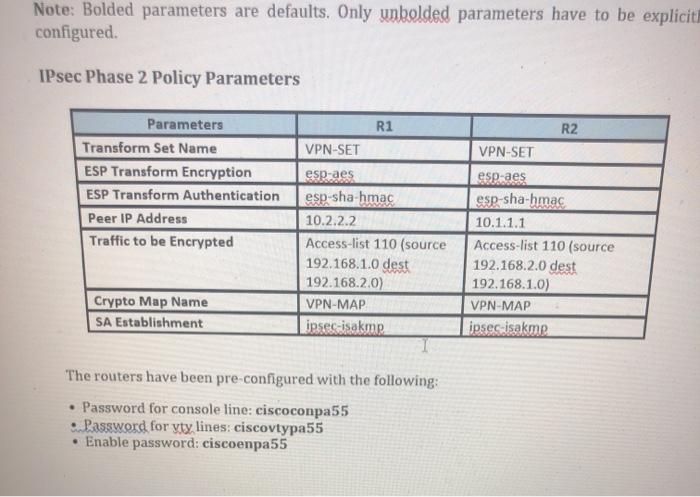
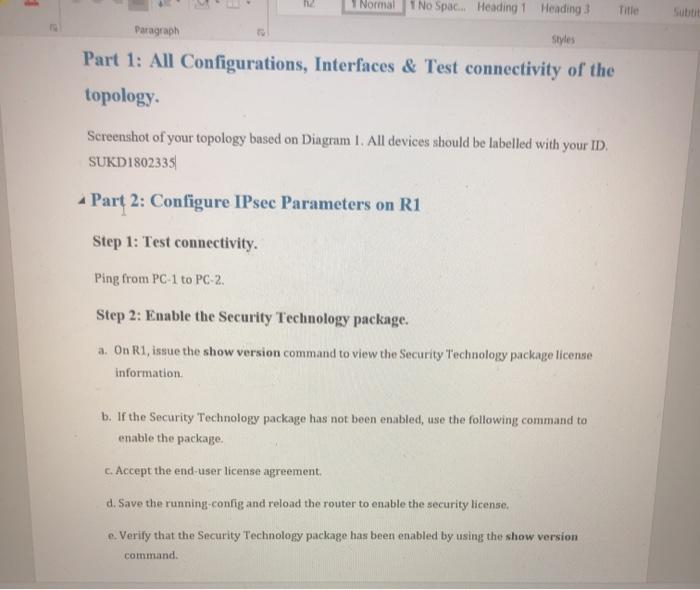
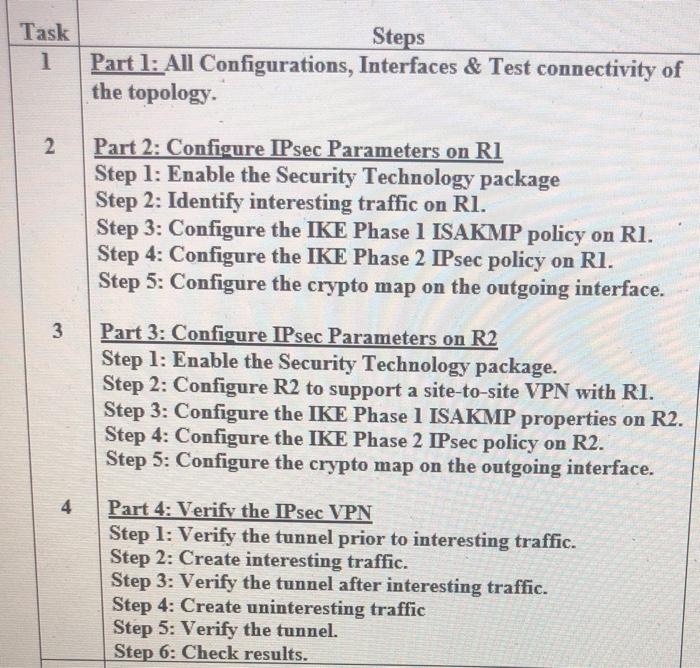
Learning Objectives Upon completion of this activity, you will be able to: . Part 1: All Configuration, Interfaces & Test Connectivity of the Topology. Part 2: Configure IPsec Parameters on R1 Part 2: Configure IPsec Parameters on R2 Part 3: Verify the IPsec VPN . [Verify connectivity throughout the network and Configure R1 to support a site-to-site IPsec VPN with R2.) Styles 192.168.3.0/24 2366-34T RCPT PC 192.168.33 192.168.1.0/24 192.168 20/24 VPN 20-24TT POPT PCI 192.168.13 11 R1 11 RO 2966 ATT PCPT PC2 192.168.23 Diagram 1: IPSEC Topology Addressing Table Device Interface IP Address Subnet Mask Default Gateway Switch Port GO/0 192.168.1.1 255.255.255.0 N/A S1 F0/1 R1 so/0/0 10.1.1.1 255.255.255.252 N/A N/A G0/0/0 192.168.3.1 255.255.255.0 N/A S1 F0/2 R3 so/0/0 10.1.1.2 255.255.255.252 N/A N/A so/0/1 10.2.2.1 255.255.255.252 N/A N/A GO/O 192.168.2.1 255.255.255.0 N/A S1 FO/5 R2 so/0/1 10.2.2.2 255.255.255.252 N/A N/A PC-1 NIC 192.168.1.3 255.255.255.0 192.168.1.1 SI FO/2 PC-2 NIC 192.168.2.3 255.255.255.0 192.168.2.1 S2 F0/1 PC-3 NIC 192.168.3.3 255.255.255.0 192.168.3.1 S3 F0/18 Objectives Verify connectivity throughout the network. Configure R1 to support a site-to-site IPsec VPN with R3. Background / Scenario The network topology shows three routers. Your task is to configure R1 and R2 to support a site-to-site IPsec VPN when traffic flows between their respective LANs. The IPsec VPN tunnel is from R1 to R2 via R3. R3 acts as a pass-through and has no knowledge of the VPN. IPsec provides secure transmission of sensitive information over unprotected networks, such as the Internet. IPsec operates at the network layer and protects and authenticates IP packets between participating IPsec devices (peers), such as Cisco routers. ISAKMP Phase 1 Policy Parameters Parameters R1 R3 ISAKMP ISAKMP AES 256 AES 256 SHA-1 Key Distribution Method Encryption Algorithm Hash Algorithm Authentication Method Key Exchange IKE SA Lifetime ISAKMP Key Manual or ISAKMP DES, 3DES, or AES MD5 or SHA-1 Pre-shared keys or RSA DH Group 1, 2, or 5 86400 seconds or less SHA-1 pre-share DH 5 86400 pre-share DH 5 86400 vpnpa55 vpnpa55 Note: Bolded parameters are defaults. Only unbolded parameters have to be explicitly configured. Dear Dhea Dolies Dramatare Note: Bolded parameters are defaults. Only unbolded parameters have to be explicit configured IPsec Phase 2 Policy Parameters R1 R2 VPN-SET VPN-SET esp-aes Parameters Transform Set Name ESP Transform Encryption ESP Transform Authentication Peer IP Address Traffic to be Encrypted esp-aes esp-sha-hmac 10.2.2.2 Access-list 110 (source 192.168.1.0 dest 192.168.2.0) VPN-MAP inses-isakmp esp-sha-hmac 10.1.1.1 Access-list 110 (source 192.168.2.0 dest 192.168.1.0) VPN-MAP ipsesisakme Crypto Map Name SA Establishment The routers have been pre-configured with the following: Password for console line: ciscoconpa55 Password for yty lines: ciscovtypa55 Enable password: ciscoenpa55 Normal No Spac... Heading 1 Heading 3 Title Paragraph Part 1: All Configurations, Interfaces & Test connectivity of the topology Screenshot of your topology based on Diagram 1. All devices should be labelled with your ID. SUKD1802335 - Part 2: Configure IPsec Parameters on R1 Step 1: Test connectivity. Ping from PC 1 to PC 2 Step 2: Enable the Security Technology package. a. On R1, issue the show version command to view the Security Technology package license information b. If the Security Technology package has not been enabled, use the following command to enable the package c. Accept the end-user license agreement d. Save the running-config and reload the router to enable the security license e. Verify that the Security Technology package has been enabled by using the show version command Task 1 1 Steps Part 1: All Configurations, Interfaces & Test connectivity of the topology 2 Part 2: Configure IPsec Parameters on RI Step 1: Enable the Security Technology package Step 2: Identify interesting traffic on RI. Step 3: Configure the IKE Phase 1 ISAKMP policy on RI. Step 4: Configure the IKE Phase 2 IPsec policy on RI. Step 5: Configure the crypto map on the outgoing interface. 3 Part 3: Configure IPsec Parameters on R2 Step 1: Enable the Security Technology package. Step 2: Configure R2 to support a site-to-site VPN with RI. Step 3: Configure the IKE Phase 1 ISAKMP properties on R2. Step 4: Configure the IKE Phase 2 IPsec policy on R2. Step 5: Configure the crypto map on the outgoing interface. 4 Part 4: Verify the IPsec VPN Step 1: Verify the tunnel prior to interesting traffic. Step 2: Create interesting traffic. Step 3: Verify the tunnel after interesting traffic. Step 4: Create uninteresting traffic Step 5: Verify the tunnel. Step 6: Check results. Learning Objectives Upon completion of this activity, you will be able to: . Part 1: All Configuration, Interfaces & Test Connectivity of the Topology. Part 2: Configure IPsec Parameters on R1 Part 2: Configure IPsec Parameters on R2 Part 3: Verify the IPsec VPN . [Verify connectivity throughout the network and Configure R1 to support a site-to-site IPsec VPN with R2.) Styles 192.168.3.0/24 2366-34T RCPT PC 192.168.33 192.168.1.0/24 192.168 20/24 VPN 20-24TT POPT PCI 192.168.13 11 R1 11 RO 2966 ATT PCPT PC2 192.168.23 Diagram 1: IPSEC Topology Addressing Table Device Interface IP Address Subnet Mask Default Gateway Switch Port GO/0 192.168.1.1 255.255.255.0 N/A S1 F0/1 R1 so/0/0 10.1.1.1 255.255.255.252 N/A N/A G0/0/0 192.168.3.1 255.255.255.0 N/A S1 F0/2 R3 so/0/0 10.1.1.2 255.255.255.252 N/A N/A so/0/1 10.2.2.1 255.255.255.252 N/A N/A GO/O 192.168.2.1 255.255.255.0 N/A S1 FO/5 R2 so/0/1 10.2.2.2 255.255.255.252 N/A N/A PC-1 NIC 192.168.1.3 255.255.255.0 192.168.1.1 SI FO/2 PC-2 NIC 192.168.2.3 255.255.255.0 192.168.2.1 S2 F0/1 PC-3 NIC 192.168.3.3 255.255.255.0 192.168.3.1 S3 F0/18 Objectives Verify connectivity throughout the network. Configure R1 to support a site-to-site IPsec VPN with R3. Background / Scenario The network topology shows three routers. Your task is to configure R1 and R2 to support a site-to-site IPsec VPN when traffic flows between their respective LANs. The IPsec VPN tunnel is from R1 to R2 via R3. R3 acts as a pass-through and has no knowledge of the VPN. IPsec provides secure transmission of sensitive information over unprotected networks, such as the Internet. IPsec operates at the network layer and protects and authenticates IP packets between participating IPsec devices (peers), such as Cisco routers. ISAKMP Phase 1 Policy Parameters Parameters R1 R3 ISAKMP ISAKMP AES 256 AES 256 SHA-1 Key Distribution Method Encryption Algorithm Hash Algorithm Authentication Method Key Exchange IKE SA Lifetime ISAKMP Key Manual or ISAKMP DES, 3DES, or AES MD5 or SHA-1 Pre-shared keys or RSA DH Group 1, 2, or 5 86400 seconds or less SHA-1 pre-share DH 5 86400 pre-share DH 5 86400 vpnpa55 vpnpa55 Note: Bolded parameters are defaults. Only unbolded parameters have to be explicitly configured. Dear Dhea Dolies Dramatare Note: Bolded parameters are defaults. Only unbolded parameters have to be explicit configured IPsec Phase 2 Policy Parameters R1 R2 VPN-SET VPN-SET esp-aes Parameters Transform Set Name ESP Transform Encryption ESP Transform Authentication Peer IP Address Traffic to be Encrypted esp-aes esp-sha-hmac 10.2.2.2 Access-list 110 (source 192.168.1.0 dest 192.168.2.0) VPN-MAP inses-isakmp esp-sha-hmac 10.1.1.1 Access-list 110 (source 192.168.2.0 dest 192.168.1.0) VPN-MAP ipsesisakme Crypto Map Name SA Establishment The routers have been pre-configured with the following: Password for console line: ciscoconpa55 Password for yty lines: ciscovtypa55 Enable password: ciscoenpa55 Normal No Spac... Heading 1 Heading 3 Title Paragraph Part 1: All Configurations, Interfaces & Test connectivity of the topology Screenshot of your topology based on Diagram 1. All devices should be labelled with your ID. SUKD1802335 - Part 2: Configure IPsec Parameters on R1 Step 1: Test connectivity. Ping from PC 1 to PC 2 Step 2: Enable the Security Technology package. a. On R1, issue the show version command to view the Security Technology package license information b. If the Security Technology package has not been enabled, use the following command to enable the package c. Accept the end-user license agreement d. Save the running-config and reload the router to enable the security license e. Verify that the Security Technology package has been enabled by using the show version command Task 1 1 Steps Part 1: All Configurations, Interfaces & Test connectivity of the topology 2 Part 2: Configure IPsec Parameters on RI Step 1: Enable the Security Technology package Step 2: Identify interesting traffic on RI. Step 3: Configure the IKE Phase 1 ISAKMP policy on RI. Step 4: Configure the IKE Phase 2 IPsec policy on RI. Step 5: Configure the crypto map on the outgoing interface. 3 Part 3: Configure IPsec Parameters on R2 Step 1: Enable the Security Technology package. Step 2: Configure R2 to support a site-to-site VPN with RI. Step 3: Configure the IKE Phase 1 ISAKMP properties on R2. Step 4: Configure the IKE Phase 2 IPsec policy on R2. Step 5: Configure the crypto map on the outgoing interface. 4 Part 4: Verify the IPsec VPN Step 1: Verify the tunnel prior to interesting traffic. Step 2: Create interesting traffic. Step 3: Verify the tunnel after interesting traffic. Step 4: Create uninteresting traffic Step 5: Verify the tunnel. Step 6: Check results
Step by Step Solution
There are 3 Steps involved in it

Get step-by-step solutions from verified subject matter experts
 Study Help