



Question: Learning Outcomes tested in this assessment: LO1. Understand and explain the fundamental networking principles related to data transmission, layered architecture, reference OSI model and
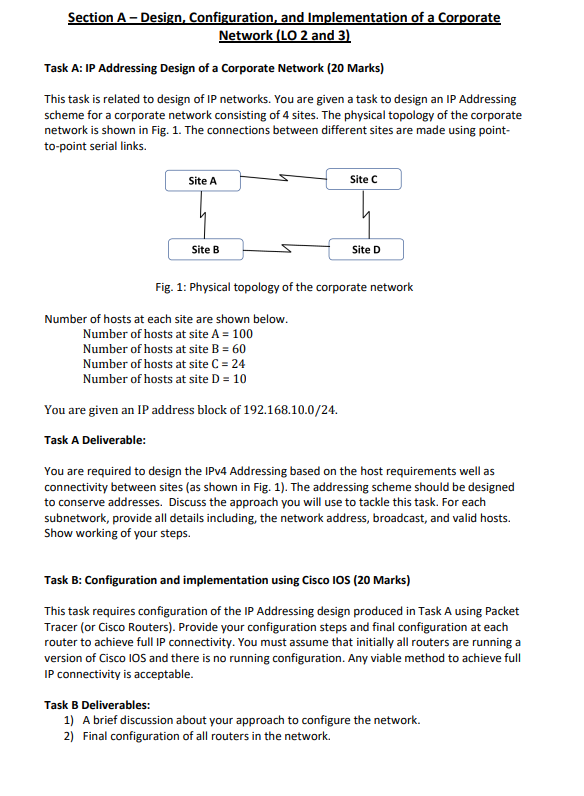
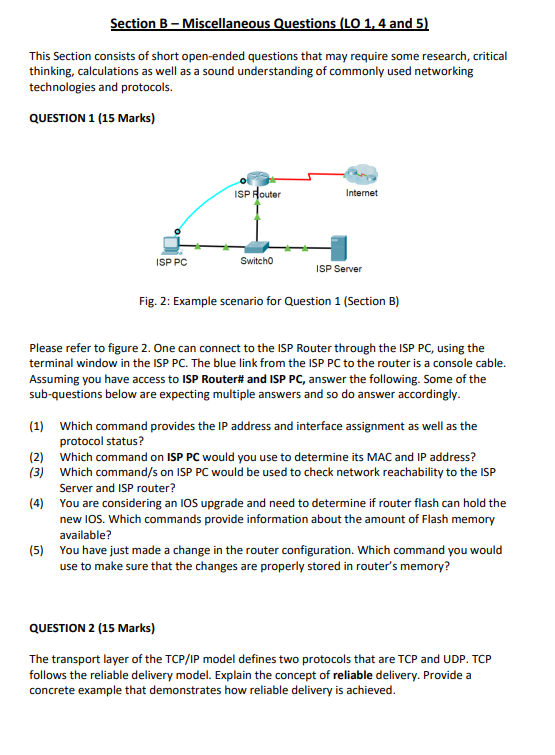
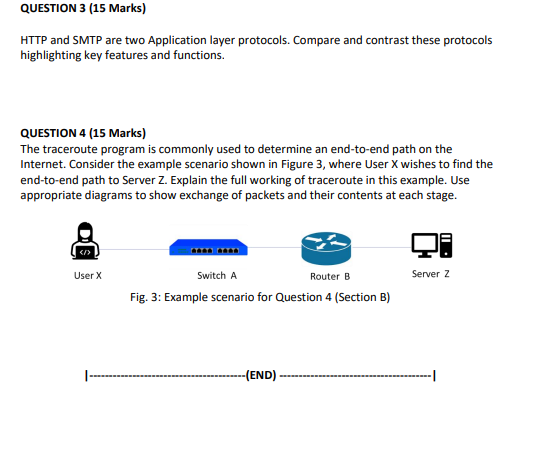
Learning Outcomes tested in this assessment: LO1. Understand and explain the fundamental networking principles related to data transmission, layered architecture, reference OSI model and TCP/IP protocol suite. LO2. Theoretically design small networks and IP schemes LO3. Build and test small networks involving hubs, switches, routers and wireless access point LO4. Demonstrate an understanding LAN, WAN technologies and supporting protocols LO5. Communicate results of work in an accurate and reliable manner Nature of the submission required: Individual report. You may need to carry out additional research for this assignment, and to make appropriate use of referencing in your answers given. Please use 'Cite Them Right' (available from the library) for referencing. Instructions to students: There are TWO Sections in this assignment. Section A requires use of Packet Tracer or Cisco Hardware. You are required to complete both tasks in this section. Section B contains FOUR questions. Please answer ALL questions. This assignment is marked out of 100 marks. It is worth 100% of the total marks for this module. Expected size of the submission: Your report must use a font size no smaller than 10 and be less than 2000 words excluding appendices and references. Section A - Design, Configuration, and Implementation of a Corporate Network (LO 2 and 3) Task A: IP Addressing Design of a Corporate Network (20 Marks) This task is related to design of IP networks. You are given a task to design an IP Addressing scheme for a corporate network consisting of 4 sites. The physical topology of the corporate network is shown in Fig. 1. The connections between different sites are made using point- to-point serial links. Site A Site B Number of hosts at each site are shown below. Number of hosts at site A = 100 Number of hosts at site B = 60 Number of hosts at site C = 24 Number of hosts at site D = 10 Site C Fig. 1: Physical topology of the corporate network You are given an IP address block of 192.168.10.0/24. Task A Deliverable: Site D You are required to design the IPv4 Addressing based on the host requirements well as connectivity between sites (as shown in Fig. 1). The addressing scheme should be designed to conserve addresses. Discuss the approach you will use to tackle this task. For each subnetwork, provide all details including, the network address, broadcast, and valid hosts. Show working of your steps. Task B: Configuration and implementation using Cisco IOS (20 Marks) This task requires configuration of the IP Addressing design produced in Task A using Packet Tracer (or Cisco Routers). Provide your configuration steps and final configuration at each router to achieve full IP connectivity. You must assume that initially all routers are running a version of Cisco IOS and there is no running configuration. Any viable method to achieve full IP connectivity is acceptable. Task B Deliverables: 1) A brief discussion about your approach to configure the network. 2) Final configuration of all routers in the network. Section B - Miscellaneous Questions (LO 1, 4 and 5) This Section consists of short open-ended questions that may require some research, critical thinking, calculations as well as a sound understanding of commonly used networking technologies and protocols. QUESTION 1 (15 Marks) ISP PC ISP Router Switch0 Internet ISP Server Fig. 2: Example scenario for Question 1 (Section B) Please refer to figure 2. One can connect to the ISP Router through the ISP PC, using the terminal window in the ISP PC. The blue link from the ISP PC to the router is a console cable. Assuming you have access to ISP Router# and ISP PC, answer the following. Some of the sub-questions below are expecting multiple answers and so do answer accordingly. (1) Which command provides the IP address and interface assignment as well as the protocol status? (2) Which command on ISP PC would you use to determine its MAC and IP address? (3) Which command/s on ISP PC would be used to check network reachability to the ISP Server and ISP router? (4) You are considering an IOS upgrade and need to determine if router flash can hold the new IOS. Which commands provide information about the amount of Flash memory available? (5) You have just made a change in the router configuration. Which command you would use to make sure that the changes are properly stored in router's memory? QUESTION 2 (15 Marks) The transport layer of the TCP/IP model defines two protocols that are TCP and UDP. TCP follows the reliable delivery model. Explain the concept of reliable delivery. Provide a concrete example that demonstrates how reliable delivery is achieved. QUESTION 3 (15 Marks) HTTP and SMTP are two Application layer protocols. Compare and contrast these protocols highlighting key features and functions. QUESTION 4 (15 Marks) The traceroute program is commonly used to determine an end-to-end path on the Internet. Consider the example scenario shown in Figure 3, where User X wishes to find the end-to-end path to Server Z. Explain the full working of traceroute in this example. Use appropriate diagrams to show exchange of packets and their contents at each stage. User X Switch A Router B Fig. 3: Example scenario for Question 4 (Section B) --(END). Server Z -1
Step by Step Solution
There are 3 Steps involved in it

Get step-by-step solutions from verified subject matter experts