Question: LECopy 3 Format Painter General 2x 29 Wrap at BV - - - A Merge & Carter Font Alionsent $ - % 98 Chboard Conditional
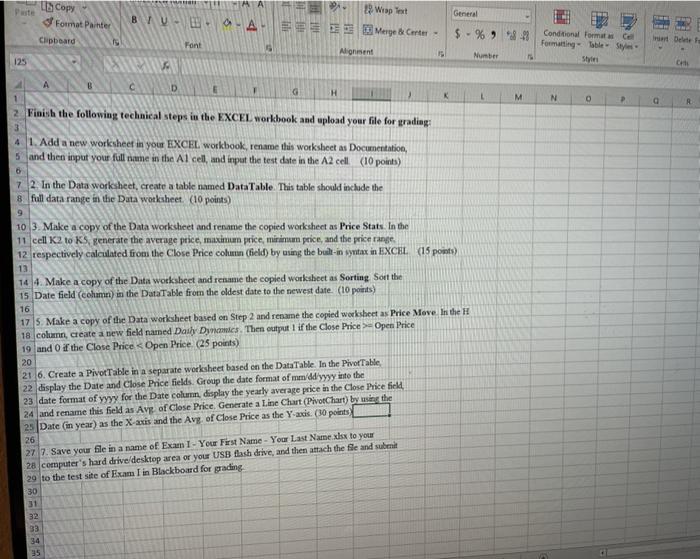
LECopy 3 Format Painter General 2x 29 Wrap at BV - - - A Merge & Carter Font Alionsent $ - % 98 Chboard Conditional Formate Formatting Table Style 15 Number 125 CH c D G H M N 0 a 2 Finish the following technical steps in the EXCEL workbook and upload your file for grading 3 4 1. Add a new worksheet in your EXCEL workbook, rename this worksheet as Documentation, 5 and then input your full name in the Al cell, and input the test date in the A2 cell. (10 points) 6 7 2. In the Data worksheet, create a table named DataTable. This table should include the 8 full data range in the Data worksheet. (10 points) 10 3. Make a copy of the Data worksheet and rename the copied worksheet as Price Stats. In the 11 cell K2 to KS generate the average price, maximum price, minimum price, and the price range, 12 respectively calculated from the Close Price column (field) by using the built-in syntax in EXCEL (15 points) 13 14 4. Make a copy of the Data worksheet and rename the copied worksheet as Sorting Sort the 15 Date field (column) in the DataTable from the oldest date to the newest date. (10 points) 16 17 S. Make a copy of the Data worksheet based on Step 2 and rename the copied worksheet as Price More in the H 18. column, create a new field named Dash Dynamics. Then output 1 if the Close Price >- Open Price 19 and 0 if the Close Price Open Price (25 points) 20 21 6. Create a Pivot Table in a separate worksheet based on the Data Table In the Pivot Table 22 display the Date and Close Price fields. Group the date format of me/dd/yyyy into the 23 date format of yyyy for the Date column. display the yearly average price in the Close Price field, 24 and rename this field as Avg of Close Price Generate a Line Chart (PivotChart) by using the 25 Date (in year) as the X axis and the Avg of Close Price as the Y-axis (30 points 26 27 7. Save your file in a name of Exam I - Your First Name - Your Last Name xhx to your 28 computer's hard drive/desktop area or your USB flash drive, and then attach the file and submit 29 to the test site of Exam I in Blackboard for grading 30 31 32 33 34 LECopy 3 Format Painter General 2x 29 Wrap at BV - - - A Merge & Carter Font Alionsent $ - % 98 Chboard Conditional Formate Formatting Table Style 15 Number 125 CH c D G H M N 0 a 2 Finish the following technical steps in the EXCEL workbook and upload your file for grading 3 4 1. Add a new worksheet in your EXCEL workbook, rename this worksheet as Documentation, 5 and then input your full name in the Al cell, and input the test date in the A2 cell. (10 points) 6 7 2. In the Data worksheet, create a table named DataTable. This table should include the 8 full data range in the Data worksheet. (10 points) 10 3. Make a copy of the Data worksheet and rename the copied worksheet as Price Stats. In the 11 cell K2 to KS generate the average price, maximum price, minimum price, and the price range, 12 respectively calculated from the Close Price column (field) by using the built-in syntax in EXCEL (15 points) 13 14 4. Make a copy of the Data worksheet and rename the copied worksheet as Sorting Sort the 15 Date field (column) in the DataTable from the oldest date to the newest date. (10 points) 16 17 S. Make a copy of the Data worksheet based on Step 2 and rename the copied worksheet as Price More in the H 18. column, create a new field named Dash Dynamics. Then output 1 if the Close Price >- Open Price 19 and 0 if the Close Price Open Price (25 points) 20 21 6. Create a Pivot Table in a separate worksheet based on the Data Table In the Pivot Table 22 display the Date and Close Price fields. Group the date format of me/dd/yyyy into the 23 date format of yyyy for the Date column. display the yearly average price in the Close Price field, 24 and rename this field as Avg of Close Price Generate a Line Chart (PivotChart) by using the 25 Date (in year) as the X axis and the Avg of Close Price as the Y-axis (30 points 26 27 7. Save your file in a name of Exam I - Your First Name - Your Last Name xhx to your 28 computer's hard drive/desktop area or your USB flash drive, and then attach the file and submit 29 to the test site of Exam I in Blackboard for grading 30 31 32 33 34









 Study Help