







Question: LEDs count up to 10 when the button is pressed When the button is pressed it will stop after counting up to 10 only port
LEDs count up to 10 when the button is pressed
When the button is pressed it will stop after counting up to 10
only port a will be used
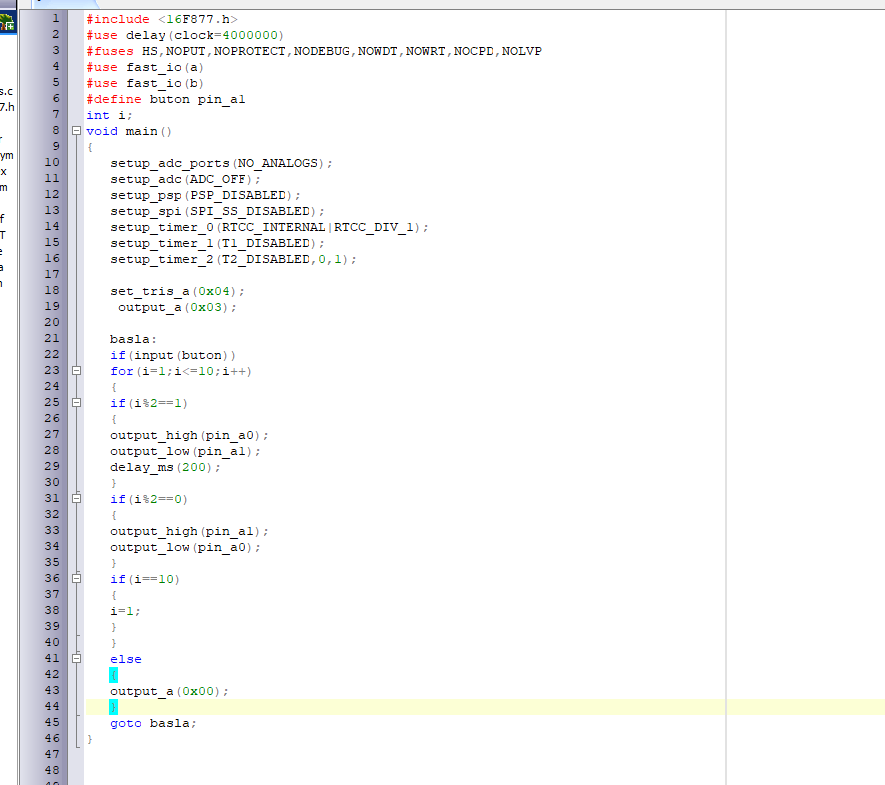
how is the code i didn't do it can you help me we will not use port b we will only use port a ?
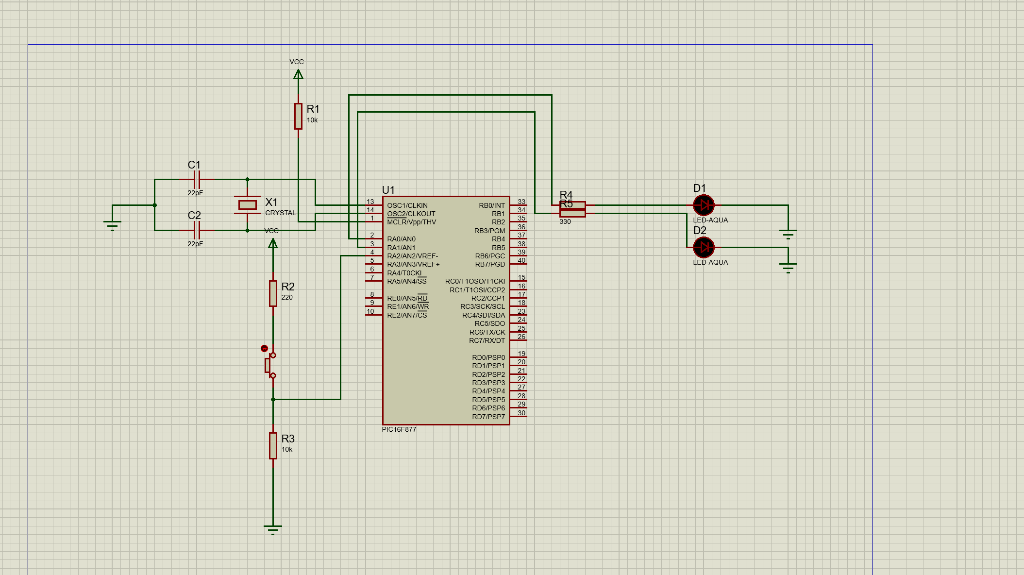
1 S.C 7.h - ym X m f T a 1 #include 2 #use delay (clock=4000000) 3 #fuses HS, NOPUT, NOPROTECT, NODEBUG, NOWDT , NOWRT, NOCPD, NOLVP 4 #use fast_io(a) 5 #use fast_io (b) 6 #define buton pin_al 7 int i; 8 void main() 9 { 10 setup_adc_ports (NO_ANALOGS); setup_adc (ADC_OFF); 12 setup_psp (PSP_DISABLED); 13 setup_spi (SPI_SS_DISABLED); 14 setup_timer_0 (RTCC_INTERNAL | RTCC_DIV_1); 15 setup_timer 1 (T1_DISABLED); 16 setup_timer_2 (T2_DISABLED, 0,1); 17 18 set_tris_a (0x04); 19 output_a (Ox03); 20 21 basla: 22 if (input (buton)) 23 for (i=1;i RANVRLI+ 6 RADIO RASONS ULUNUA 15 | R2 220 9 RLUNDRU REHANG/WE R-20N/ICS 18 ROOVI 1060'ICKI RC1T1OSICCP2 ROZOCPE RCBECKSCL R:414UNLY FCBISCO KURIXICK RCT/RXOT 24 145 25 11 20 21 ROOPSPO 1 RO2IPSP2 108 Pers RO4PSP TOM R06PSP ROIDENT 27 28 29 90 PICIGT R3 TOR
Step by Step Solution
There are 3 Steps involved in it

Get step-by-step solutions from verified subject matter experts
 Study Help