



Question: Lesson 13 Participation Introduction to Unix Modify the script displayed in the lecture slides named twoArg.sh Ensure that it is executable and displays argument 1
Lesson 13 Participation Introduction to Unix
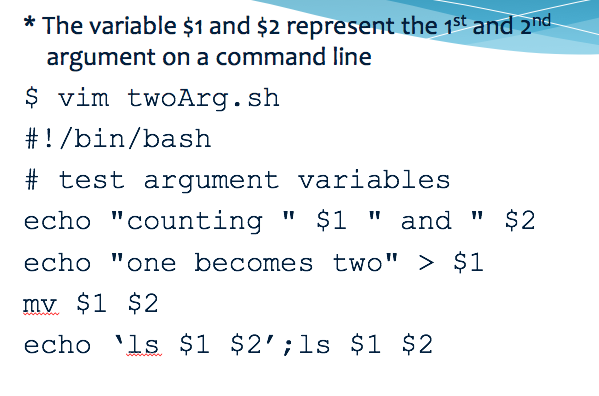
Modify the script displayed in the lecture slides named twoArg.sh
Ensure that it is executable and displays argument 1 and argument 2 from the command line.
Modify the script on two lines so that the 2nd argument gets a .txt added as an extension and that it displays the new file name in the ls command (ie file.txt ).
Upload your script twoArg.sh to canvas with pscp (win) or scp (mac). Name the file twoArg.txt when copying to your desktop.
From windows:
pscp user@host:/home/user/filename c:\users\someUser\Desktop\someFile.txt
*The variable $1 and $2 represent the 1st and 2nd argument on a command line $ vim twoArg.sh # ! /bin/bash # test argument variables echo "counting " $1 "and " $2 echo "one becomes two" > $1 TV mv $1 $2 echo 'ls $1 $2' ;ls $1 $2
Step by Step Solution
There are 3 Steps involved in it

Get step-by-step solutions from verified subject matter experts