







Question: Linear Search vs Binary Search with arrays Create a package called ceLinearBinary and add the class Search . No need to include a main method.
Linear Search vs Binary Search with arrays
- Create a package called ceLinearBinary and add the class Search. No need to include a main method.
- Add two public static methods: linear and binary. Both methods have a return type int and two parameters:
- numbers of type int[]
- key of type int
- We start writing the JUnit tests before implementing the methods. However, to do so, the class Search needs to compile. Return 0 (the default value for int) and add a comment //TODO to resolve syntax issues and to indicate that the implementation doesn't provide the expected functionality yet.
- Add a corresponding JUnit test file called SearchTest to the project. It should be in a separate source folder called test and it should include test method stubs for the two methods linear and binary. Run the JUnit tests. At this point, both test methods are expected to fail. Here is something to
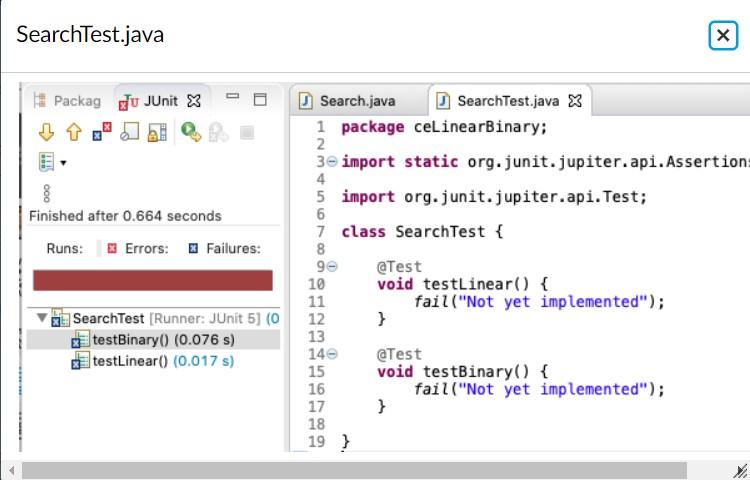
Identify at least five situations we should test for (e.g. search for the first element in the array, search for an element that is not included in the array, etc.) The goal is to cover as many situations as we can and to maximize the likelihood of uncovering bugs in the program. Write descriptive test method names that start with the following pattern: {methodName}_{what we test} If you test the method linear by searching for the first element, the name could be linear_searchFirstElement or linear_firstElement. Once you identified five situations and the corresponding method names,
The examples cover the following situations: search element is in array/search element is not in the array array includes elements / array is empty They also test for boundary values (first and last elements) since they could be missed by an off-by-one error.
linear_firstElement linear_middleElement linear_lastElement linear_elementNotInArray linear_emptyArray
Sometimes it is helpful to include a third part in the method name that describes the result. It doesn't seem to add much value in case of the method linear. However, it can be helpful when writing JUnit tests for other classes. Here is how the names would look like when using the pattern {methodName}_{what we test} _{descriptionOfResult}
linear_firstElement_returnIndex0 linear_middleElement_returnIndexOfElement linear_lastElement_returnLastIndex linear_elementNotInArray_returnMinusOne linear_emptyArray_returnMinusOne
Implement the test methods to test the method linear. If you came up with different test situations, that's great. Please ensure though that the five tests described above are included. Notice that most of the tests will fail. This is expected because the method linear hasn't been properly implemented yet and returns a constant 0.
- Go back to class Search and Implement the method linear. Run the JUnit tests again. At this point, the tests for the method linear should pass.
- Let's turn to the method binary. Start by identifying and implementing at least five test methods to test the method binary. Keep in mind that binary search requires a sorted array when choosing your test data.
- Go back to class Search and Implement the method binary. At this point, all tests should pass.
- Refactor If you used private final fields to declare the test arrays, that's great. If you haven't done so, refactor to the code to simplify the test methods.
SearchTest.java Packag du JUnit X n ooo Finished after 0.664 seconds Runs: Errors: Failures: Search.java SearchTest.java X 1 package ceLinearBinary; 2 3e import static org. junit.jupiter.api. Assertion 4 5 import org.junit.jupiter.api. Test; 6 7 class SearchTest { 8 90 @Test 10 void testLinear() { 11 fail("Not yet implemented"); 12 } 13 140 @Test 15 void testBinary() { 16 fail("Not yet implemented"); 17 } 18 19 } SearchTest (Runner: JUnit 5) (0 testBinary0 (0.076 s) testLinear() (0.017 s)
Step by Step Solution
There are 3 Steps involved in it

Get step-by-step solutions from verified subject matter experts
 Study Help