





Question: Linus Linux Ex. 2 - Editing Files with vi (9 Points) 1. (a) (4 Points) In the docs directory, create a file by name license.txt
Linus
Linus Linux Ex. 2 - Editing Files with vi (9 Points) 1.
Linux

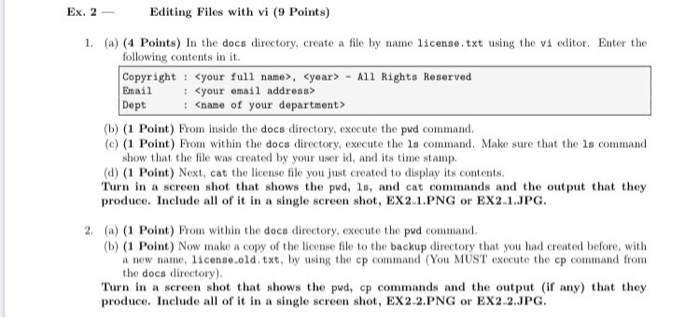
Ex. 2 - Editing Files with vi (9 Points) 1. (a) (4 Points) In the docs directory, create a file by name license.txt using the vi editor. Enter the following contents in it. Copyright : , - All Rights Reserved Email Dept (b) (1 Point) From inside the docs directory, execute the pud command. (c) (1 Point) From within the docs directory, execute the ls command. Make sure that the ls command show that the file was created by your user id, and its time stamp. (d) (1 Point) Next, cat the license file you just created to display its contents. Turn in a screen shot that shows the pud, ls, and cat commands and the output that they produce. Include all of it in a single screen shot, EX 2.1.PNG or EX2.1.JPG 2. (a) (1 Point) From within the docs directory, execute the pud command (b) (1 Point) Now make a copy of the license file to the backup directory that you had created before, with a new name, license.old, txt, by using the cp command (You MUST execute the cp command from the docs directory). Turn in a screen shot that shows the pwd, cp commands and the output (if any) that they produce. Include all of it in a single screen shot, EX2 2.PNG or EX2 2.JPG

Step by Step Solution

There are 3 Steps involved in it

1 Expert Approved Answer
Step: 1 Unlock blur-text-image
Question Has Been Solved by an Expert!

Get step-by-step solutions from verified subject matter experts

Step: 2 Unlock
Step: 3 Unlock

Students Have Also Explored These Related Databases Questions!