







Question: Linux Intro Week 13 Practice 1. Create a backup of all of the fonts on your system by making a tarball of /us/share/fonts/ and
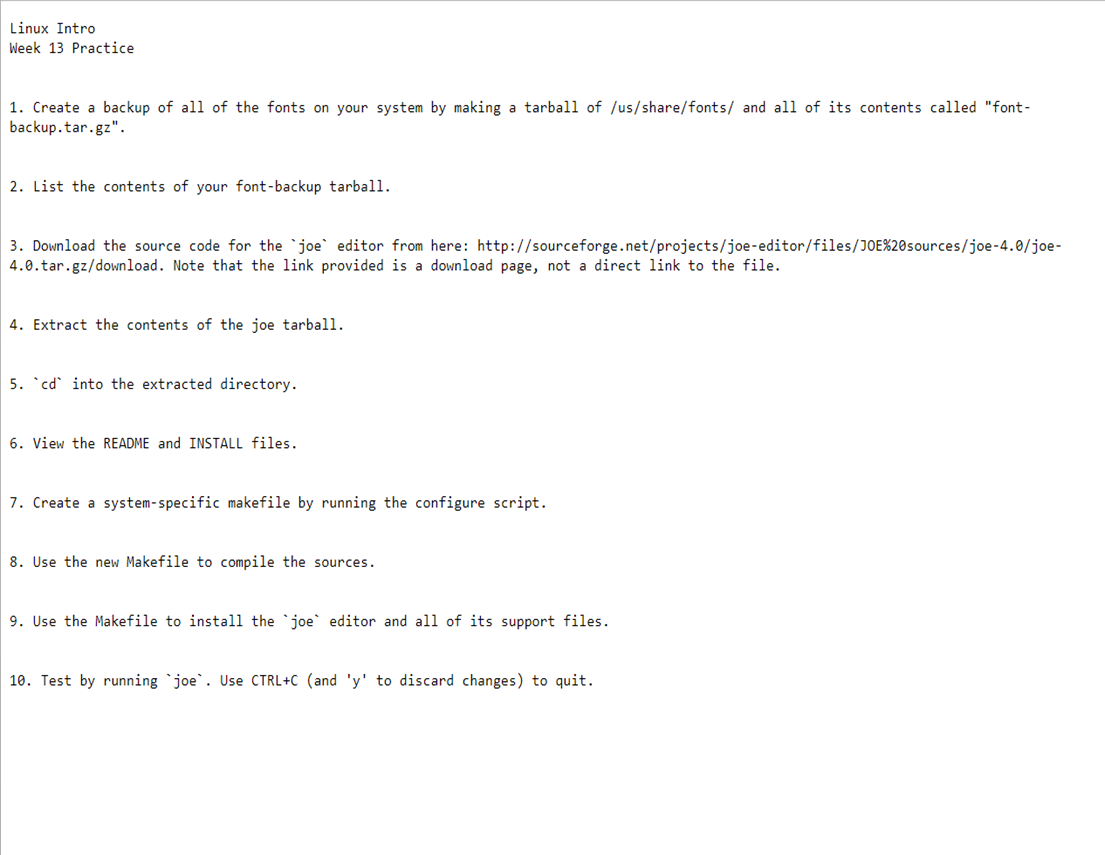
Linux Intro Week 13 Practice 1. Create a backup of all of the fonts on your system by making a tarball of /us/share/fonts/ and all of its contents called "font- backup.tar.gz". 2. List the contents of your font-backup tarball. 3. Download the source code for the joe editor from here: http://sourceforge.net/projects/joe-editor/files/JOE %20sources/joe-4.0/joe- 4.0.tar.gz/download. Note that the link provided is a download page, not a direct link to the file. 4. Extract the contents of the joe tarball. 5. cd into the extracted directory. 6. View the README and INSTALL files. 7. Create a system-specific makefile by running the configure script. 8. Use the new Makefile to compile the sources. 9. Use the Makefile to install the joe editor and all of its support files. 10. Test by running joe. Use CTRL+C (and 'y' to discard changes) to quit.
Step by Step Solution
There are 3 Steps involved in it

Get step-by-step solutions from verified subject matter experts
 Study Help