







Question: Linux Shell Scripting (cloud9) Three files are needed: 1. commands.txt 2. split.cpp 3. printpaths.sh Instructions Use the shell to determine the number of executables in
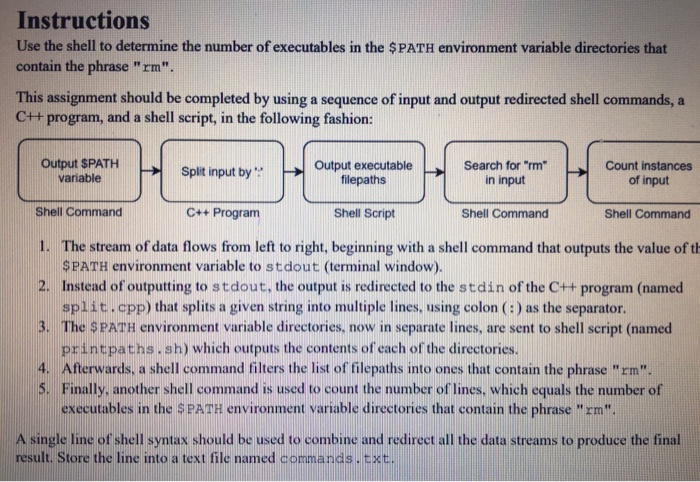
Instructions Use the shell to determine the number of executables in the $PATH environment variable directories that contain the phrase "rm" This assignment should be completed by using a sequence of input and output redirected shell commands, a C++ program, and a shell script, in the following fashion: Output SPATH Split input by Output executable filepaths Search form in input Count instances of input variable Shell Command 1. The stream of data flows from left to right, beginning with a shell command that outputs the value of th 2. Instead of outputting to stdout, the output is redirected to the stdin of the C+t program (named C++ Program Shell Script Shell Command Shell Command $PATH environment variable to stdout (terminal window). split cpp) that splits a given string into multiple lines, using colon (:) as the separator The SPATH environment variable directories, now in separate lines, are sent to shell script (named printpaths. sh) which outputs the contents of each of the directories 4. Afterwards, a shell command filters the list of filepaths into ones that contain the phrase "rm". Finally, another shell command is used to count the number of' lines, which equals the number of executables in the SPATH environment variable directories that contain the phrase "rm" A single line of shell syntax should be used to combine and redirect all the data streams to produce the final result. Store the line into a text file named commands . txt
Step by Step Solution
There are 3 Steps involved in it

Get step-by-step solutions from verified subject matter experts
 Study Help