







Question: Linux System You are given a list of groups and the members that belong to each of the groups as below. Group Names and Members
Linux System
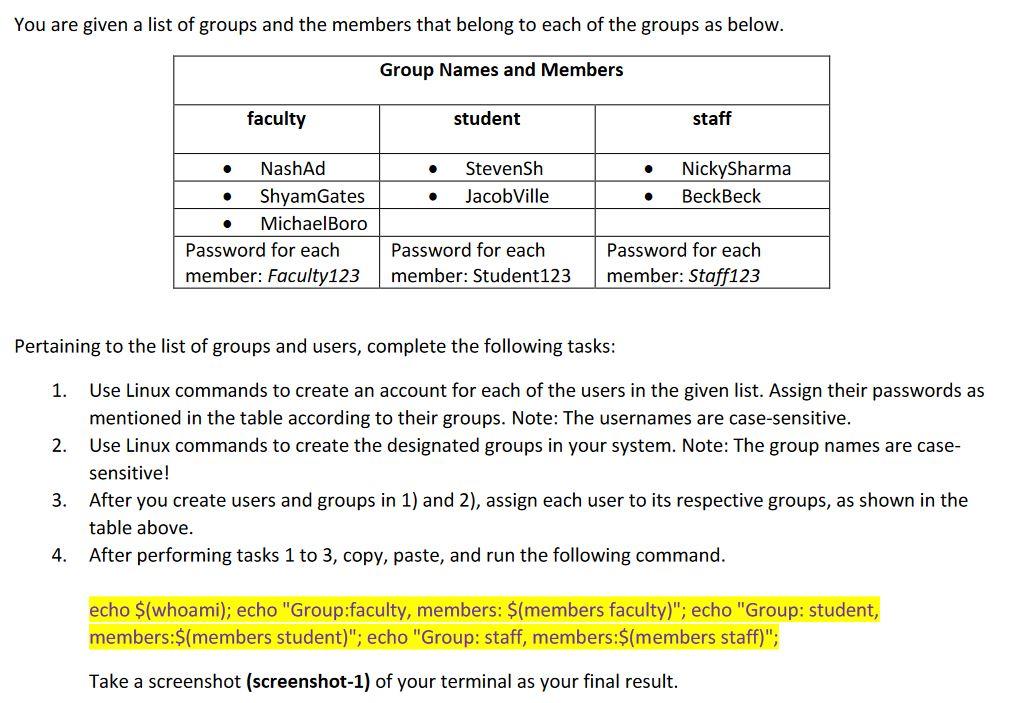
You are given a list of groups and the members that belong to each of the groups as below. Group Names and Members faculty student staff . StevenSh Jacob Ville NickySharma BeckBeck . NashAd Shyam Gates Michael Boro Password for each member: Faculty123 Password for each member: Student123 Password for each member: Staff123 Pertaining to the list of groups and users, complete the following tasks: 1. 2. Use Linux commands to create an account for each of the users in the given list. Assign their passwords as mentioned in the table according to their groups. Note: The usernames are case-sensitive. Use Linux commands to create the designated groups in your system. Note: The group names are case- sensitive! 3. After you create users and groups in 1) and 2), assign each user to its respective groups, as shown in the table above. 4. After performing tasks 1 to 3, copy, paste, and run the following command. echo $(whoami); echo "Group:faculty, members: $(members faculty)"; echo "Group: student, members:$(members student)"; echo "Group: staff, members:$(members staff)"; Take a screenshot (screenshot-1) of your terminal as your final result
Step by Step Solution
There are 3 Steps involved in it

Get step-by-step solutions from verified subject matter experts
 Study Help