







Question: List All Items Exit List Your Program For your lab, you will create a program to manage a simple to do list. Each item on
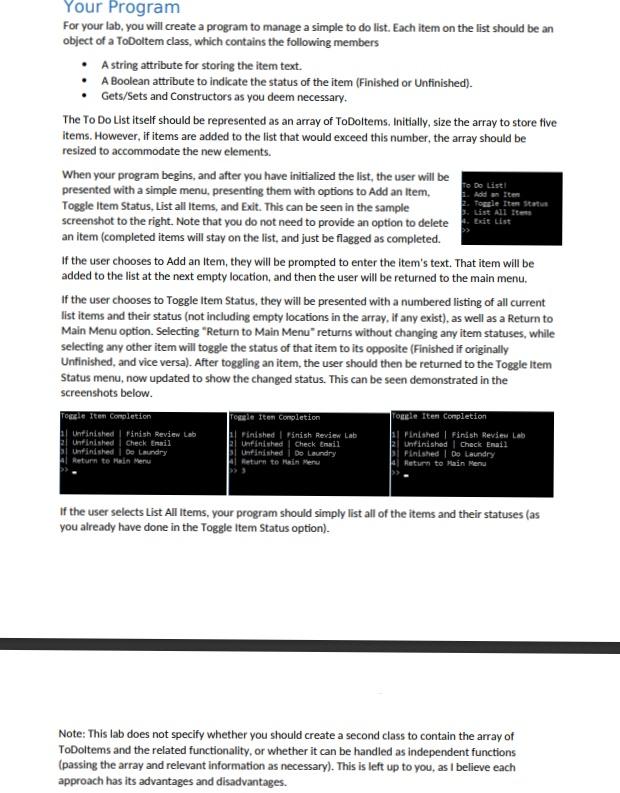
List All Items Exit List Your Program For your lab, you will create a program to manage a simple to do list. Each item on the list should be an object of a ToDoltem class, which contains the following members A string attribute for storing the item text. A Boolean attribute to indicate the status of the item (Finished or untinished). Gets/Sets and Constructors as you deem necessary. The To Do List itself should be represented as an array of ToDoItems. Initially, size the array to store tive items. However, if items are added to the list that would exceed this number, the array should be resized to accommodate the new elements. When your program begins, and after you have initialized the list, the user will be To Do List presented with a simple menu, presenting them with options to Add an Item, Add Item Toggle Item Status, List all Items, and Exit. This can be seen in the sample Toggle Item Status screenshot to the right. Note that you do not need to provide an option to delete an item (completed items will stay on the list, and just be flagged as completed. If the user chooses to Add an Item, they will be prompted to enter the item's text. That item will be added to the list at the next empty location, and then the user will be returned to the main menu. if the user chooses to Toggle Item Status, they will be presented with a numbered listing of all current list items and their status (not including empty locations in the array, if any exist), as well as a Return to Main Menu option. Selecting "Return to Main Menu returns without changing any item statuses, while selecting any other item will toggle the status of that item to its opposite (Finished if originally Unfinished, and vice versa). After toggling an item, the user should then be returned to the Toggle Item Status menu, now updated to show the changed status. This can be seen demonstrated in the screenshots below. Posle fton Completion Toggle Iten Completion Couple Itent Completion Unfinished Finish Review Lab Finished Panish Review Lab 11 Finished Finish Review Lab El Unfinished Check Email Unfinished Check Email Return to Main Menu Unfinished Check Email Unfinished De Laundry Return to Main Menu Unfinished De Laundry Return to Main Menu Finished I Do Laundry If the user selects List All items, your program should simply list all of the items and their statuses (as you already have done in the Toggle Item Status option). Note: This lab does not specify whether you should create a second class to contain the array of ToDoItems and the related functionality, or whether it can be handled as independent functions (passing the array and relevant information as necessary). This is left up to you, as I believe each approach has its advantages and disadvantages
Step by Step Solution
There are 3 Steps involved in it

Get step-by-step solutions from verified subject matter experts
 Study Help