







Question: local filename = grid.txt local grid = loadGrid ( filename ) - - function to load the grid from a file function loadgrid (
local filename "grid.txt
local grid loadGridfilename
function to load the grid from a file
function loadgridfilename
local file io open filename
local grid
if file then
for line in file:lines do
local row
for num in line:gmatch d do
table.insert row tonumbernum
end
table.insert grid row
end
file:close
else
printError : Unable to open the file."
osexit
end
return grid
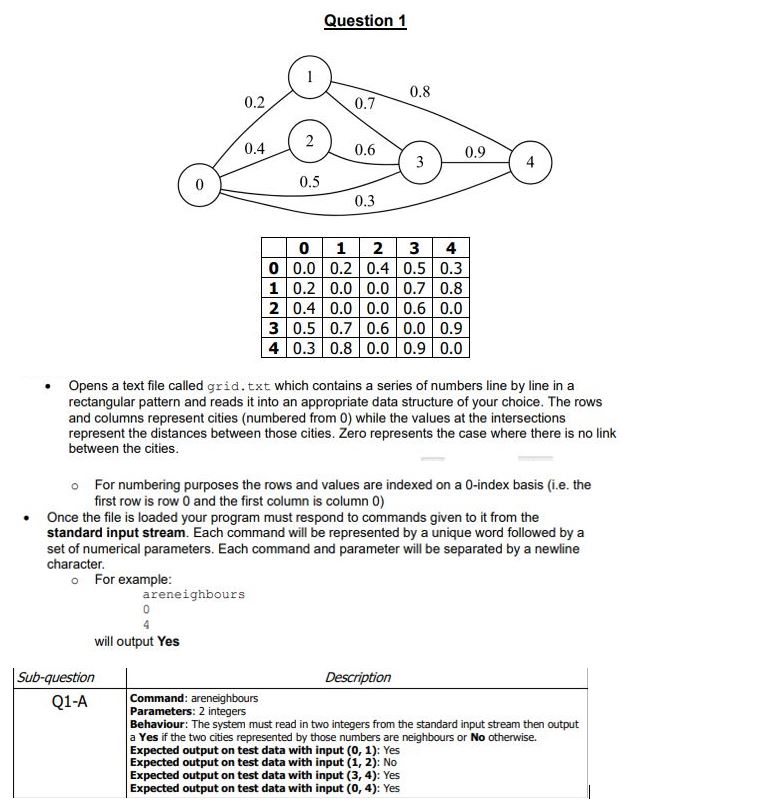
endOpens a text file called grid. txt which contains a series of numbers line by line in a
rectangular pattern and reads it into an appropriate data structure of your choice. The rows
and columns represent cities numbered from while the values at the intersections
represent the distances between those cities. Zero represents the case where there is no link
between the cities.
For numbering purposes the rows and values are indexed on a index basis ie the
first row is row and the first column is column
Once the file is loaded your program must respond to commands given to it from the
standard input stream. Each command will be represented by a unique word followed by a
set of numerical parameters. Each command and parameter will be separated by a newline
character.
For example:
areneighbours
will output Yes
Step by Step Solution
There are 3 Steps involved in it
1 Expert Approved Answer
Step: 1 Unlock

Question Has Been Solved by an Expert!
Get step-by-step solutions from verified subject matter experts
Step: 2 Unlock
Step: 3 Unlock
 Study Help